EasyManua.ls Logo

Canon Canovision8 E50E - Periodic

Canon Canovision8 E50E
179 pages
Print Icon
To Next Page IconTo Next Page
To Previous Page IconTo Previous Page
Loading...
2.
Periodic
Check/Confirmation
and
Notes
for
Each
Mechanism
To
maintain
the
performances
of
equipment
and
tape
properly,
perform
the.
fol-
lowing
checks
periodically.
Also,
after
repairing,confirm
the
followings
~
~
xegardless
of
the
length
of
use
hours.
*
Cleaning
2-1
Rotary
Drum
(1)
Clean
the
rotary
drum
gently
with
a
thick
lens
tissue
(CY9-4023-003)
with
ethyl
alcohol
wetted.
ey
When
cleaning,
rotate
the
rotary
drum
counterclockwise
gradually
by
hand.
*Notes:
1.
Do
not
rotate
the
motor
by
using
the
power
source.
2.
Do
not
rotate
the
drum
clockwise.
3.
Do
not
clean
the
drum
except
the
above
procedure,
If
the
lens
tissue
with
ethyl
alcohol
soaked
is
used
vertically
to
head
chip,
the
head
chip
may
be
damaged.
~
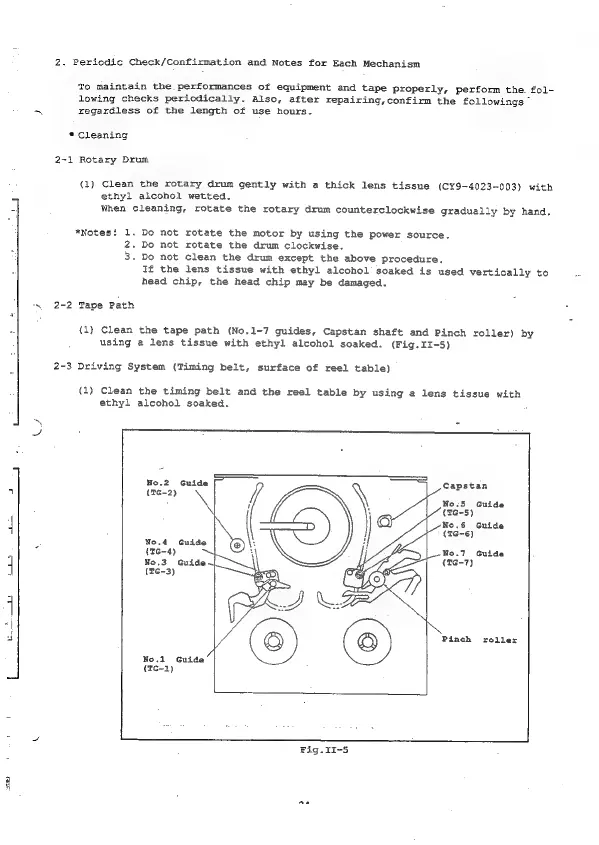
2-2
Tape
Path
(1)
Clean
the
tape
path
(No.1-7
guides,
Capstan
shaft
and
Pinch
roller)
by
using
a
lens
tissue
with
ethyl
alcohol
soaked.
(Fig.II-5)
2-3
Driving
System
(Timing
belt,
surface
of
reel
table)
(1)
Clean
the
timing
belt
and
the
reel
table
by
using
a
lens
tissue
with
ethyl
alcohol
soaked.
ar,
No.2
Guide
Capstan
4
(TG-2)
7
;
No.5
Guide
a
(TG-5)
No.6
Guide
|
i
(mé-6)
No.4
Guide
Ls
(rea)
|
@Y
No.3
Guide
~
(16-3)
No.7
Guide
(6-7)
pare)
be
|
df
©
©
Pinch
roller
No.1
Guide
(TG-1)
Fig.II-5
2

Table of Contents

Related product manuals