EasyManua.ls Logo

Canon Canovision8 E50E - Tape Loading;Play

Canon Canovision8 E50E
179 pages
Print Icon
To Next Page IconTo Next Page
To Previous Page IconTo Previous Page
Loading...
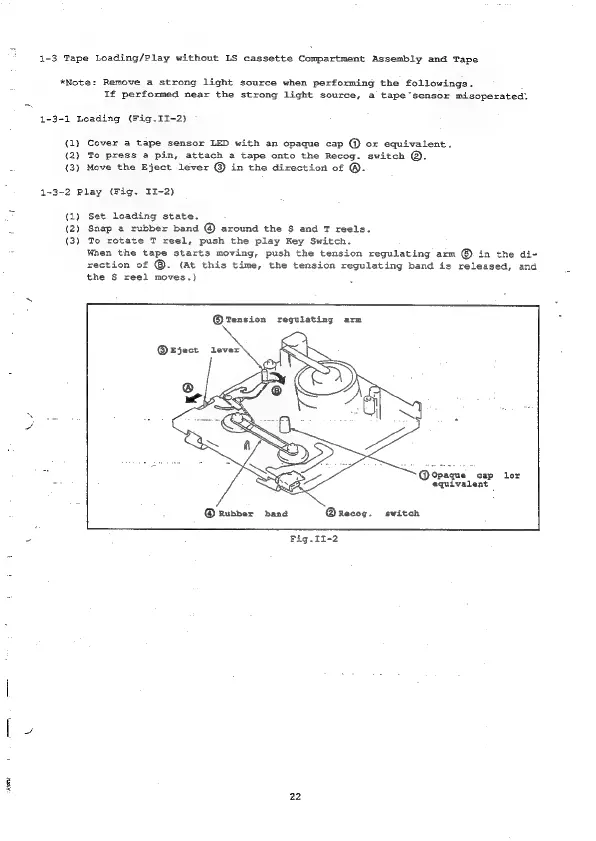
1-3
Tape
Loading/Play
without
LS
cassette
Compartment
Assembly
and
Tape
*Note:
Remove
a
strong
light
source
when
performing
the
followings.
If
performed
near
the
strong
light
source,
a
tape
sensor
misoperated.
1-3-1
Loading
(Fig.II-2)
(1)
Cover
a
tape
sensor
LED
with
an
opaque
cap
@
or
equivalent.
(2)
To
press
a
pin,
attach
a
tape
onto
the
Recog.
switch
@.
{3)
Move
the
Eject
lever
@
in
the
direction
of
®.
1-3-2
Play
(Fig.
II~-2)
(1)
Set
loading
state.
(2)
Snap
a
rubber
band
around
the
$
and
T
reels.
(3)
To
rotate
T
reel,
push
the
play
Key
Switch.
When
the
tape
starts
moving,
push
the
tension
regulating
arm
©.
in
the
di-
rection
of
@.
(At
this
time,
the
tension
regulating
band
is
released,
and
the
S$
reel
moves.)
.
@®Tension
reguiating
arm
by
@opaque
cap
lor
4
equivalent
y
@
Rubber
band
@Recog.
switch
S
Fig.II-2
[
2
ses
22

Table of Contents

Related product manuals