EasyManua.ls Logo

Canon Canovision8 E50E - JOG Chrominance Phase Adjustment; Playback y Level Adjustment

Canon Canovision8 E50E
179 pages
Print Icon
To Next Page IconTo Next Page
To Previous Page IconTo Previous Page
Loading...
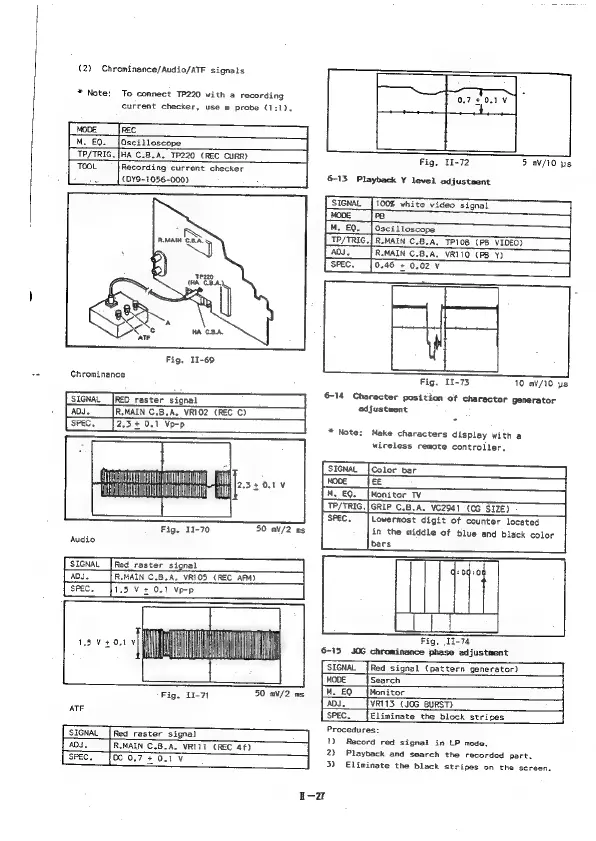
(2)
Chrominance/Audio/ATF
signals
*
Note:
To
connect
TP220
with
a
recording
current
checker,
use
@
probe
(1:1).
MODE
REC
M.
EQ.
|Oscilloscope
TP/TRIG.{HA
C.B.A.
TP220
(REC
CURR)
TOOL
Recording
current
checker
bs
(DY9-1056-000)
R.MAIN
SS
b
‘P20
(HA
CBA.
Fig,
11-69
oo
Chrominance
SIGNAL
|RED
raster
signal
[
ADJ.
|R.MAIN
C.5,A,
VRIO2
(REC
C)
TT
FT
"
we
Fig.
1-70
50
mV/2
ms
Audio
SIGNAL
[
ADJ.
{
SPEC.
Red
raster
signal
R.MAIN
C.B.A.
VRIO5
(REC
AFM)
1.5
V+
0.1
Vp-p
i
Fig.
11-71
50
aV/2
ns
ATF
SIGNAL
[Red
raster
signal
ADI.
R.MAIN
C.B.A.
VRI1i
(REC
4f)
SPEC,
[OC
0.7
+
0.1
¥
Fig,
11-72
5
mV/10
ps
6-13
Playback
Y
level
adjustment
ra
R.MAIN
C.B.A,
VRI10
(PB
Y)
0.46
+
0.02
V
Fig.
11-73
10
m®V/10
ys
6-14
Character
position
of
character
generator
adjustwent
*
Note:
Make
characters
display
with
a
wireless
remote
controller,
Color
bar
jwooe
|
M,EQ.
[Monitor
TV
TP/TRIG.|GRIP
C.B.A.
VC2941
(0G
SIZE)
SPEC.
Lowermost
digit
of
counter
located
in
the
middle
of
blue
and
black
color
bars
~
Af
Fig,
11-74
6-15
JOG
chrominance
phase
adjustment
Red
signal
(pattern
generator)
Search
Monitor
VRI13_
(JOG
BURST)
|
Eliminate
the
block
stripes
Procedures:
1)
Record
red
signal
in
LP
mode.
2)
Playback
and
search
the
recorded
part.
3)
Eliminate
the
black
stripes
on
the
screen.

Table of Contents

Related product manuals