EasyManua.ls Logo

Canon Canovision8 E50E - Page 60

Canon Canovision8 E50E
179 pages
Print Icon
To Next Page IconTo Next Page
To Previous Page IconTo Previous Page
Loading...
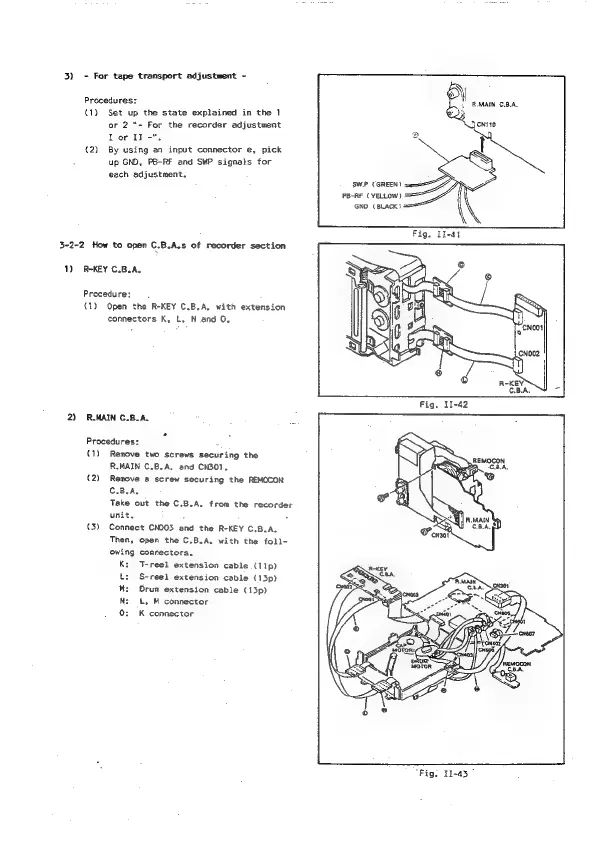
3)
-
For
tape
transport
adjustment
-
Procedures:
(1)
Set
up
the
state
explained
in
the
1
or
2
“-
For the
recorder
adjustment
Tor
II
-".
(2)
By
using
an
input
connector
e,
pick
up
GND,
P8-RF
and
SWP
signals
for
each
adjustment.
3-2-2
How
to
open
C.B.A.s
of
recorder
section
1)
R-KEY
C.B.A,
Procedure;
(1)
Open
the
R-KEY
C.B.A,
with
extension
connectors
K,
L,
N
and
0.
2)
RMAIN
C.B.A.
Procedures:
.
(1)
Remove
two
screws
securing
the
R.MAIN
C.B.A.
and
CN301,
(2)
Remove
a
screw
securing
the
REMOCON
C.B.A.
Take
out
the
C.B.A.
from
the
recorder
unit.
(3)
Connect
CNOO3
and
the
R-KEY
C.B.A.
Then,
open
the
C.B.A.
with
the
foll-
owing
connectors.
K:
T-reel
extension
cable
(11p)
t:
S-reel
extension
cable
(13p)
M:
Orum
extension
cable
(13p)
Nz:
£,
M
connector
0:
K
connector
SW.P
(GREEN)
PB-RE
(YELLOW)
GND
(BLACK?
“Fig.
11-43"

Table of Contents

Related product manuals