EasyManua.ls Logo

Canon Canovision8 E50E - Page 158

Canon Canovision8 E50E
179 pages
Print Icon
To Next Page IconTo Next Page
To Previous Page IconTo Previous Page
Loading...
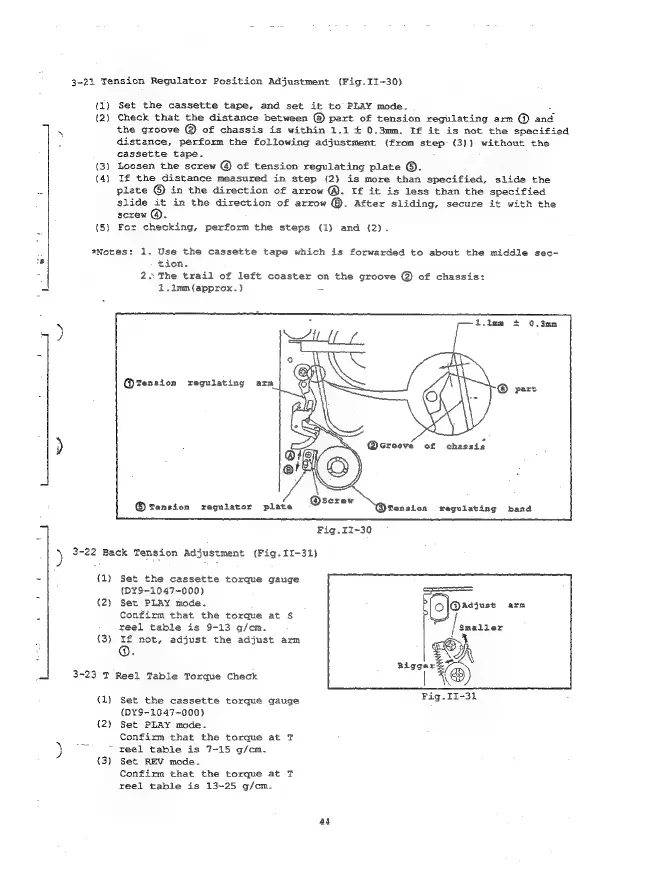
3-21
Tension
Regulator
Position
Adjustment
(Fig.II-30)
(1)
Set
the
cassette
tape,
and
set
it
to
PLAY
mode.
(2)
Check
that
the
distance
between
@
part
of
tension
regulating
am
@
and
the
groove
@
of
chassis
is
within
1.1
+
0.3mm.
If
it
is
not
the
specified
distance,
perform
the
following
adjustment
(from
step
(3))
without
the
cassette
tape.
(3)
Loosen
the
screw
@
of
tension
regulating
plate
©.
(4)
If
the
distance
measured
in
step
(2)
is
more
than
specified,
slide
the
plate
©
in
the
direction
of
arrow
@.
If
it
is
less
than
the
specified
slide
it
in
the
direction
of
arrow
©.
After
sliding,
secure
it
with
the
screw
@.
(5)
For
checking,
perform
the
steps
(1)
and
(2).
*Notes:
1.
Use
the
cassette
tape
which
is
forwarded
to
about
the
middle
sec-
tion.
2.
The
trail
of
left
coaster
on
the
groove
@
of
chassis:
2.1mm(approx.)
-
w
i
Q@Tension
regulating
ara
Tension
reguiater
plate
@fension
regulating
band
3-22
Back
Tension
Adjustment
(Fig.
11-31)
{1)
Set
the
cassette
torque
gauge
(D¥9-1047-000)
ay
(2)
Set
PLAY
mode.
arm
Confirm
that
the
torque
at
$
reel
table
is
9-13
g/cm.
(3)
If
not,
adjust
the
adjust
arm
@.
3-23
T
Reel
Table
Torque
Check
a
,
g
)
$
3
:
Fig.iI~30
|
(1)
Set
the
cassette
torque
gauge
(DY¥9-1647~000)
{2)
Set
PLAY
mode.
Confixm
that
the
torque
at
T
)
=
veel
table
is
7-15
g/cm.
{3)
Set
REV
mode.
Confirm
that
the
torque
at
T
reel
table
is
13~25
g/cm.
aa

Table of Contents

Related product manuals