EasyManua.ls Logo

Canon Canovision8 E50E - Page 160

Canon Canovision8 E50E
179 pages
Print Icon
To Next Page IconTo Next Page
To Previous Page IconTo Previous Page
Loading...
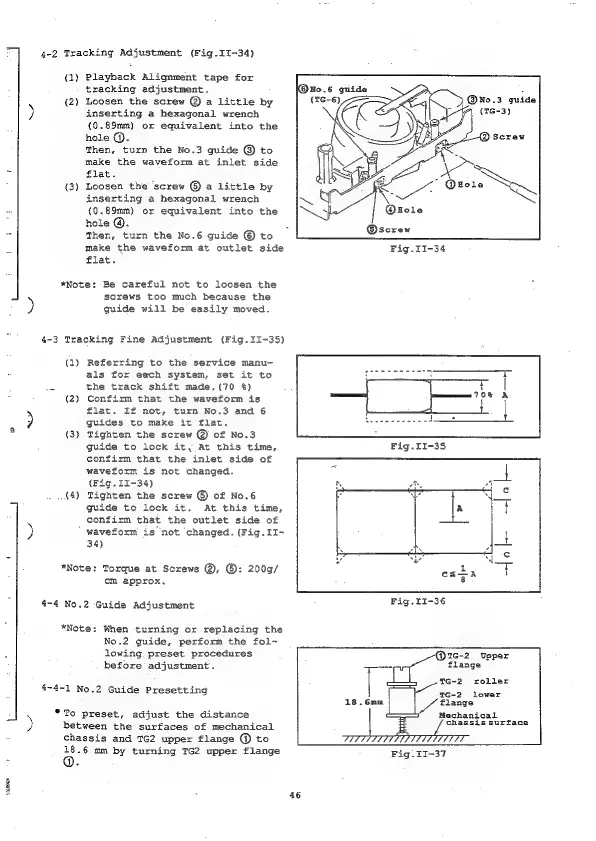
4-2
Tracking
Adjustment
(Fig.II-34)
(1)
Playback
Alignment
tape
for
tracking
adjustment.
(2)
Loosen
the
screw
@
a
little
by
inserting
a
hexagonal
wrench
(0.89mm)
or
equivalent
into
the
hole
@.
Then,
turn
the
No.3
guide
@
to
make
the
waveform
at
inlet
side
=
flat.
(3)
Loosen
the
‘screw
@
a
little
by
inserting
a
hexagonal
wrench
~
(0.89mm)
or
equivalent
into
the
hole
@.
=
Then,
turn
the
No.6
guide
©
to
make
the
waveform
at
outlet
side
flat.
Ned
*Note:
Be
careful
not
to
loosen
the
screws
too
much
because
the
)
guide
will
be
easily
moved.
4-3
Tracking
Fine
Adjustment
(Fig.II-35)
(1)
Referring
to
the
service
manu-
als
for
each
system,
set
it
to
2
the
track
shift
made,.(70
%)
(2)
Confirm
that
the
waveform
is
5
flat.
If
not,
turn
No.3
and
6
:)
guides
to
make
it
flat.
*
(3)
Tighten
the
screw
@
of
No.3
guide
to
lock
it,
At
this
time,
confirm
that
the
inlet
side
of
waveform
is
not
changed.
(Pig.
11-34)
.{4)
Tighten
the
screw
©
of
No.6
guide
to
lock
it.
At
this
time,
|
confirm
that
the
outlet
side
of
)
waveform
is
not
changed.
(Fig.II-
34)
*Note:
Torque
at
Screws
@,
©:
200g/
cm
approx.
4-4
No.2
Guide
Adjustment
*Note:
When
turning
or
replacing
the
No.2
guide,
perform
the
fol-
lowing.
preset
procedures
7
7
ON
Upper
before
adjustment.
flange
T6-2
roller
TG-2
lower
flange
Mechanical
chassis surface
between
the
surfaces
of
mechanical
chassis
and
TG2
upper
flange
@
to
18.6
mm
by
turning
TG2
upper
flange
Fig.
II-37
4-4-1
No.2
Guide
Presetting
18.6nm
*To
preset,
adjust
the
distance
Ned
Beery
46

Table of Contents

Related product manuals