COPYRIGHT
©
2001 CANON INC. 2000 2000 2000 2000 CANON iR2200/iR2800/iR3300 REV.0 MAR. 2001
CHAPTER 5 PICK-UP/FEEDING SYSTEM
5-37 P
9.1 Pickup Assembly
9.1.1 Removing the Pickup Assembly
1) Remove the cassette 1/2.
2) Remove the multifeeder tray. (p. 5-42P)
3) Remove the pickup cover. (p. 5-43P)
4) Remove the right lower cover.
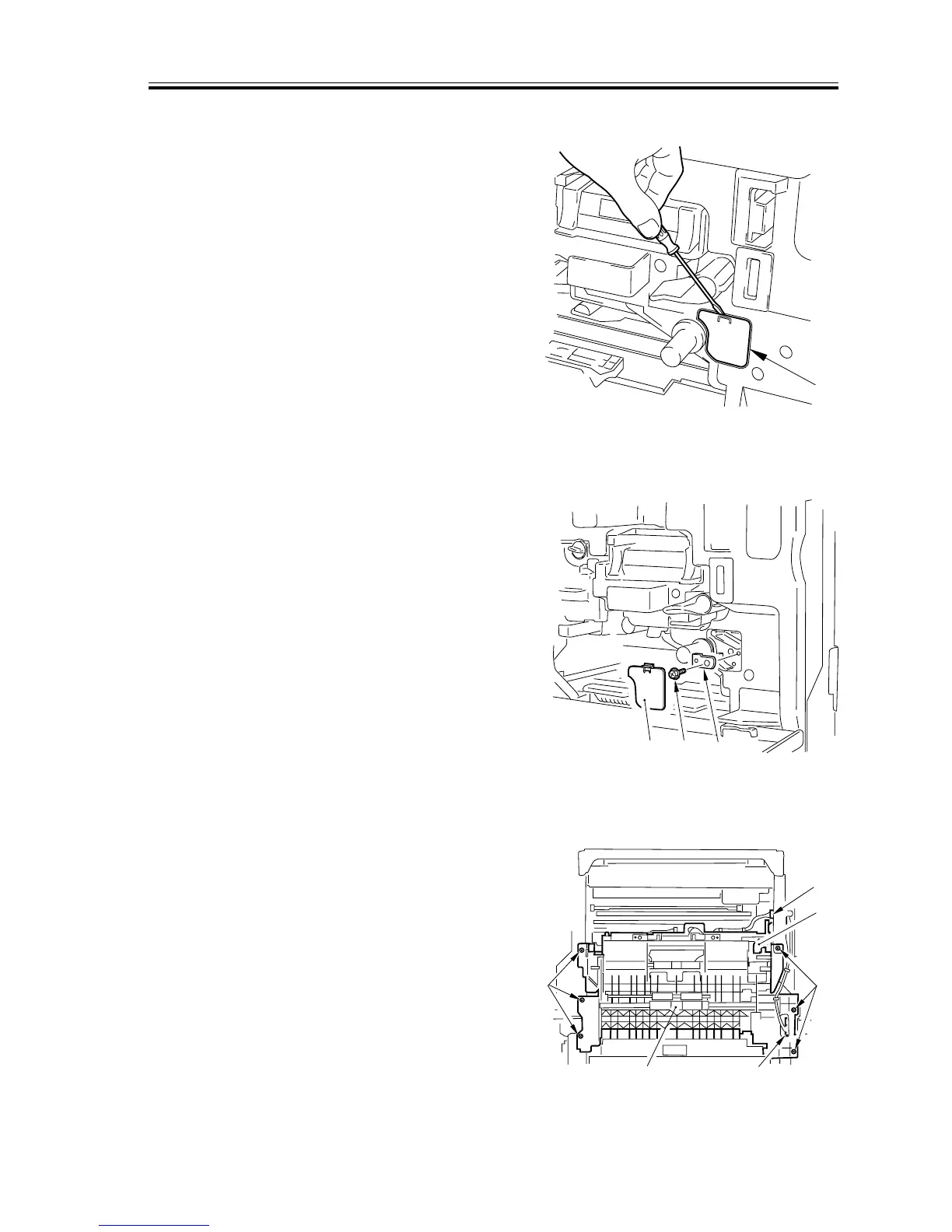
5) Fit a flat-bladed screwdriver, and re-
move the paper lint cleaning cover [1].
F05-901-01
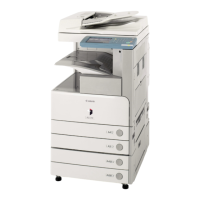
6) Remove the screw [2], and detach the
positioning pin [3].
F05-901-02
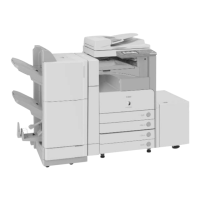
7) Disconnect the two connectors [1].
8) Remove the seven screws [2], and re-
move the screw [3] from the right rear;
then, detach the pickup assembly [4].
F05-901-03







 To Next Page