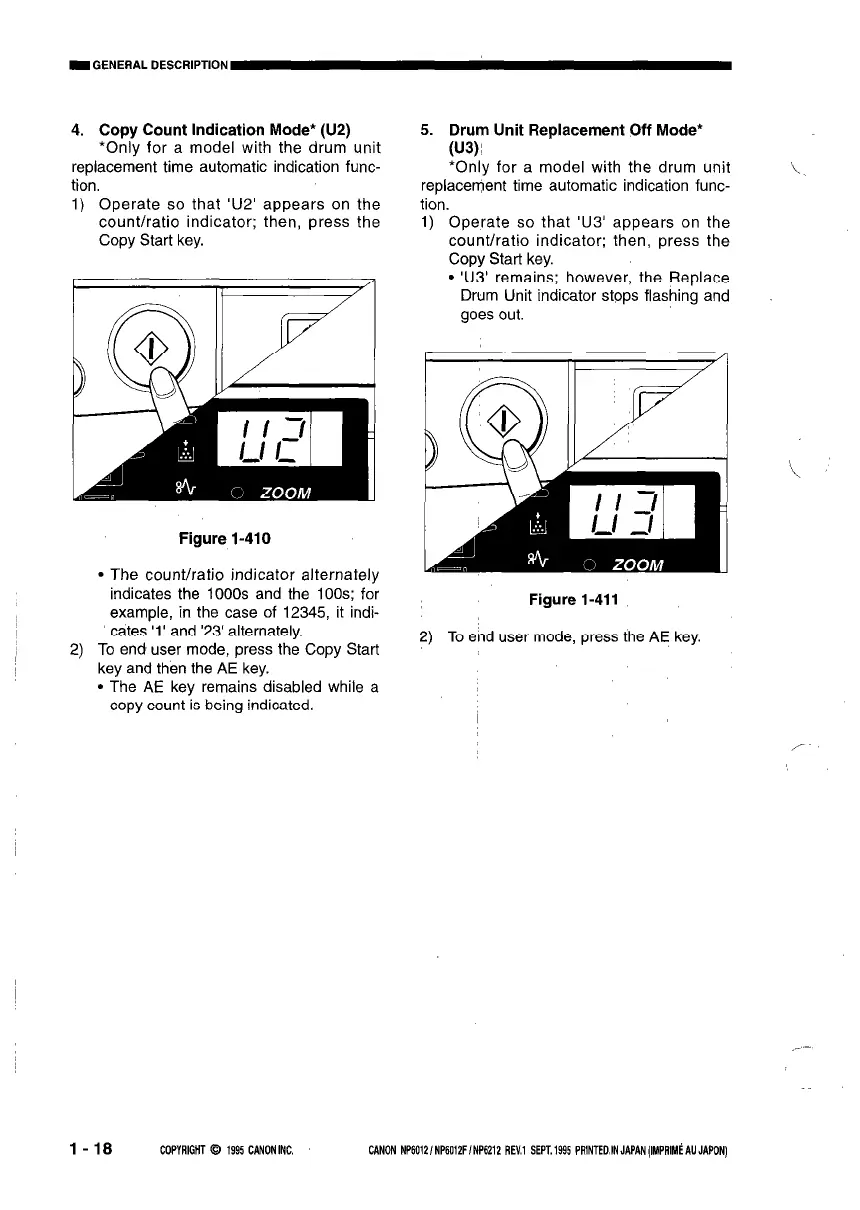
4. Copy Count Indication Mode* (U2)
*Only for a model with the drum unit
replacement time automatic indication func-
tion
1) Operate so that ‘U2’ appears on the
count/ratio indicator; then, press the
Copy Start key.
Figure l-410
l The count/ratio indicator alternately
indicates the 1000s and the 100s; for
example, in the case of 12345, it indi-
cates ‘1’ and ‘23’ alternately.
2) To end user mode, press the Copy Start
key and then the AE key.
l The AE key remains disabled while a
copy count is being indicated.
7
5. Drum Unit Replacement Off Mode*
(U3)!
‘Only for a model with the drum unit
replacement time automatic indication func-
tion.
1) Operate so that ‘U3’ appears on the
count/ratio indicator; then, press the
Copy Start key.
l ‘U3’ remains; however, the Replace
Drum Unit indicator stops flashing and
goes out.
Figure 1-411
2) To end user mode, press the AE key.
l-18 COPYRIGHT 0 1995 CANON INC. CANON NP60121 NP6012Ff NP6212 REV.1 SEPT. 1995 PRlNTEO,IN JAPAN (IMPRIMi AU JAPON)



 To Next Page