80
Chapter 4 Operating Procedures
• Domain/Workgroup
If the computer containing the shared folder is part of a
domain, enter the domain name.
• Save password
Save the entered password.
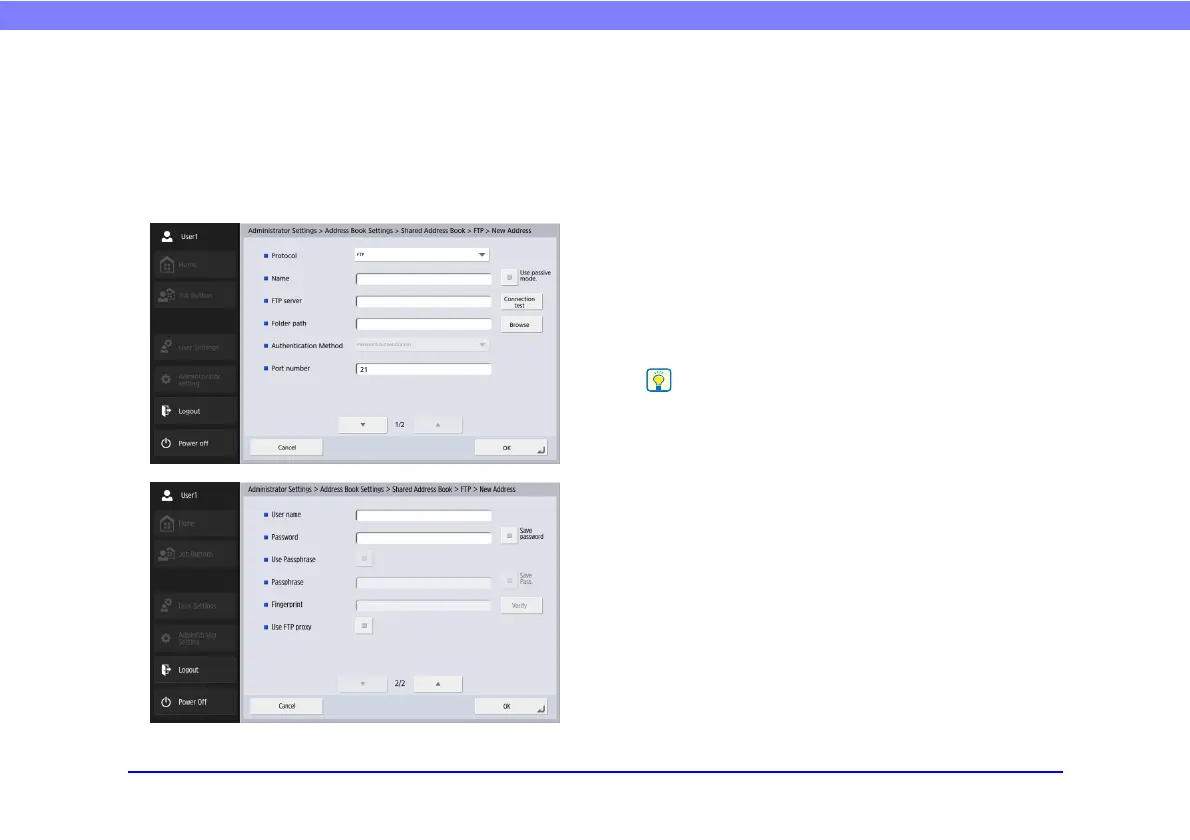
FTP Registration Screen
• Protocol
Select the protocol to be used when sending by FTP.
When performing encrypted communication, you can
select [FTP], [FTPS (Explicit)], [FTPS (Implicit)] or
[SFTP]. When [SFTP] is selected, you can select
[Authentication Method].
•Name
Enter the name to appear in the address book.
•FTP server
Enter the address of the FTP server.
• Folder path
Enter the path of the sub-folder when specifying a sub-
folder on the FTP server.
If the path of the sub-folder is unknown, use the procedure
below to specify the sub-folder.
1. Enter the server address, user name, and password, and
click [Browse] to log in to the FTP server.
2. Specify any sub-folder at the level of the displayed folder and
click [OK].
• Authentication Method
When [SFTP] is selected in [Protocol], select the
Authentication Method from [Password Authentication]
or [Private Key Authentication].
• Port number
Enter the port number. The standard port number is 21.








 To Next Page