24
This is a connection mode when using a wireless LAN device compatible with Wi-Fi Protected
Setup (WPS). In PIN code connection mode (PIN mode), an 8-digit identification number
specified on the camera is set on the wireless LAN device to establish a connection.
Even if there are multiple wireless LAN devices active in your area, this is a relatively reliable
method of establishing a connection using a shared identification number.
It may take about one minute to establish connection.
1
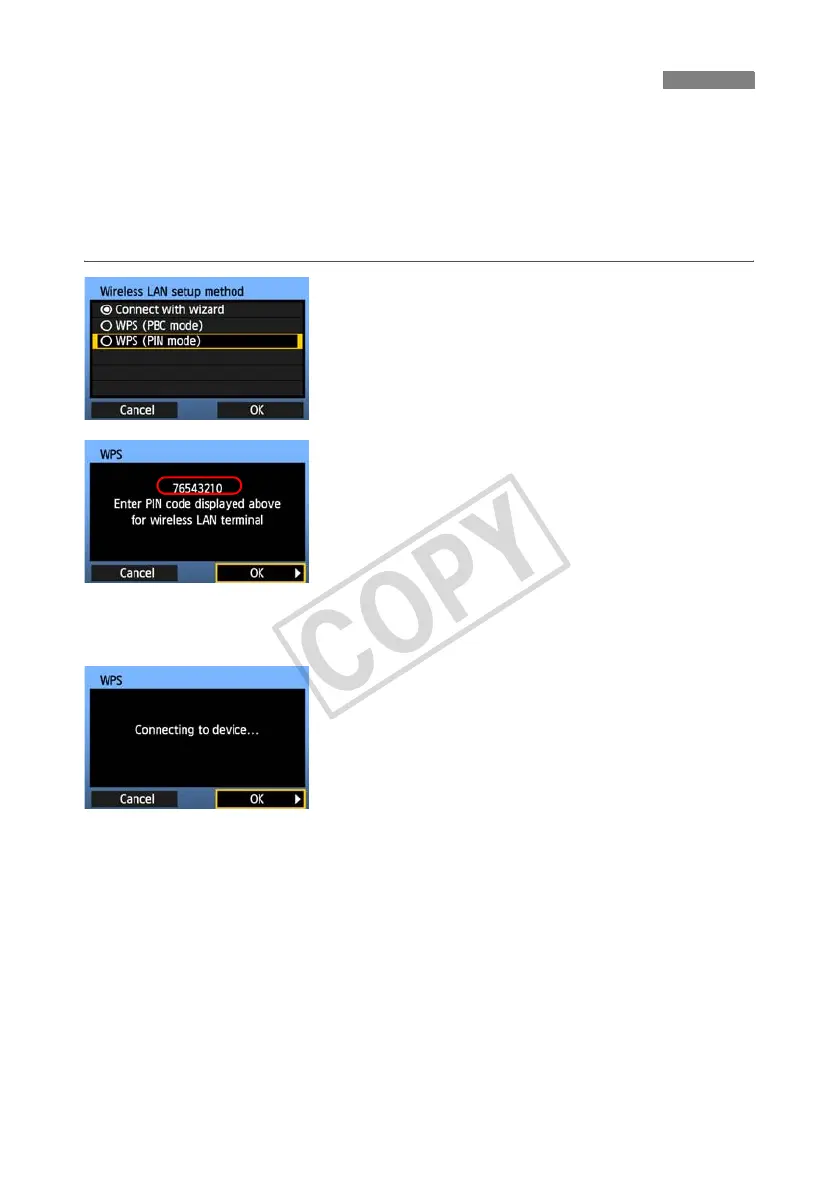
Select [WPS (PIN mode)].
Turn the <5> dial to select [WPS (PIN mode)],
and then press <0>.
Select [OK] and press <0> to go to the next
screen.
2
Specify the PIN code on the wireless
LAN device.
On the wireless LAN device, specify the 8-digit
PIN code shown on camera LCD monitor.
For instructions on setting PIN codes on the
wireless LAN device, refer to the instruction
manual of the wireless LAN device.
Select [OK] and press <0> to display the
confirmation screen.
3
Establish a connection with the
wireless LAN device.
Select [OK] and press <0> to establish a
connection with the wireless LAN device.
When the connection with the wireless LAN device
is established, the [Network] screen (p.25) is
displayed.
WPS Connections (PIN Mode)



 To Next Page