69
6
Using External Media
When using external media connected via USB and a CF card loaded in the camera at the
same time, various types of image recordings can be made. Note that the settings made in
[Record func.] below are disabled in the Full Auto and Creative Auto modes.
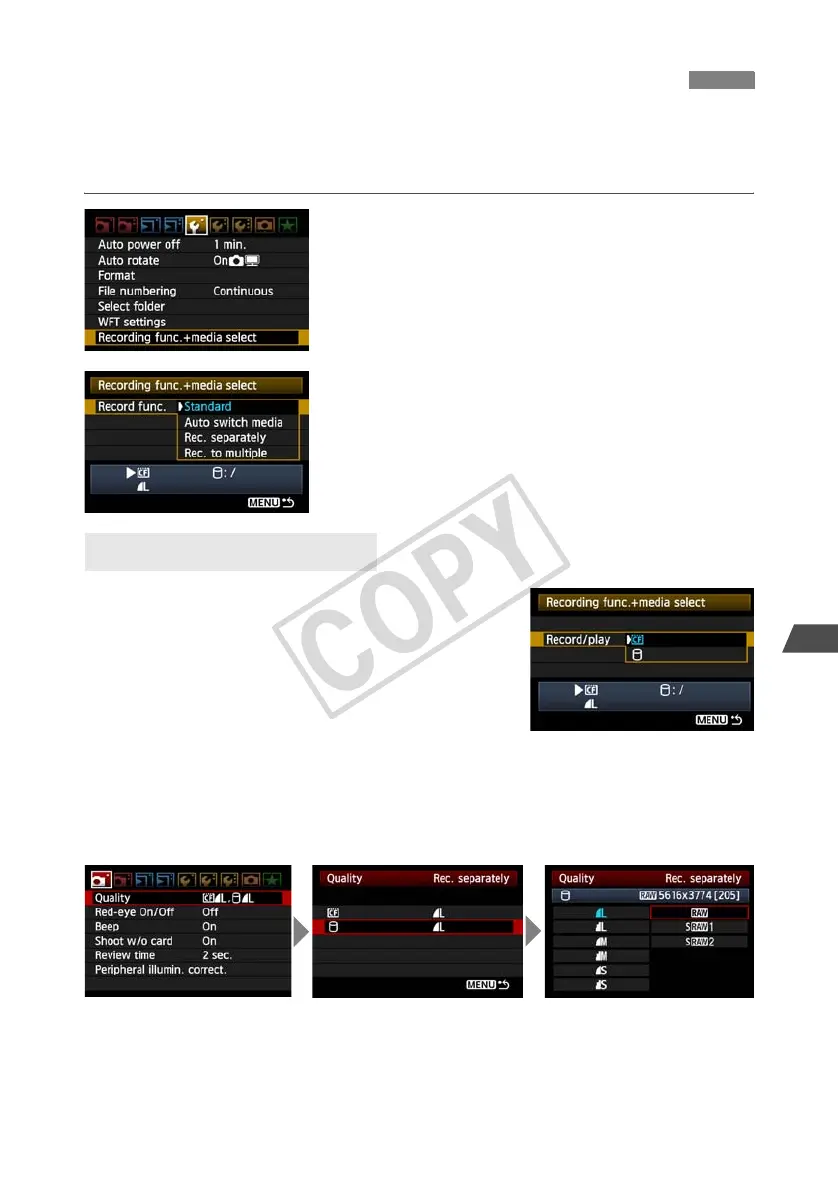
1
On the [5] tab, select [Recording
func.+media select].
2
Select [Record func.].
Select the setting based on “[Record func.]
Options” below.
The recording quality is selected with [Quality] on
the [1] tab.
Standard
Image are recorded to the media selected in [Record/
play].
Auto switch media
Images are recorded to the media selected in [Record/
play], and when there is no more free space, the recording
of images is automatically switched to the other media.
Rec. separately
Whenever an image is taken, it is recorded to both the CF card and external media.
Selecting [Quality] on the [1] tab enables selection of a separate recording image quality
for the CF card and external media. Making this setting displays the image quality recorded
to the external media on the transmitter’s LCD panel.
Rec. to multiple
Whenever an image is taken, the same image is recorded to both the CF card and external
media. [Rec. to multiple] is not available for movie. Movie is only recorded on the CF card.
Using Together With a CF Card
[Record func.] Options



 To Next Page