44
These instructions are continued from Chapter 1.
You can use the included WFT Pairing Software to enable the transmitter to communicate with
a computer via PTP.
WFT Pairing Software is installed automatically during easy installation of the software
provided with the camera. If it is not installed, install it on the computer for communication with
the transmitter before this procedure.
The configuration procedure is as follows, using Windows XP as an example.
1
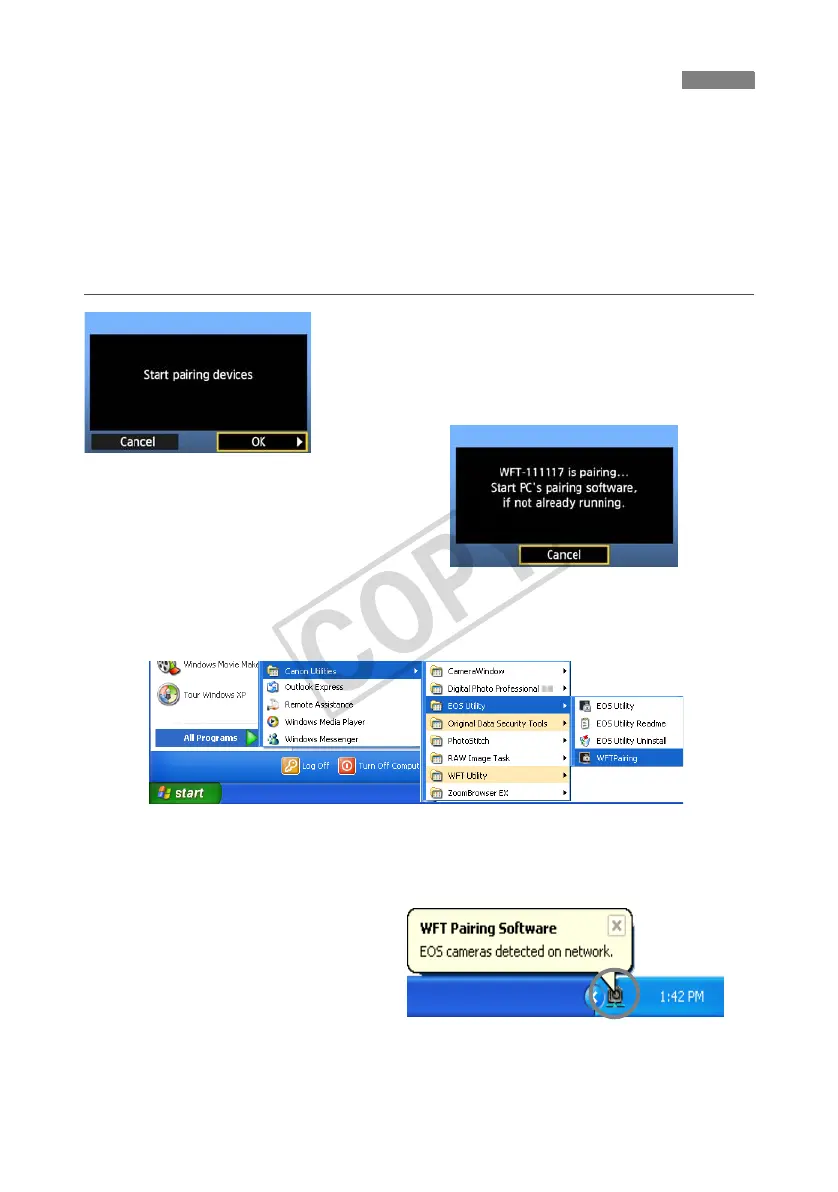
First, the pairing screen is displayed.
Turn the <5> dial to select [OK]. When you press
<0>, the following message is displayed. Here,
****** represents the last six digits of the MAC
address of the WFT-E4 for the connection.
2
Start the pairing software.
Normally, it is installed in the same location as
EOS Utility.
X After the pairing software starts up, an icon is
displayed in the task bar.
X When the camera is detected, a message is
displayed.
Configuring PTP Transfer Settings



 To Next Page