33
Automatic Image Transfer After Each Shot
2
FTP Settings and Image Transfer
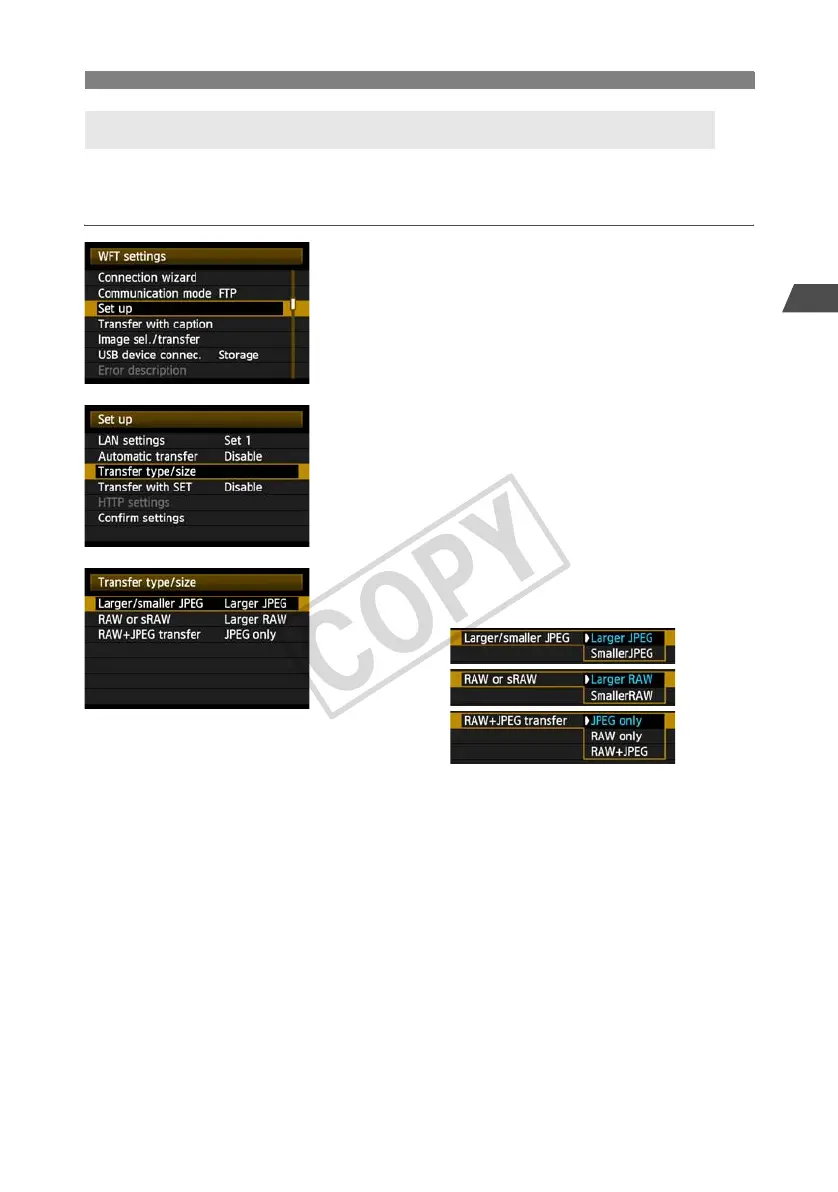
In automatic transfer during shooting, you can choose which images to transfer if different sizes
of images are recorded to the CF card and external media (p.69), or during RAW+JPEG
shooting.
1
In [WFT settings], select [Set up].
2
Select [Transfer type/size].
3
Select the size and type of images to
transfer.
For instance, if the camera is set up to record 73 images on a CF card and 83 images
on external media and you want to transfer 83 images, set [Larger/smaller JPEG] to
[Smaller JPEG].
If the camera is set up to record RAW images on a CF card and JPEGs on external media,
specify which images to transfer in the [RAW+JPEG transfer] setting. Similarly, complete
the same setting if RAW+JPEG images are recorded simultaneously on a single CF card.
Selecting Particular Sizes or Types of Images to Transfer



 To Next Page