The MLB242 Analysis Instrument is a standalone, compact device designed for the analytical quality control of various food products. It is intended for in-vitro analysis only and is similar to other CDR Lab Junior models such as FoodLab Junior, WineLab Junior, BeerLab Junior, CiderLab Junior, and OxiTester Junior. The instrument is manufactured by CDR s.r.l in Firenze, Italy.
Function Description
The MLB242 analyzer serves as a spectrophotometer with four channels and two beams, each operating at different wavelengths. It is equipped with a color LCD touch screen for all operations, allowing users to interact with symbols and messages using a finger or a special touch-screen pen. The analytical tests are internally stored with associated calibration parameters, and test results are saved in a database with serial or positive identification. A lithium battery ensures data retention.
The analytical tests are primarily conducted in two phases. In the first phase, a defined amount of sample material is pipetted into pre-filled cuvettes containing R1 reagent. After incubation, a blank value is measured and stored. For colorimetric tests, an R2 reagent is added to the cuvette content, and after a second incubation, the color change is read. Results are displayed and automatically memorized. Data transfer to a host computer is possible via a USB interface, which installs a temporary drive for the transfer.
The device is temperature-controlled at 37.0°C ±1°C for pre-warming test cuvettes, and free cells can also be used for incubation. Upon power-on, the analyzer automatically calibrates and performs elementary function checks, displaying any malfunctions. Each measuring cell is equipped with an Insertion Tube Sensor to detect whether a cuvette is present.
Important Technical Specifications
- Analyzer Type: Analyzer with photometer technique.
- Operating System: Linux OS V2.6.33.
- Main Processor: ARM 9 AT91SAM9263.
- Memories: 128 MB for application routine, 2GB SD chip for storing of user data.
- Measuring Head: 4 cells, 2 optics each (different depending on analyzer type), temperature-controlled at 37°C ±1°F/98.6°F.
- Automatic calibration and self-testing.
- Linearity control, if necessary, with warning message.
- Drift compensation automatic.
- Photometric range: 0.0-3.0 Abs.
- Photometric resolution: Δ = 0.0001 max.
- Photometric accuracy: ± 3%.
- Self-checking: Automatically performed after power-on and after test selection.
- Tube Sensor: Each measuring cell is equipped with a tube insertion sensor.
- Analysis Methods: Endpoint, Kinetic, and fixed time.
- Incubation Block: 37.0°C ±1°F/98.6°F, temperature-controlled, 4 x 4 positions.
- Cuvettes: Volume at triangular mark: 1000µl, mixed polymer, for optical use, cups: Polystyrol made.
- Languages: English, German, French, Italian, Spanish.
- Tests Selectable: Pre-defined tests stored in memory.
- LCD-Display: TFT 4.3” color with touchscreen function.
- Connectivity: 1 x USB printer port for servicing and data transfer to host. Bluetooth 2.1 function will be available on later series.
- Printer: No.
- System Time: Real-time clock for time and date.
- Power Supply: External AC/DC adapter.
- Prim. voltage: 100 - 250V, 47 - 63 Hz, 0.8 A.
- Sec. voltage: 24V, 1.4 VA, max.: 3.0 A.
- Fuses: no.
- Safety certificates: TÜV/GS, UL, CE.
- Optional: Lithium battery 5000 mAh will be available on later series.
- Environment-conditions: Rel. humidity: 20% - 80%, no condensing.
- Dimensions: Height 90 mm, width 145 mm, depth 220 mm.
- Weight: Ca. 765 gr.
Usage Features
The MLB242 is designed for ease of use with its touch-screen interface.
- Power ON/OFF: A short press turns the device on, while a 3-second press turns it off.
- Main Dialogue: The main screen displays the analyzer name, a HOME button, optional battery loading status, date/time, and menus for Settings, Tests, and Results (DATABASE).
- Test Selection and Execution: Users can select tests from a Parameters List. Help dialogues with illustrations guide users through the test procedure, including sample preparation, incubation, and reading.
- Blank Reading: The instrument guides the user to place the cuvette for blank reading, indicating the correct measuring cell with a blue LED.
- Sample Identification: After setting identification, instructions are provided for inserting the test tube into the measuring cell.
- Reagent Indications: The manual clarifies terms like R1 (reagents pre-filled in cuvettes), R1a (reagent that activates R1), and R2/R3 (reagents causing optical changes).
- Cancellation of a Test: A test can be terminated by touching HOME on the head line, with options to Continue or Finish.
- Storing of Reagent Blank Value: For specific tests like peroxides, a red cuvette symbol indicates where to store the Reagent Blank value, which is subtracted from test results.
- Exceeded Measuring Range: If results are too low or too high, the system suggests repeating the test with adjusted sample volumes.
- Management of Results: Results are displayed and can be exported in XML or CSV format via USB for use with software like MS-Excel.
- Settings Menu: This menu allows users to configure language, date/time, laboratory name, test methods, audio loudness, brightness, and view information about the analyzer.
- Tube Sensor Control: The "Extra" menu allows users to turn the tube sensor ON or OFF.
- Data Transfers: Analytical data can be uploaded to a computer via a USB cable. Software updates are also managed through USB.
Maintenance Features
- Hygiene: The analyzer should be cleaned with a dampened cloth and a suitable surface disinfectant solution designed for laboratory instruments. Organic acid-based cleaning substances should not be used. Cleaning solutions should never be sprayed or poured directly onto the analyzer.
- Liquid Spills: In case of liquid spills, immediately absorb the liquid with a suitable cloth.
- Control Measurements: If control measurements do not yield expected results, contact the distributor.
- Repairs: Repairs must only be carried out by trained personnel, and replacement parts must comply with analyzer specifications. Contact the representative for any analyzer problems.
- Software Update: Software updates are available via E-Mail after product registration and can be downloaded. The update process involves copying files to a USB device and then connecting it to the analyzer.
- Disposal: The instrument is made of materials that do not present particular problems for disposal. However, the operator must handle waste products (substances or objects from demolitions) according to European Directives 91/156/CEE on waste products, 91/689/CEE on dangerous waste products, and 94/62/CE on packaging and waste materials. This includes avoiding creating risk to water, air, earth, and flora/fauna, causing inconvenience by noise and smells, and damaging landscapes and sites of particular interest. Cuvettes and reagents should be disposed of according to valid regulations, and packaging materials can be disposed of as recyclable materials.

 Need help?
 General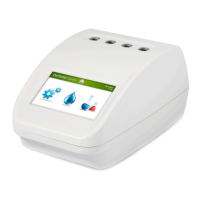

 To Next Page