25
MLB242
User’s Guide MLB242-V1
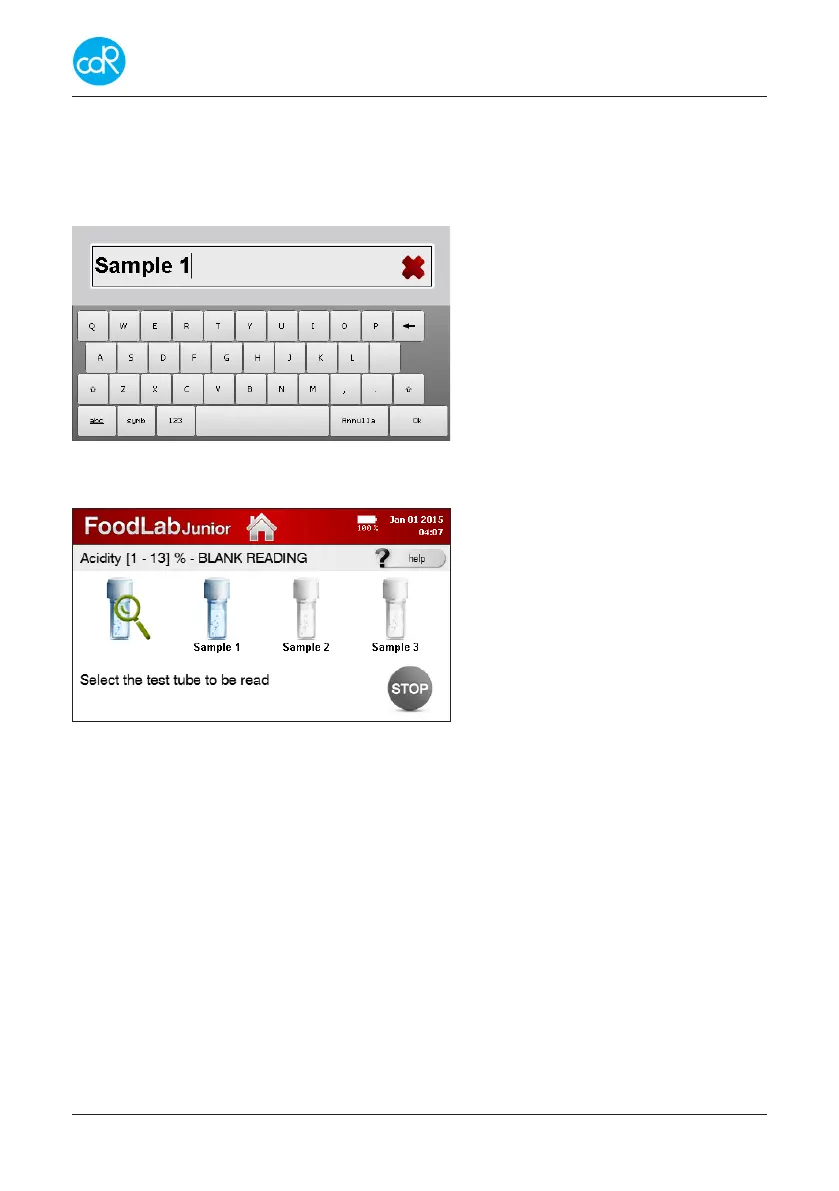
• Proceed as advised and touch button for Blank Reading of sample 1.
For positivesampleidentication, touch Sample 1 to open a dialogue that allows
a name of gures. Dierent dialogs of gures can be selected by touching the corre-
sponding button.
Sample identication name
red cross: deletion of gures
List of gures abc, symb,
Arrow up: big gures
Arrow left: deletion of gure
Ok: to conrm
EXIT: to leave dialogue:
Figure 21 Sample identication
• Touch Ok to leave this dialogue.
For every sample a cuvette symbol is
shown.
Figure 22 Blank reading
• Proceed as described for next sample, or touch STOP END OF SESSION to nish
BLANK READING session.
3.4.1 Cancellation of a test
A test run can be terminated by touching HOME on head line except during a meas-
urement. A message will appear providing functions Continue or Finish. Make your
choice.
3.4.2 Storing of Reagent Blank value
This description is special for testing of peroxide values! If you put R2 reagent into the
test cuvette with R1 reagent, a red colour is shown. This colour “Reagent Blank” must
be subtracted by testing of samples to get accurate results.
This Reagent Blank Value is dierent between reagent lots. So whenever you start with
a new peroxide reagent lot, you must store the reagent blank for all curves used for
peroxides! The values are stored as long as they are stored again.


 To Next Page