24
MLB242
User’s Guide MLB242-V1
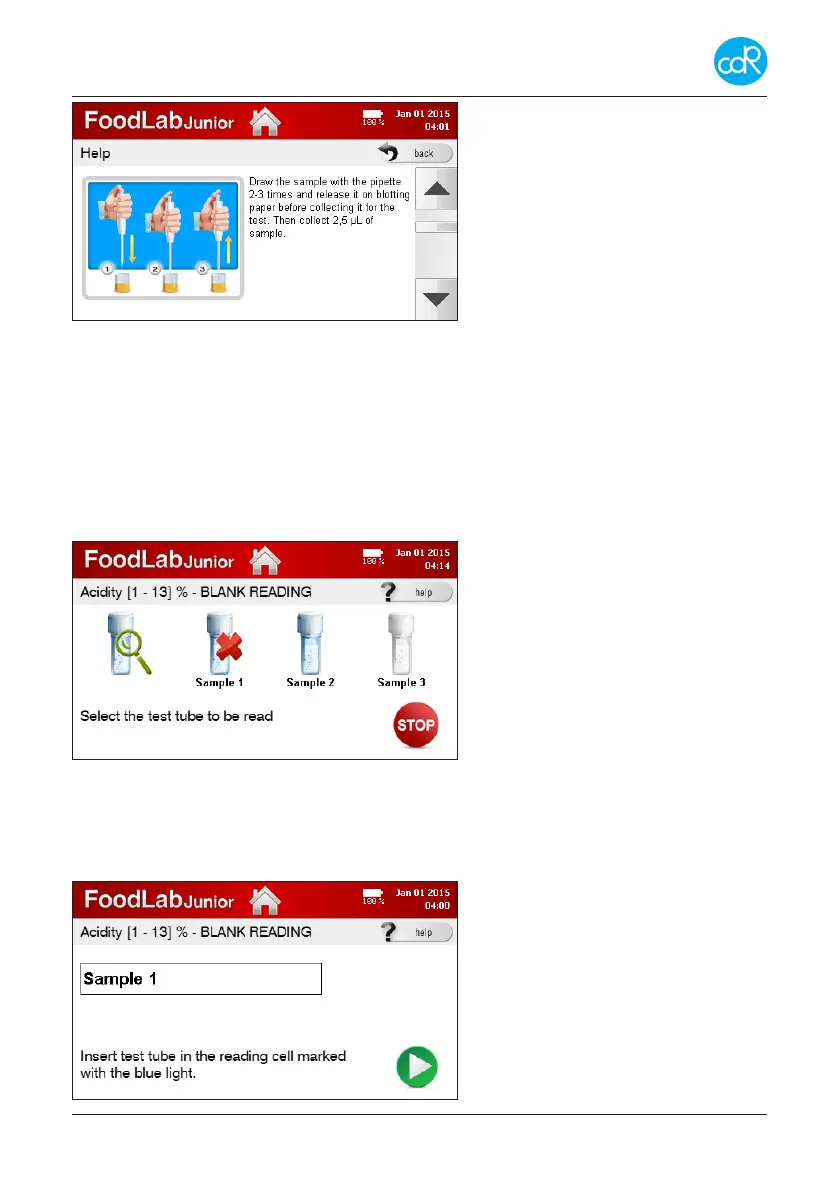
In this example you can switch
between a number of dialogues by
using the arrow-key.
Note advises as shown for your
orientation.
To leave this dialogue, touch back.
Figure 18 Help dialogue
You will be back at Timer dialogue.
• Touch Start timer button to run the timer count-down. If the incubation cycle is
over, a beeper is heard to get attention.
• Touch NEXT button to proceed next step of analysis, the following dialogue is pos-
sibly shown:
Selectable symbols of test cuvettes are shown for a Blank Reading.
Especially for testing of peroxides, a red coloured cuvette symbol is shown to store
the Reagent Blank value. Go as
described in section 3.4.2 for more
details.
Figure 19 Symbols - Blank Reading
• Touch Sample 1 that should be read and put test cuvette with sample 1 into the
blue indicated measuring cell. If the blank reading is not ok, a red cross appears.
• Check test cuvette and try again blank reading. Reason: wrong test cuvette, is out
of stability, shelf-live is over, dirty cuvette ...
After setting of identication, follow
the instruction given in this dialogue.
Figure 20 Sample identication


 To Next Page