23
MLB242
User’s Guide MLB242-V1
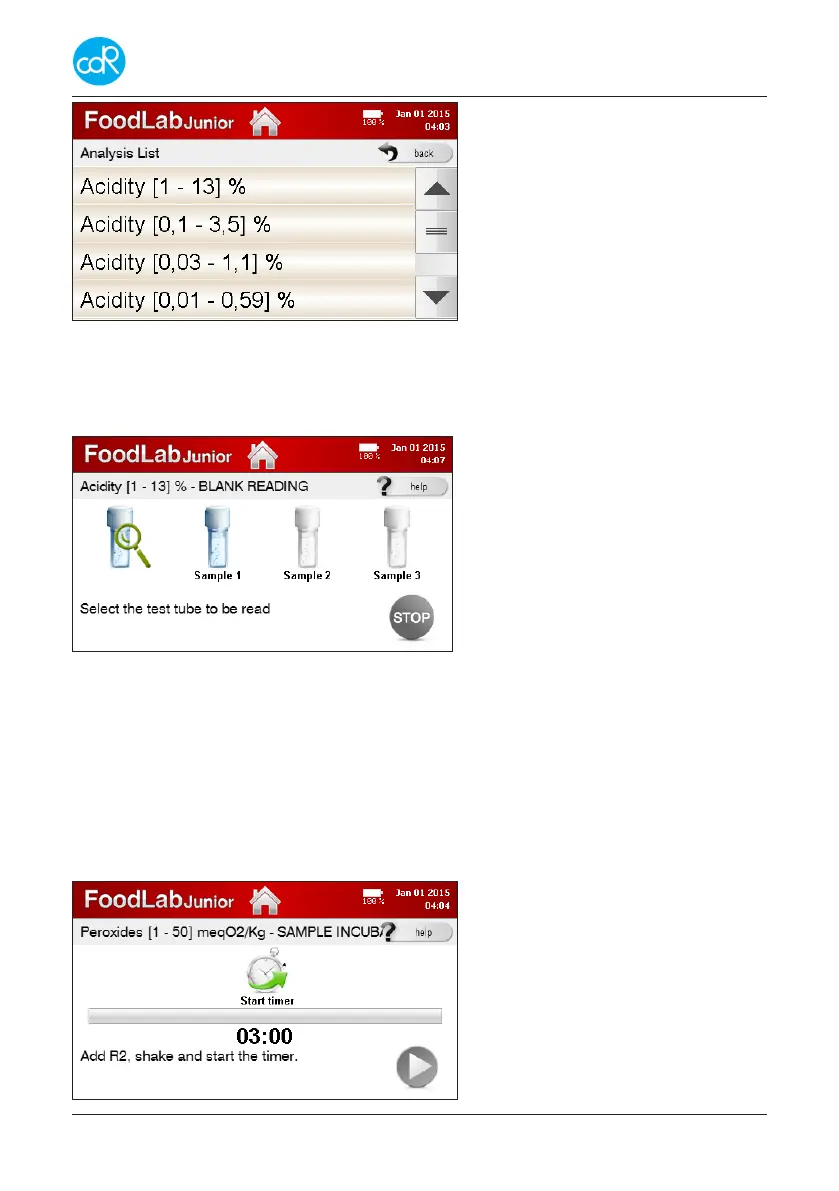
Figure 15 Analysis List
• Select a test you want to run by touching it on the list shown. If more test available
as shown, touch arrow-key up or down to scroll through the list.
After test selection the rst application dialogue is shown e.g. Acidity:
Cuvette with magnifying symbol
shows the reading cell to be used for
testing. It is not touchable. Position is
also indicated by a blue LED light.
Up to three samples can be tested a
run.
Figure 16 Samples for Blank Reading
• Proceed as described in test application instructions, e.g. select Sample 1 and ...
A dialog appears where you can modify the sample identication, it is instructed to
pipette a reagent or sample into a cuvette. After blank reading, the cuvette icon is
marked with a green check mark. Proceed in the same way with the samples 2 and 3.
By selecting STOP, the measurement of blank values may be closed early after test
1 or 2, this happens automatically after completion of sample 3. The dialogue for the
incubation of samples is displayed then:
An instruction is indicated that should
be followed below the timer.
If you touch this question mark “?”,
you will get a series of separate dia-
logs for test application instructions.
Figure 17 Sample incubation


 To Next Page