29
MLB242
User’s Guide MLB242-V1
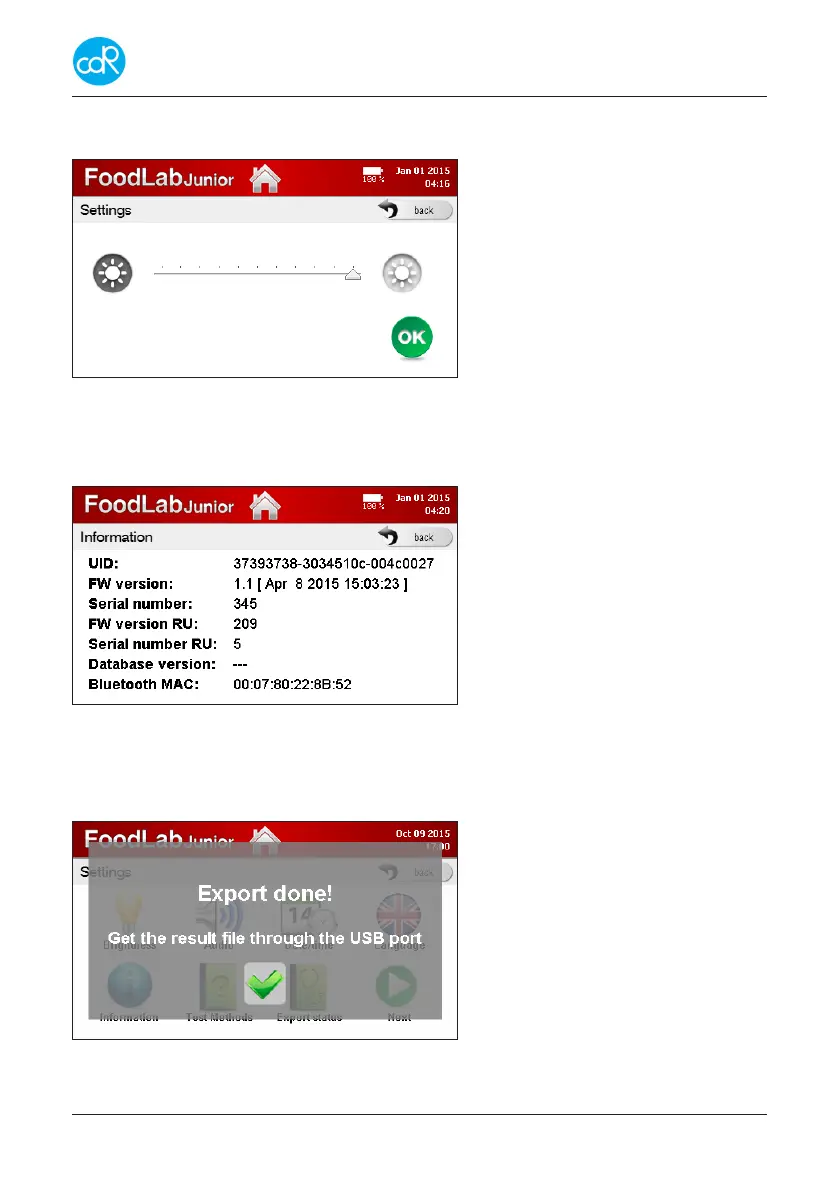
3.7.6 Brightness
Touch BRIGHTNESS to open its dialogue.
Adjust here the brightness of the
display by touching symbols.
The line shows the adjusted range of
brightness.
Touch back for exit or
Touch OK for storing.
Figure 28 Adjustment brightness
3.7.7 Info
Touch INFO to open its dialogue.
List of analyser’s facts like
Serial number S/N or
Any update information.
Touch back for exit.
Figure 29 Info dialogue
3.7.8 Export Status
Touch EXPORT STATUS, the following dialogue appears:
Function allows to save user settings
and results on a JUNIOR drive on PC
by USB cable.
The le takes about 100 KB.
Proceed as described in chapter 6.5
Data transfers.
Touch check mark to leave dialogue.
Figure 30


 To Next Page