27
MLB242
User’s Guide MLB242-V1
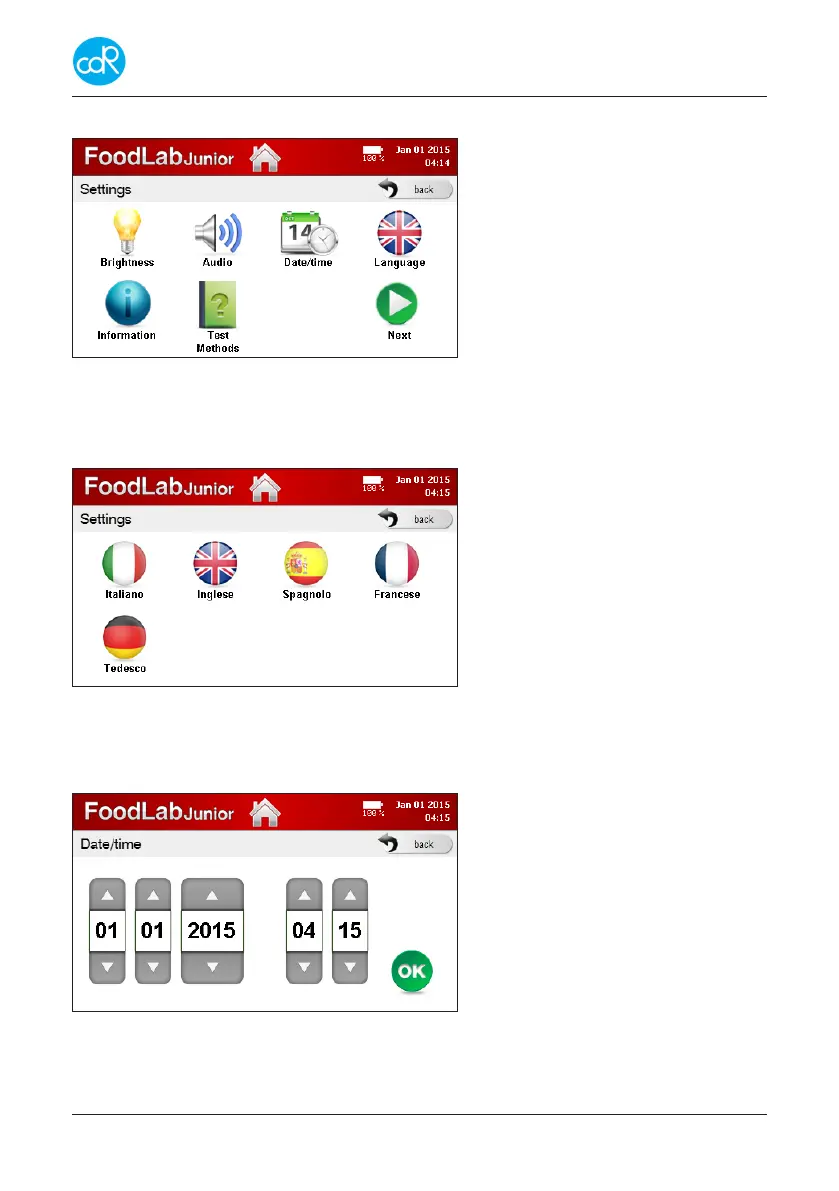
3.7 Settings Menu
This dialogue consists of two pages
selectable by NEXT button.
The HOME button on Top line
leads you back.
Touch Next for other options.
Figure 23 Menu Settings
3.7.1 Language
Touch the LANGUAGE button to open its dialogue.
Touch language you want to run, it’s
once available for operation.
Touch HOME to leave dialogue.
Figure 24 Language selection
3.7.2 Date/Time
Touch DATE/TIME button to open its dialogue.
Setting of day, month and year by
arrow-keys up and down.
Setting of hours and minutes by
arrow-keys up and down.
Touch OK for storing.
Figure 25 Setting Date/Time


 To Next Page