15
MLB242
User’s Guide MLB242-V1
Beeper
A beep will be heard:
- after power on/o
- after touch of function on screen
- at end of incubation cycle
- if an error occurs
Connections
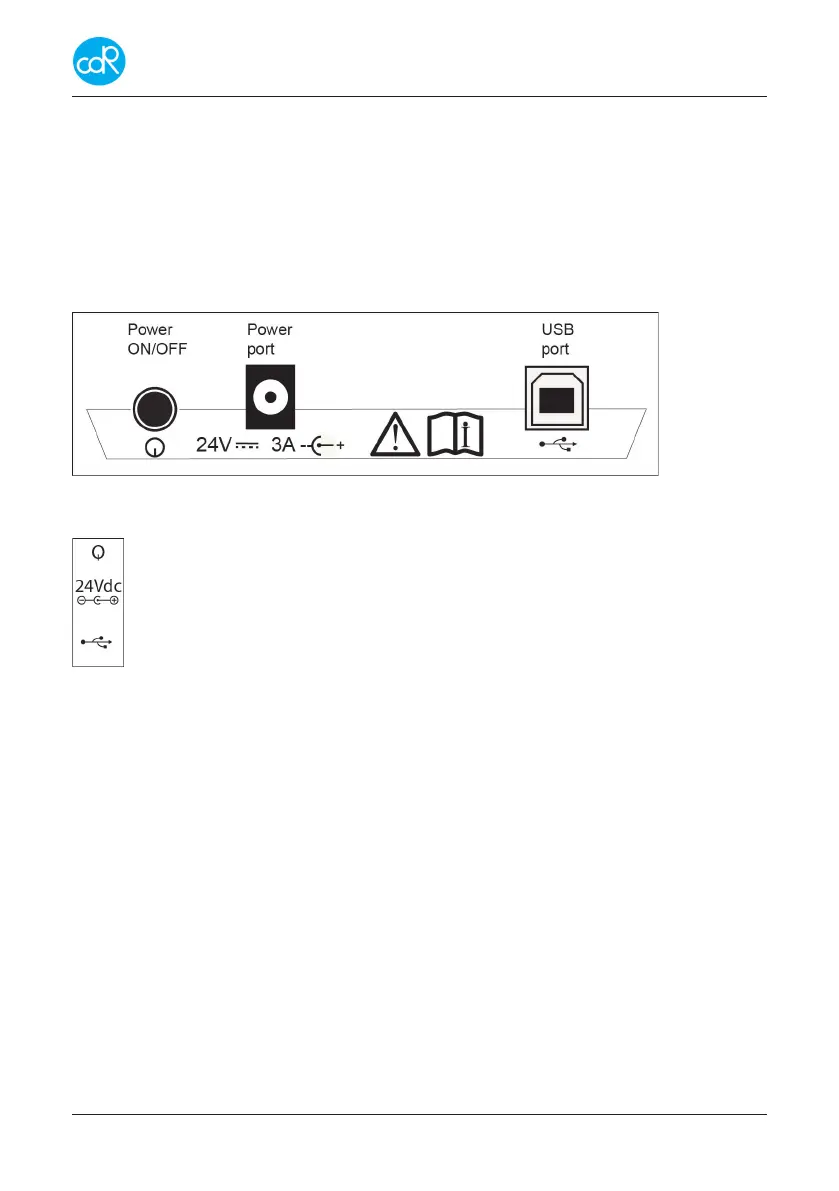
At rear site following parts are available:
Figure 4 connections and its symbols
Power switch ON/OFF
24V DC port for external power unit (internal pin is +)
USB port type B for technical service and for the data transfer to computer.
Connection to the host PC.
To upload analytical data, connect an USB-cable between analyser and USB-port of
the pc. See chapter 6.5.
Power requirements
The analyzer must be powered by an external power supply of secondary 24Vdc +/-
10%; 3 A with limited power supply LPS after Clause 2.5 of EN 60950-1, branded with
European Quality Marks for Safety like: TUV, VDE, SEMKO, NEMEKO etc. Use the
power adapter supplied with the analyser to meet important safety regulations.
Normally a standard power cable is supplied with the adapter with a protective ground
contact. Check if the plug will t the power outlet (convenience outlet) you have. If you
need a common adapter use one that meets a standard regulation for safety.


 To Next Page