18
MLB242
User’s Guide MLB242-V1
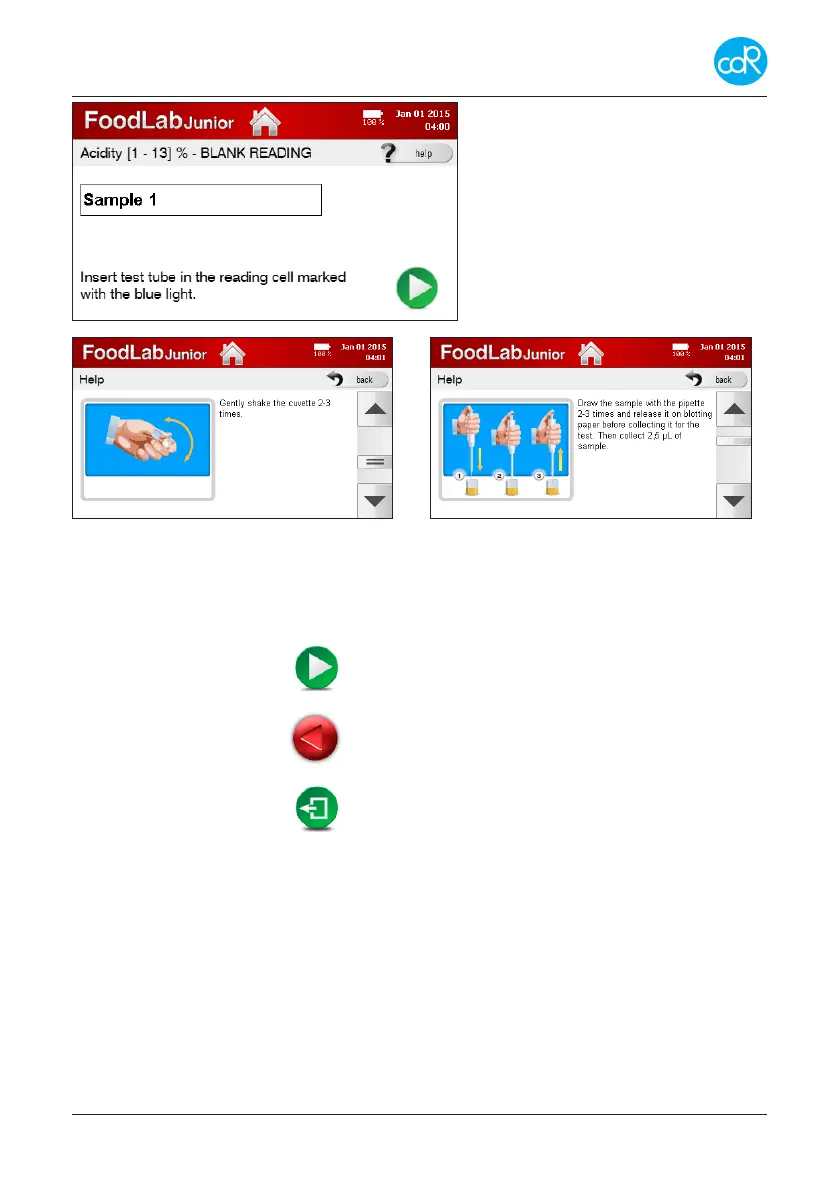
Touch ? help to open the rst appli-
cation dialogue.
This dialogue asks you to place the
cuvette with sample 1 into the indicat-
ed measuring cell for blank reading.
Figure 8 Blank reading
Figure 9 Help dialogue Figure 10 Help dialogue
For every test you can have a look of a number of illustrations that explain the test
procedure entirely.
Touch:
- for next dialogue
- for previous dialogue
- to leave a dialogue, Exit
Reagent indications
While reading test applications you will be confronted by dierent reagents terms. Un-
derstand the following description:
R1 basically all reagents pre-lled in test cuvettes are called as R1, also in bulk ware
where the reagent must be pipetted into empty test cuvettes.
R1a is a reagent that activates the R1.
R2 is a reagent that causes an optical change depending to a concentration.
R3 is a reagent that causes an optical change depending to a concentration.


 To Next Page