21
MLB242
User’s Guide MLB242-V1
WineLabJunior or BeerLabJunior.
If the analyser is switched on rst time after leaving production, automatically the dia-
logue for language setting appears.
Select language symbol you want to work with. After that dialogues to set or control will
appear as date & time, Laboratory name.
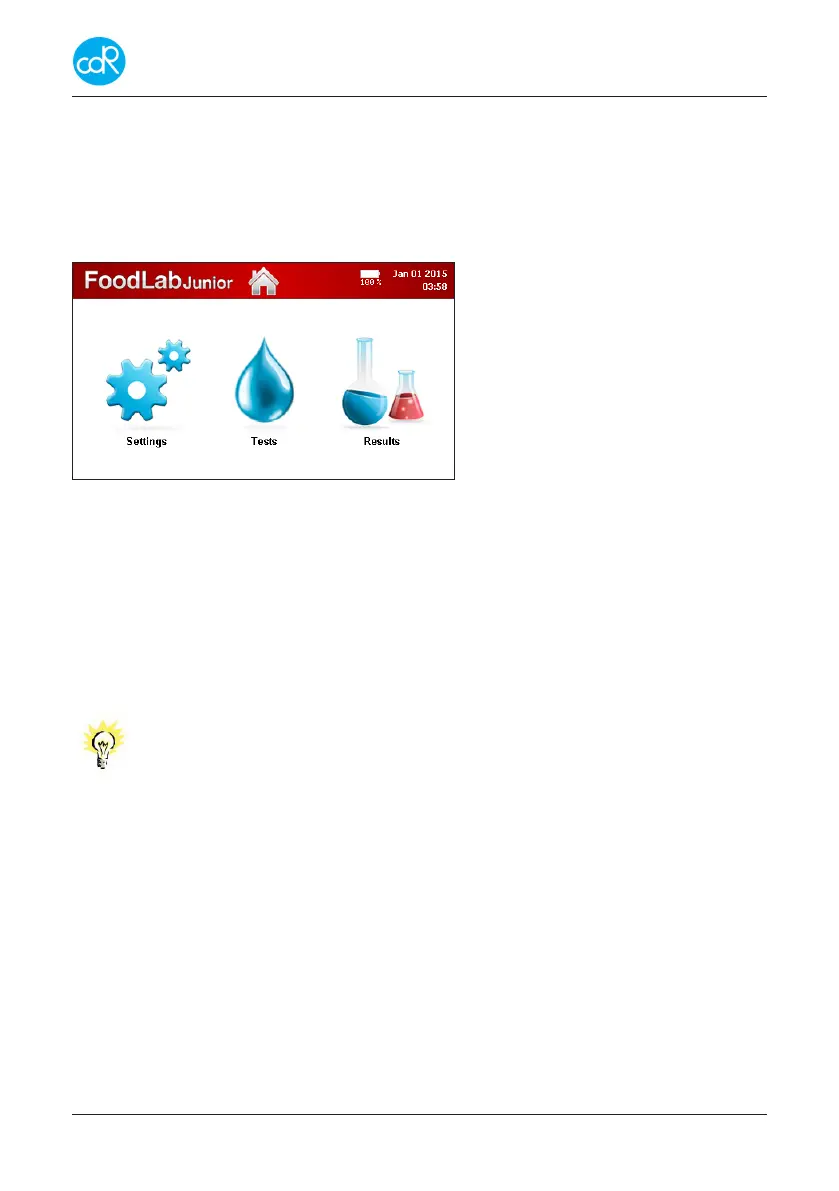
After that the Main dialogue is shown:
Top line
Central dialogue
Figure 13 Central dialogue
According to the system verication, dierent messages could appear that you must
follow and conrm always by OK.
Use SETTINGS to congure your system, see chapter 3.7 for details.
Use TESTS to run a test listed, see chapter 3 Operation for details.
Use Results to open a list of results, see chapter 3.8 for details.
Note
Regarding the operation on the MLB242, there is no risk for the oper-
ator if he uses the software as it is intended for!
After visual examination of the equipment, there shouldn’t be an
ergonomic danger for the operator!
End of installation.


 To Next Page