16 | Page
Carlson RT4 User Manual
SD Cards
SD Cards The RT4 has a slot for a micro SD card located in the baery compartment.
The card slot and exible card holder are designed to hold the card
securely in place so it will not come out or disconnect if the tablet is
dropped. To insert or remove a card, follow these steps:
1. Power o the tablet.
2. Remove the baery door as outlined in Chapter 1.
CAUTION: The RT4 is not sealed against water and dust when the baery
pack and baery door are not installed properly.
CAUTION: Always power o the tablet before removing the baery. Failure
to do so may cause loss of data or damage to the tablet. EXCEPTION: If
your tablet has an internal baery, this cauon does not apply. You can
safely remove the removable baery while the unit is running.
3. Remove the baery pack by pulling up on the black tab on the baery
pack.
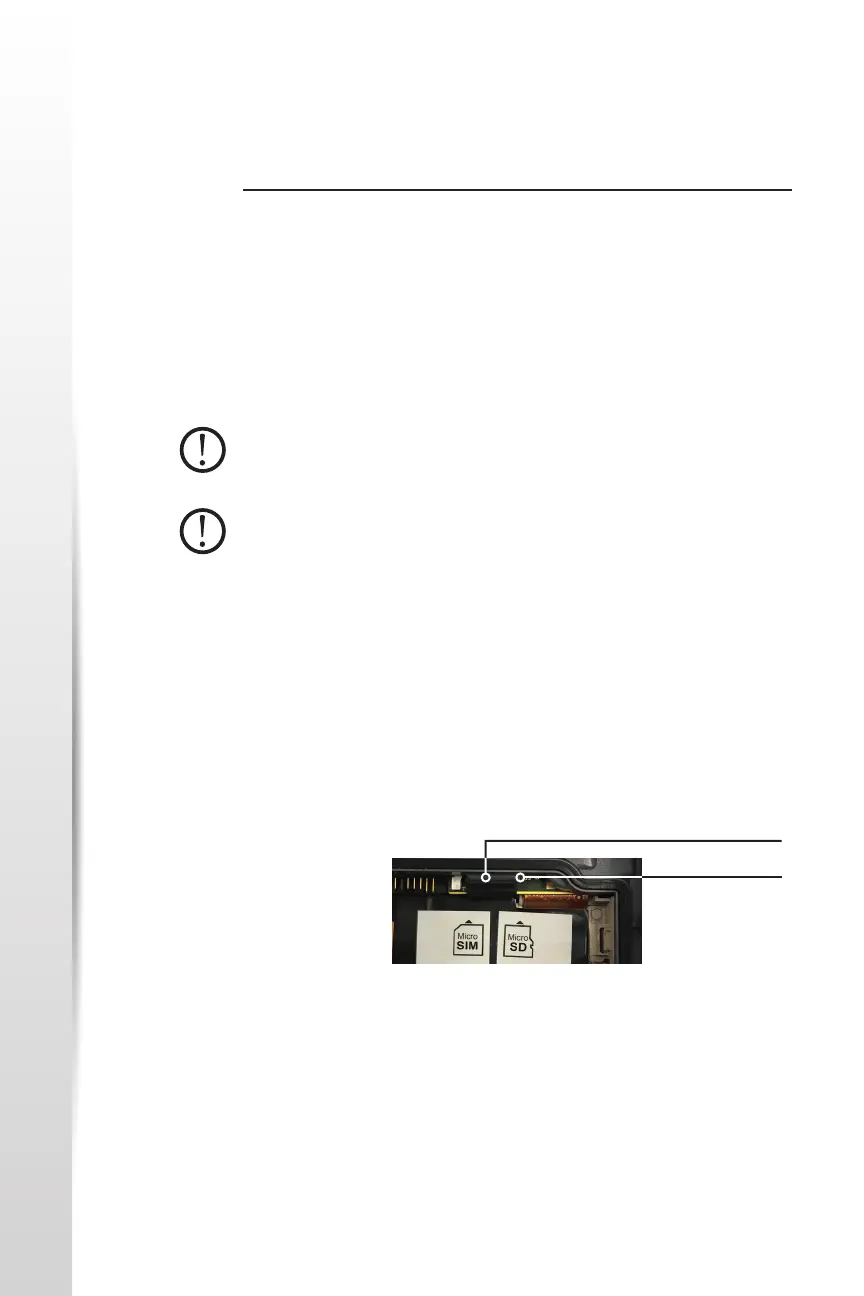
4. An image on the baery compartment label shows the correct
locaon and orientaon for the SD card (slot on the right). Pull the
exible card holder back out of the way. Push the card into the slot to
insert it.
5. Push the exible card holder back into place, covering the card slots.
6. Replace the baery pack, and aach the baery door.
To remove the SD card, pull it out. Use tape or an eraser if you have
trouble.
SD Card Slot
Flexible Card Holder



 To Next Page