10
REAR PANEL DESCRIPTION
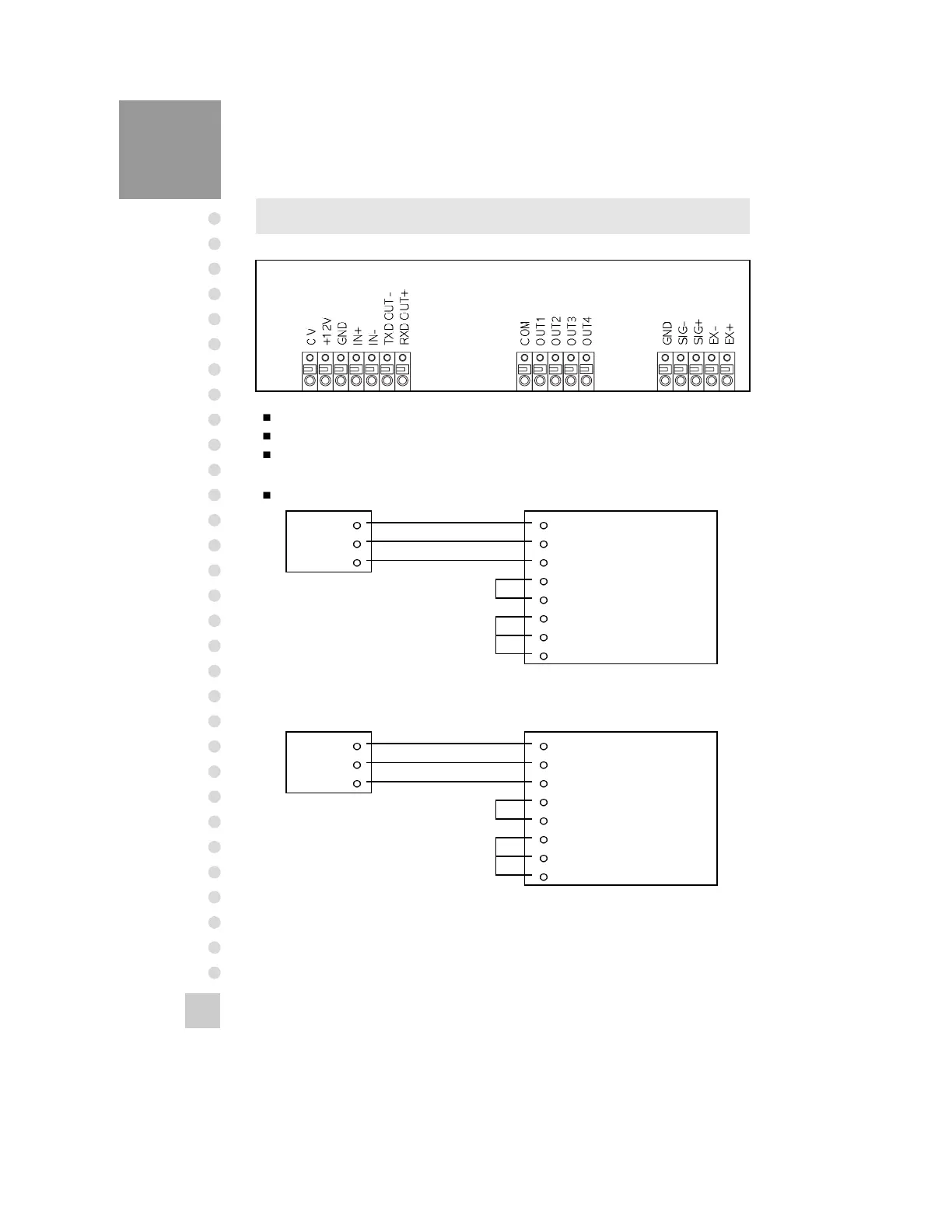
Power(0V, +12V) : Connect to DC 12V
RS-485/422 Interface(IN+, IN-, OUT+, OUT-) : Refer to option
RS-232 Interface(TXD, RXD, GND)
RXD
TXD
GND
2 Transmit Data
3 Receive Data
7 Signal Ground
4 Request To Send
5 Clear To Send
6 Data Set Ready
8 Carrier Detect
20 Data Terminal Ready
Connect RS-232C Port of Computer
25pin port(Female)
RS-232C port of Computer
RS-232C port of CI-2400BS
RXD
TXD
GND
3 Transmit Data
2 Receive Data
5 Chassis Ground
1 Carrier Detect
4 Data Terminal Ready
6 Data Set Ready
7 Request to Send
8 Clear to Send
9pin port(Female)
RS-232C port of Computer
RS-232C port of CI-2400BS


 To Next Page