`
41
F08
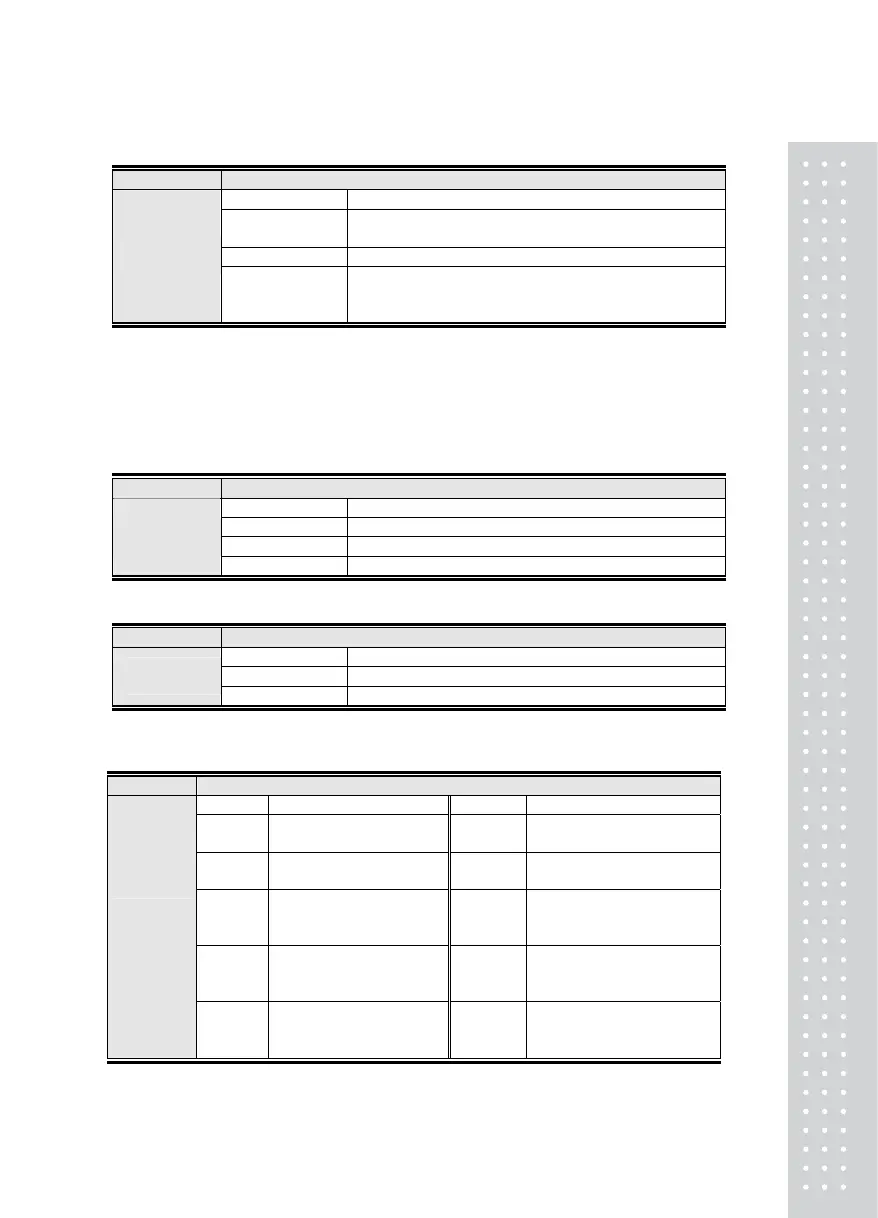
Function Set the Hold Type
Display Signification
F08. 0
Average Hold: Holds the average of the varying weight for
f-09 time when the Hold key is pressed or externally entered.
F08. 1 Peak Hold: Holds the peak value of varying weight
Set-up Range
(0 ~ 2)
F08. 2
Sampling Hold: Holds the sample or momentary value of
the varying weight when the Hold key is pressed or
externally entered.
Note 1. The hold function does not work if the loaded weight value exceeds the maximum capacity or the
hold key is pressed during Hold.
Note 2. When set to #2, if the weight is loaded when the scale is empty, the maximum value of the loaded
weight is calculated and displayed.
Note 3. If the weight is zero when the Hold LED is ON, the Hold function is automatically cleared.
Note 4. Cannot enter the Set Mode while using the Hold function.
F09
Function Set-up for the Average hold time
Display Signification
F09. 01 Calculates the average value in 0.1 sec
F09. 30 Calculates the average value in 3 sec
Set-up Range
(01 ~ 99)
F09. 90 Calculates the average value in 9 sec
F10
Function Set-up for the operation condition of Zero key and the Tare key (0 ~ 1)
Display Signification
F10. 0 Always available
Set-up Range
(0, 1)
F10. 1 Only available when the weight is stable
F11
Function Set the Zero Range
Display Signification Display Signification
F11. 0
Zero key is available within
2% of the maximum weight
F11. 5
Zero key is available within
50% of the maximum weight
F11. 1
Zero key is available within
5% of the maximum weight
F11. 6
Zero key is available within
60% of the maximum weight
F11. 2
Zero key is available within
10% of the maximum
weight
F11. 7
Zero key is available within
70% of the maximum weight
F11. 3
Zero key is available within
20% of the maximum
weight
F11. 8
Zero key is available within
80% of the maximum weight
Set-up
Range
(0~9)
F11. 4
Zero key is available within
40% of the maximum
weight
F11. 9
Zero key is available within
100% of the maximum weight



 To Next Page