`
40
F06
Function Set-up for the Automatic Zero Tracking Compensation
Display Signification
F06. 0 Do not use the automatic zero tracking compensation
F06. 1 Compensate if it slowly changes to below 0.5 divisions
F06. 5 Compensate if it slowly changes to below 2.5 divisions
Set-up Range
(0 ~ 9)
F06. 9 Compensate if it slowly changes to below 4.5 divisions
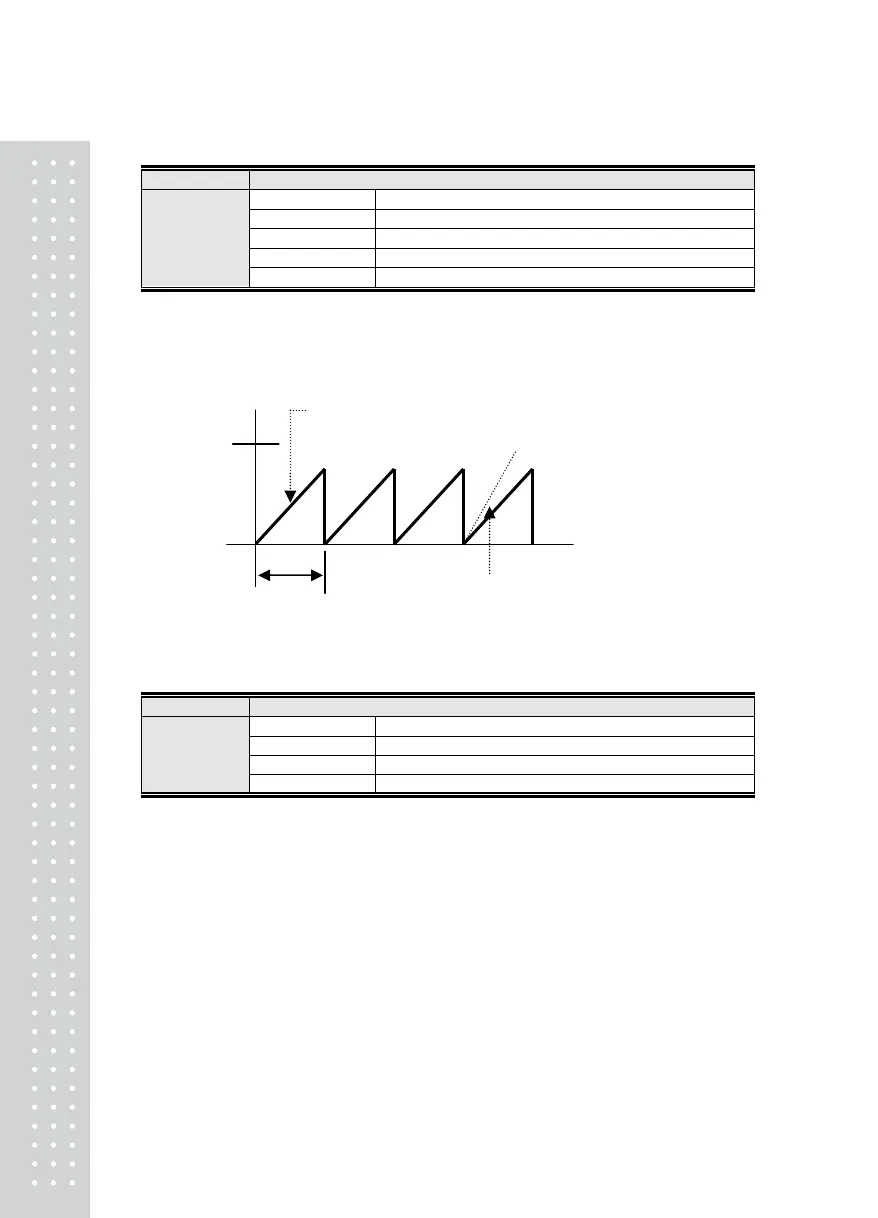
Note 1. This function automatically compensates to zero if the weight does not exceed a designated range
of division within a designated time at a zero status.
Ex) If the maximum indicated division is 120.0 kg and the value of one division is set to 0.05 kg, and
F06 is set to “4”, then…
F07
Function Weight Backup function
Display Signification
F07. 0 Do not use Weight Backup
F07. 1 Use Weight Backup (reference: calibration)
Set-up Range
(0~2)
F07. 2 Use Weight Backup (reference: operation)
Note 1. Backup status stores the initial zero status when the power is off, even during power outages.
Therefore, if there is an item on the scale when the power is on, it displays the weight value.
If the scale is empty, press the Zero key to re-enter the zero value.
If there is a variation in weight within 100g within 0.75
sec, the Display will display “0” automatically.
It there is a variation in weight exceeding
100g within 0.75 sec, the Display will
display the change in value.
2.0digit
(0.1Kg)
0.75 Sec



 To Next Page