5.8 Adjusting the Web, Router Stop Plate 21.21
The space between the edge of the stock and the deepest part of the pocket is called the “Web”.
The Web may be set between 5/8” and 13/16” by adjusting the Router Stop Plate from the top of
the machine. The factory setting is approximately 5/8”.
Note: If you experience inconsistent web size, make sure the lock nut on the Router Stop
Plate is secure. If the router stop plate is secure, check Router Stop Switch for proper
function
5.8.1 WEB ADJUSTMENT STEPS:
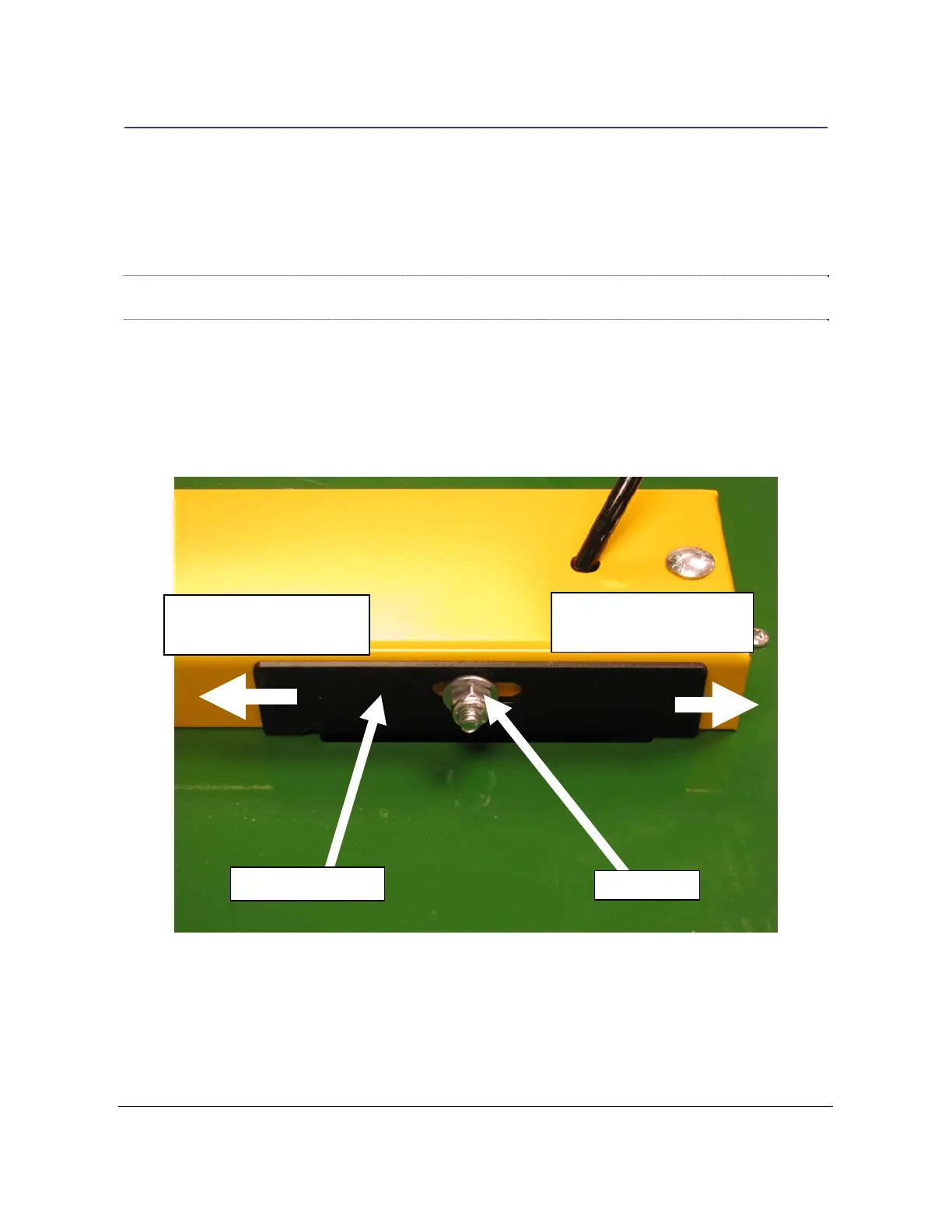
1. The Router Stop Plate is a black bracket found on the right side of
the yellow Clamp
Guard.
2. It is held in place by a ¼” lock nut. See Fig 9.
Lock Nut
Adjust towards back for
shorter web
Adjust towards front for
longer web
Router Stop Plate
Fig 9
3. Adjust the Web length by loosening the lock nut and moving the Router Stop Plate to-
wards the front of the machine for a longer web and towards the back of the machine for
a shorter Web.
4. Secure the lock nut after making any adjustments.
TSM-21 Diagnostic Manual Parker/Humphrey Solenoids


 To Next Page