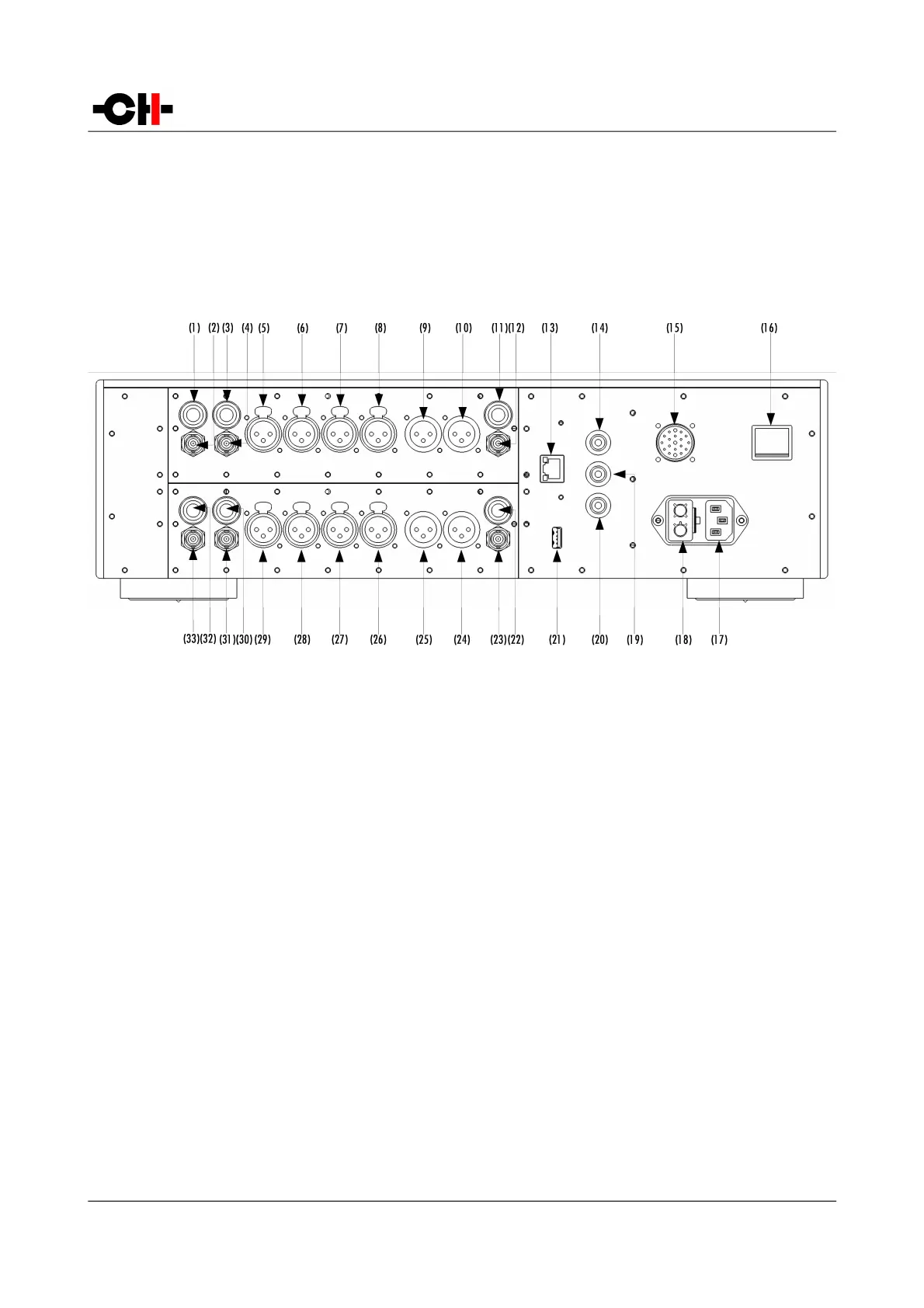
3.3 Connections
This section provides information about how to connect a dual-monaural L1 preamplifier to your system. For details about how to
integrate your L1 in a specific setup, please refer to the preamplifier configuration section of this user manual. If you don't feel
confident with the connections to be applied, please contact your authorized dealer for assistance.
L1 rear panel connections
(1) RCA 1 left input
(2) BNC 1 left input
(3) RCA 2 left input
(4) BNC 2 left input
(5) XLR 1 left input
(6) XLR 2 left input
(7) XLR 3 left input
(8) XLR 4 left input
(9) XLR 1 left output
(10) XLR 2 left output
(11) RCA left output
(12) BNC left output
(13) Ethernet port for command interface
(14) Earth connector. Internally connected to digital ground
(15) External power supply connector for X1 power supply option
(16) Power on/off switch
(17) Power cord receptacle
(18) Power fuse and voltage selection
(19) Analog ground connector 1.Can be connected to digital ground (Earth) using provided jumper
(20) Analog ground connector 2
(21) USB port for software upgrades
(22) RCA right output
Rev 1.0 L1 User Manual 17



 To Next Page