14
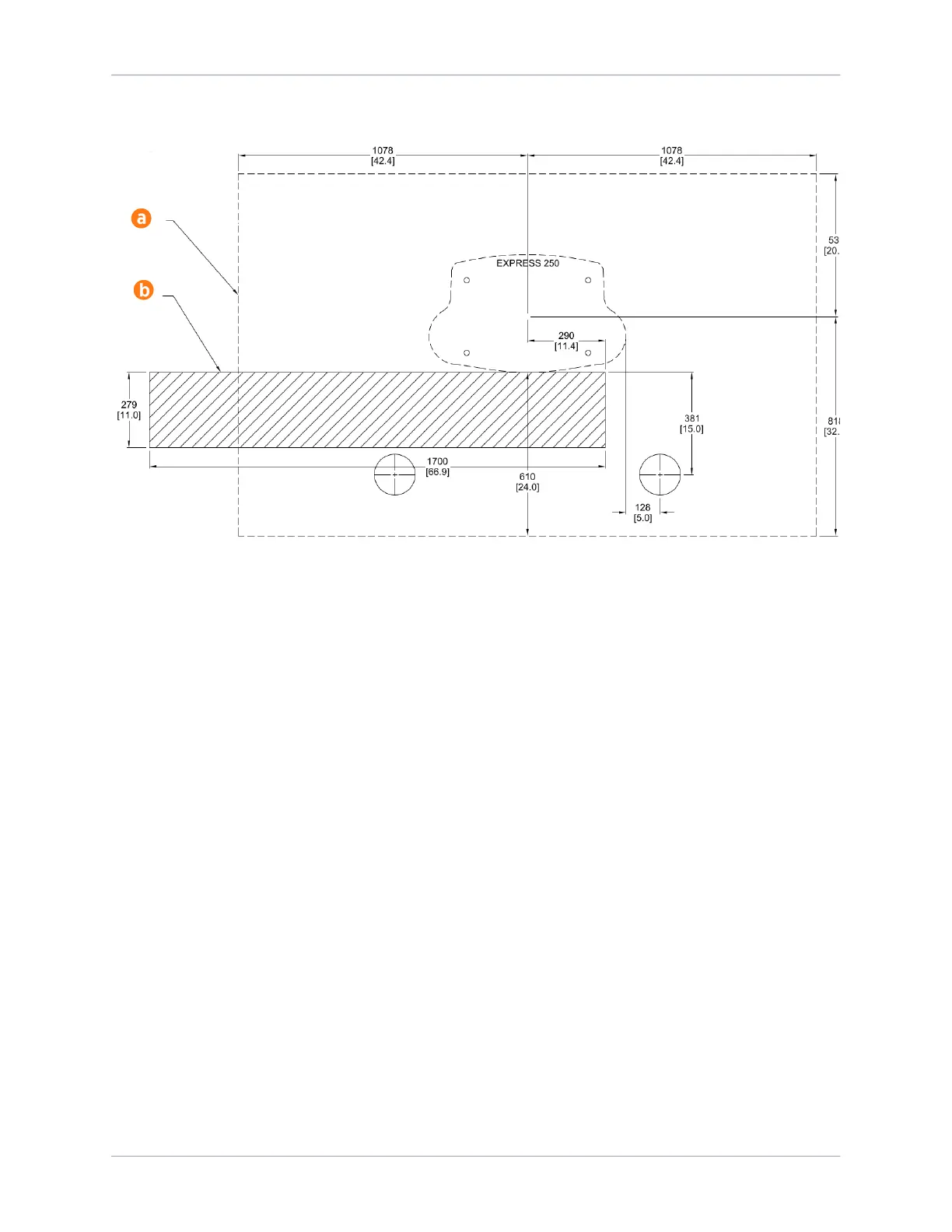
Head-in or back-in space bollard installation:
Pairing Previously Installed Charging Stations
If all site construction for paired charging is completed in advance, Express 250 stations can be
initially installed as Standalone and paired at a later date. In that case, follow these additional steps:
• During initial site construction, install DC and communication conduit or ducting (as applicable
by region) in advance.
• Extend side clearance at both DC conduit stub-up locations to 1.2 m (4 ft) to allow space for
cable pulling equipment.
• Run a pull rope through the larger DC conduit before landing the charging stations. Do not pull
DC cable in advance, as it is too thick to hide inside the cover panels without risking damage or
unwanted electrical contact.
• Install a fishing tape in the smaller communication conduit to assist with routing the Ethernet
cable later. If Ethernet is pulled in advance, leave 317.5 cm (125 in) of wire above grade at each
end.
• Use duct seal compound to seal the ends of the DC and communications conduit stub-ups. Seal
the ends of the fishing tape to hang outside the conduit.
• Install the cover panels and extrusions on the Express 250 stations over the stub-ups as normal.
By only connecting AC wiring (and shunt trip if applicable), each Express 250 can perform as a
Standalone station until the station owner is ready to pair them. At a later time, the stations can be
paired by installing DC conductors, connecting Ethernet communication, and performing a firmware
update if required. Refer to the Express 250 Installation Guide for further details.
Once two Express 250s are correctly paired, operation of both stations is inhibited if Ethernet










 To Next Page