31
Assemble the CPE250-CMT
Before pouring concrete, assemble the CPE250-CMT with its anchor bolts, washers, and nuts.
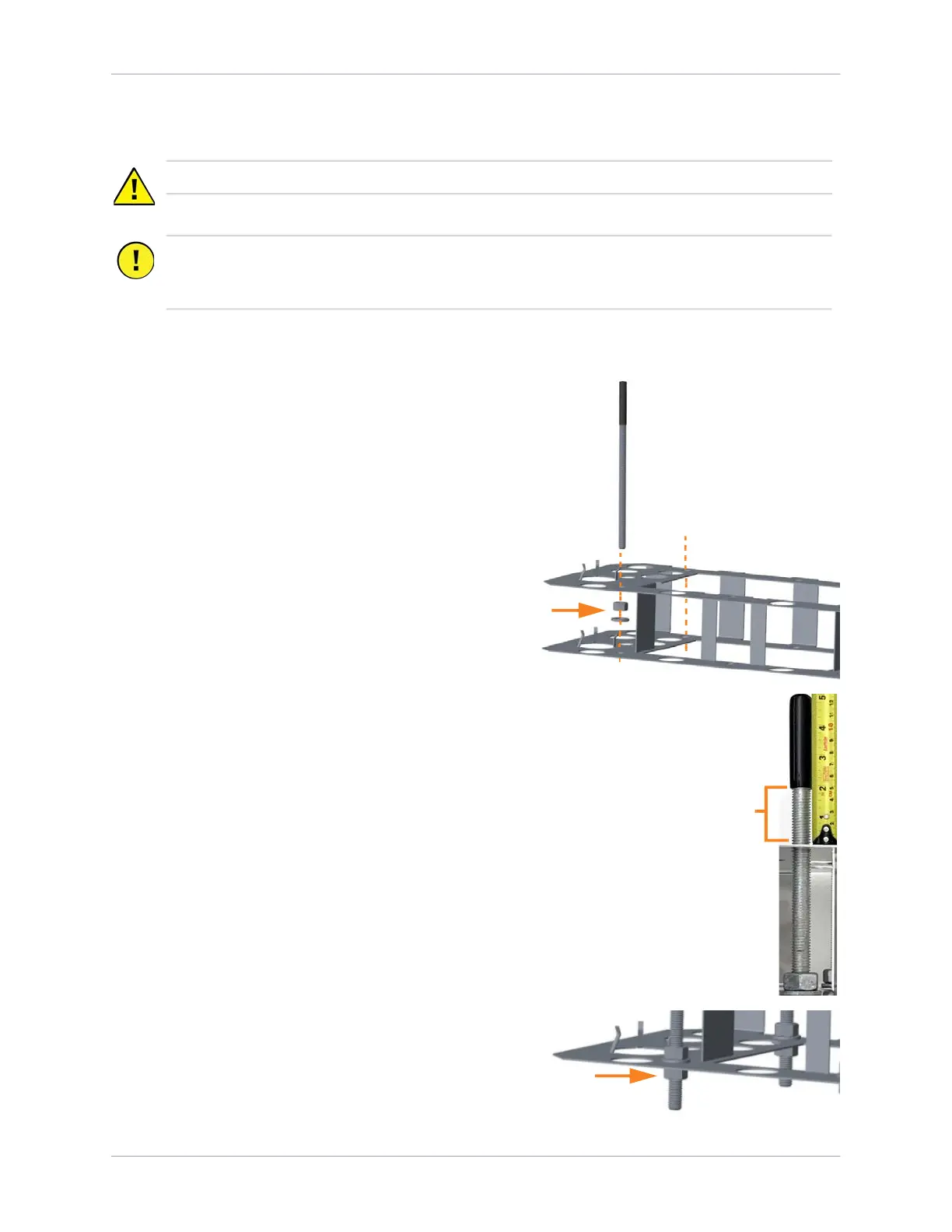
1. Holding a mounting bolt by its plastic cap, insert the
bare end into a corner bolt hole in the top plate of
the template.
2. Before inserting the bolt through the bottom plate of
the template, thread a nut onto the bolt and add a
washer as shown.
3. Ensure the plastic cap is pressed fully down on the
bolt.
4. Holding the bottom nut and washer flush against the
top surface of the bottom plate, thread the bolt onto
the nut until the distance between the bottom of the
plastic cap and the surface of the top plate is 51 mm
(2 in).
5. Repeat Steps 1 to 4 for the remaining three corner
bolts.
Note: Do not insert bolts into the center two holes.
Only the four corner bolts are required for system
stability.
6. Secure a second washer and nut onto the bottom of
each bolt until it is flush with the bottom surface of
the bottom plate. Torque each nut to 5.6 Nm
(50 in-lb).
CAUTION: The CPE250-CMT can have sharp edges. Wear cut-resistant gloves.
Important: Although the CPE250-CMT was originally designed for six anchor bolts, only the
four corner anchor bolts are required for station stability. Newer charging stations are
designed to only use the four corner anchor bolts.
51 mm (2 in)











 To Next Page