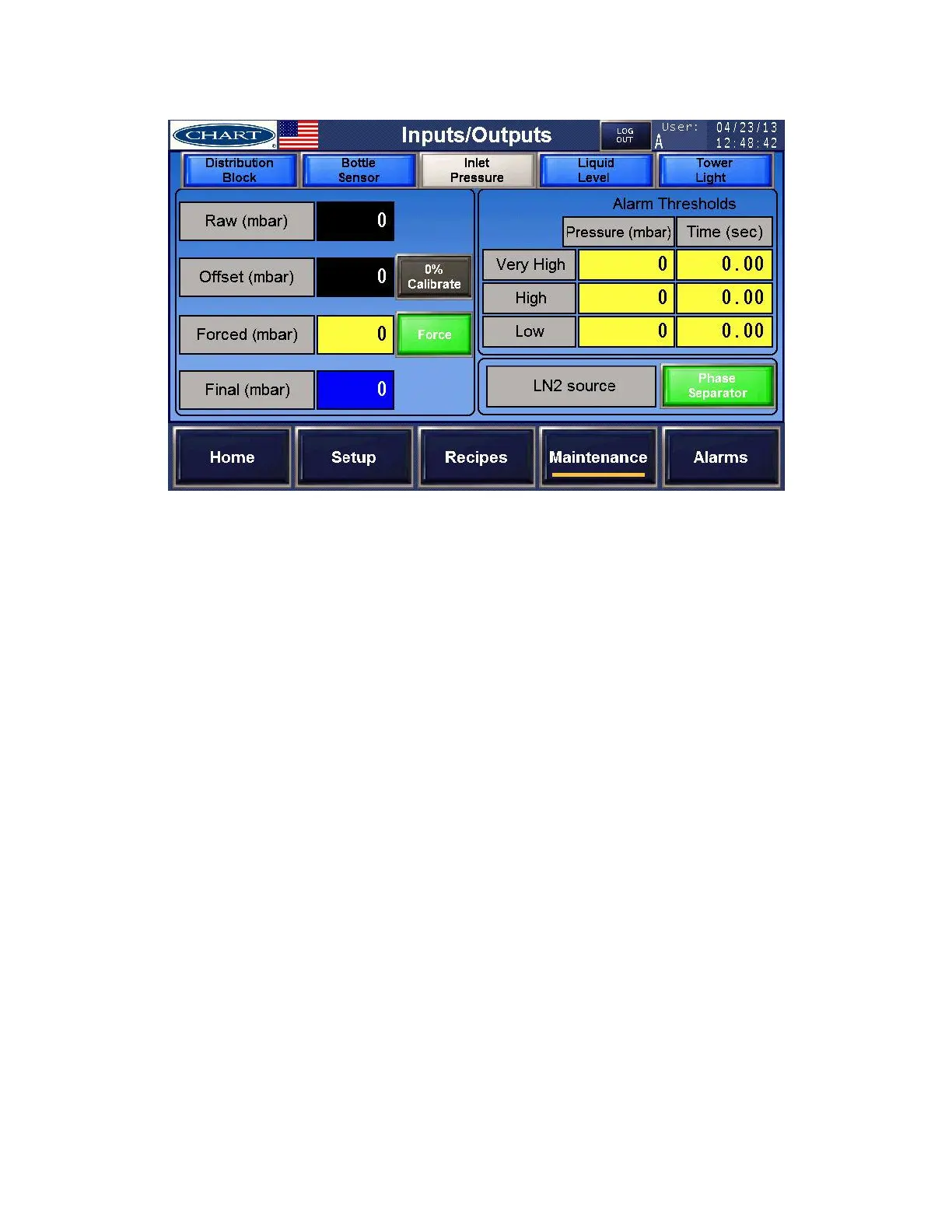
Inlet Pressure – calibrate and set alarm threshold for Inlet Pressure
a) Raw Inlet Pressure – This is the raw reading from the PLC analog input.
b) Offset Inlet Pressure – After calibrating the inlet pressure at zero level by pushing the
‘Offset’ pushbutton the raw reading will become the inlet pressure offset.
c) Final Inlet Pressure % - The blue box indicates the current inlet pressure.
d) Forced Inlet Pressure % - You can force an inlet pressure by typing a value in the yellow
input box and pressing the ‘Force’ toggle.
e) Alarm Thresholds – The thresholds low and high inlet pressure alarms can be set by typing
an alarm threshold % value and associated time before the alarms occurs into the yellow
input box.
f) LN2 Source – Press the ‘LN2 Source’ toggle to choose the source of liquid nitrogen.


 To Next Page