Control Setup Chore-Tronics® 3 Breeder Edition Control
22
MT2484A
Clocks Setup
See “Feeding System (Matrix)” on page 18 for some Setup examples.
Feed Clock
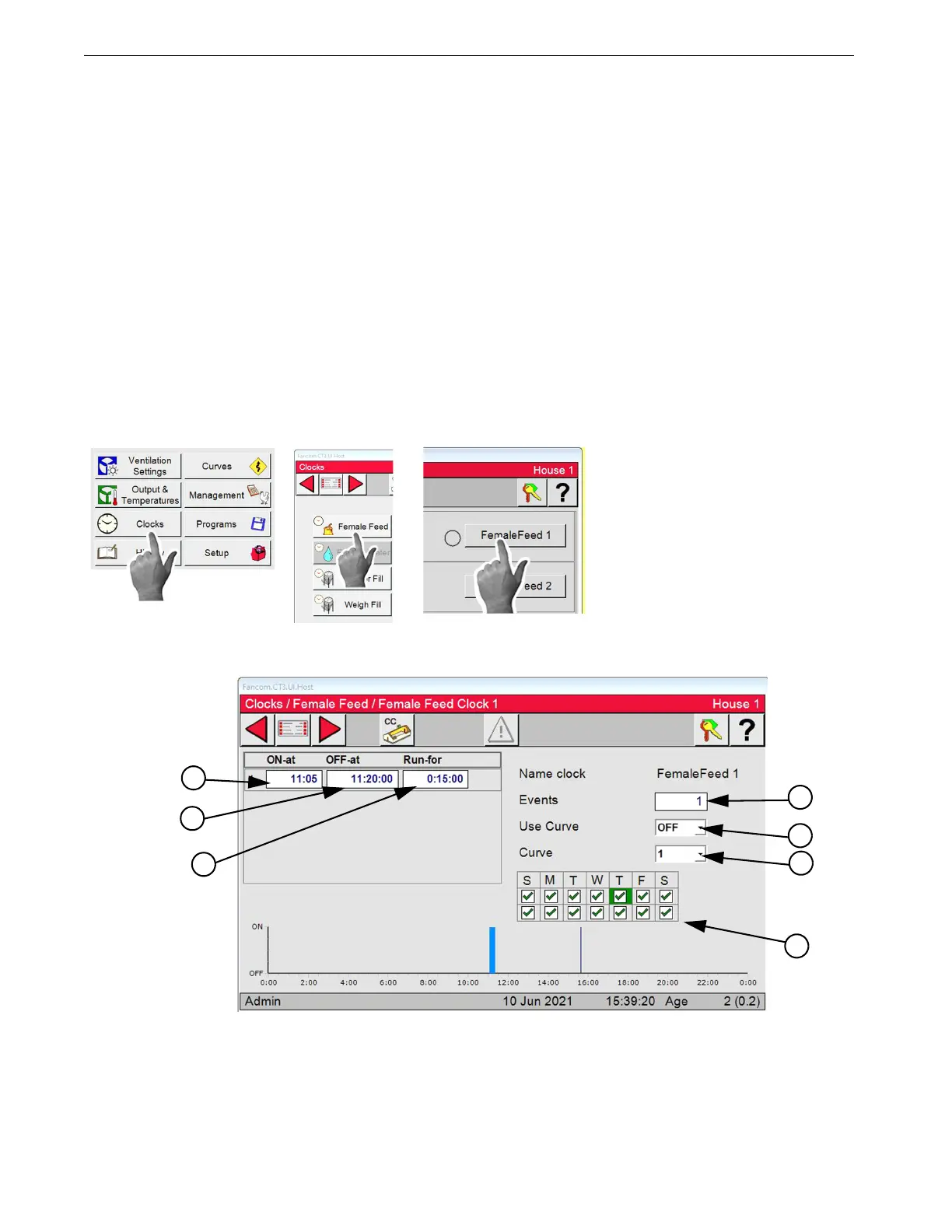
In the Clocks/Female or Male Feed/Female or Male Feed Screen....
1.Events: The desired number of timed events. The maximum number is 24.
2.Schedule: This is where the Feed and Non-Feed day schedule is set. If a day of the week has a check
mark, then the events listed in the clock will happen that day. If a day of the week is blank, then the events
listed in the clock will NOT happen that day. The first line of the schedule indicates the Feed and Non-
Feed days of the current week. The second line of the schedule indicates the Feed and Non-Feed days of
the next week. The schedule will be repeated every two weeks.
3.On-at: The time of day that an event will start.
4.Off-at: The time of day (hours:minutes:seconds) that an event will turn off.
Note: If Stop feed when preset is met has been setup the Feeder will stop at Preset met.
5.Run-for: The total time in (hours:minutes:seconds) that the Feeder will run.
6.Use Curve: Select On or Off from dropdown. The Curves are selected from the Run For Curves.
7.Curve: Select the Curve number you want to use from the dropdown.
Note: Follow the same steps to setup the Male Feed Clock.



 To Next Page