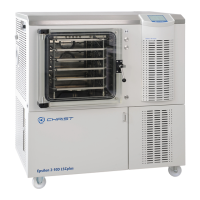
Freeze-dryer Alpha 1-4 LDplus
Freeze-dryer Alpha 2-4 LDplus
Version 11/2006, Rev. 2.2 of 17/10/2016 • sb
Translation of the original operating manual
Option: Electrical lifting hoist
The freeze-dryer can be retrofitted with an electrical lifting hoist that
facilitates the attachment and removal of drying chambers.
The freeze-dryer must be in the standby mode and completely aerated.
The drying chamber cannot be moved in the "Main drying" and "Final
drying" phases.
• Select the function "Lifting hoist" under "Special functions" in the main
menu (see above).
• Move the drying chamber by way of the up/down keys.
Fig. 37: Operation of the electrical lifting hoist
• After the completion of the process, exit the menu via the left function
key "back".
Pos: 133 /010 Uni versalmodule/ Leerzeile @ 0\mod_12 02116244500 _0.docx @ 1 14 @ @ 1
Pos: 134 /200 Chris t/360 GT-B A Labor-Pilot ( STANDARDMOD ULE)/060 Betrieb/LDplus/ 060-0050-003 0-0030 Prozess- und Anlagen-I nformationen @ 31\mod_140 8352503867_ 68.docx @ 209634 @ 4 @ 1
6.5.3.3 Process and equipment information
The menu "Process & equipment info" provides the user with information
concerning error, process, and system messages.
In the event of a message, a sound signal will be issued, the symbol " "
will appear on the status line, and the process and equipment information
window will be displayed. If the user is currently in a menu, the window will
not be displayed until the user exits the main menu.
1 Message
2 Status of the
information
3 Number of active
messages
4 Function key "exit
menu"
5 Function key
"acknowledge
message"
Fig. 38: Structure of the "Process & equipment info" menu
Regardless of the presence of a message, the menu can be activated at all
times in order to view any messages that are present.
• Select the "Process & equipment info" function in the main menu.
The error messages are listed in detail under chapter 7 - "Malfunctions and
error correction".


 To Next Page