4
To ensure proper performance, maximum safety and
reliability, it is essential to install the unit correctly. This
includes proper mounting, spacing, hardware and wir-
ing. See below:
• Maximum surrounding air temperature is 40°C in
“Open Type Equipment” which is suitable for use in
pollution degree 2. For temperature >40°C refer to
the Derating Curves.
• Install the unit vertically (max 10° inclination from
vertical axis).
Spacing
To ensure maximum reliability, the device must be cor-
rectly installed in the panel in such a way as to obtain
adequate heat exchange between the heat sink and
the surrounding air under conditions of natural convec-
tion. Under no circumstance shall any component, in-
cluding cable channels, compromise minimum thermal
spacing dimensions. Air must be able to flow vertically
on the heat sink without any obstacles.
Solid state devices dissipate heat which may impact
installation room temperature. Exchange with external
air or an air conditioner may be necessary to transfer
heat outside the panel.
• Minimum vertical distance between unit and panel
wall: 3.9” (100 mm)
• Minimum horizontal distance between unit and pan-
el wall: 0.8” (20 mm)
• Minimum horizontal distance between adjacent
power control units: 0.4” (10 mm)
3. Installation
Mounting
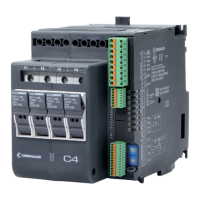
C4 Models to be installed on a DIN Rail . Rear panel
dimensions are on previous page.
To install C4 onto a DIN Rail:
1. Depress DIN mounting spring. u
2. Position controller on the DIN Rail at a slight angle.
3. Lower controller on to DIN Rail. v
4. Release the mounting spring.
To remove from DIN Rail:
1. Depress DIN mounting spring. u
2. Rotate bottom of controller off of the DIN Rail. v
3. Remove from DIN Rail.
1
PRESS
1
PRESS
2
ROTATE
2


 To Next Page