Need help?
Do you have a question about the Chromalox C4 and is the answer not in the manual?
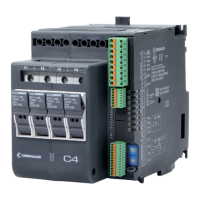
Overview of the C4 controller's capabilities and applications.
Key features and functionalities of the C4 controller.
Procedures for checking the unit after unpacking.
Instructions for installing the controller on a DIN rail.
Requirements and precautions for the controller's power supply.
Guidelines for connecting input and output signals.
Electrical safety and electromagnetic compatibility considerations.
General notes and recommendations for proper installation.
Identification of physical components and terminals on the controller.
Maintenance and troubleshooting of the cooling fan.
Steps for installing optional field bus modules.
Details on connecting power supply terminals.
Guidelines for safe and effective power wiring.
Wiring diagrams for all input and output terminals.
Explanation of status indicators and their meanings.
Configuration of module address using rotary switches.
Pin assignments for J1/J1a connector and output types.
Setting controller functions via dip switches.
Configuration and pinouts for communication ports.
Illustrative setups for network communication.
Wiring example for four single-phase loads with neutral.
Wiring example for four single-phase loads without neutral.
Wiring example for two 3-phase loads in delta.
Wiring example for two 3-phase loads in wye.
Wiring example for mixed 3-phase load states.
Wiring example for a single 3-phase load in delta.
Procedure for setting serial communication speed automatically.
Procedure for setting field bus node addresses.
Technical specifications for analog process inputs.
Technical specifications for digital inputs.
Specifications for heat control solid state outputs.
Specifications for optional cool control outputs.
Specifications for alarm outputs.
Specifications for the primary serial communication port.
Specifications for the optional field bus port.
Electrical power ratings and considerations.
Settings for alarm configurations and masking.
Information on controller diagnostics and fault reporting.
Guidelines for panel installation and environmental conditions.
Specifications for operating temperature and humidity.
Safety functions, protection, and alarm features.
Description of status LEDs and indicators.
Power supply and protection specifications.
Details on control loop actions and tuning.
Information on the configuration software and its use.
Reference for controller setup and programming.
Part numbers and specifications for fuses and holders.
Part numbers and descriptions for field bus interface cards.
List of other available spare parts and cables.
 General
| Brand | Chromalox |
|---|---|
| Model | C4 |
| Category | Controller |
| Language | English |

 To Next Page