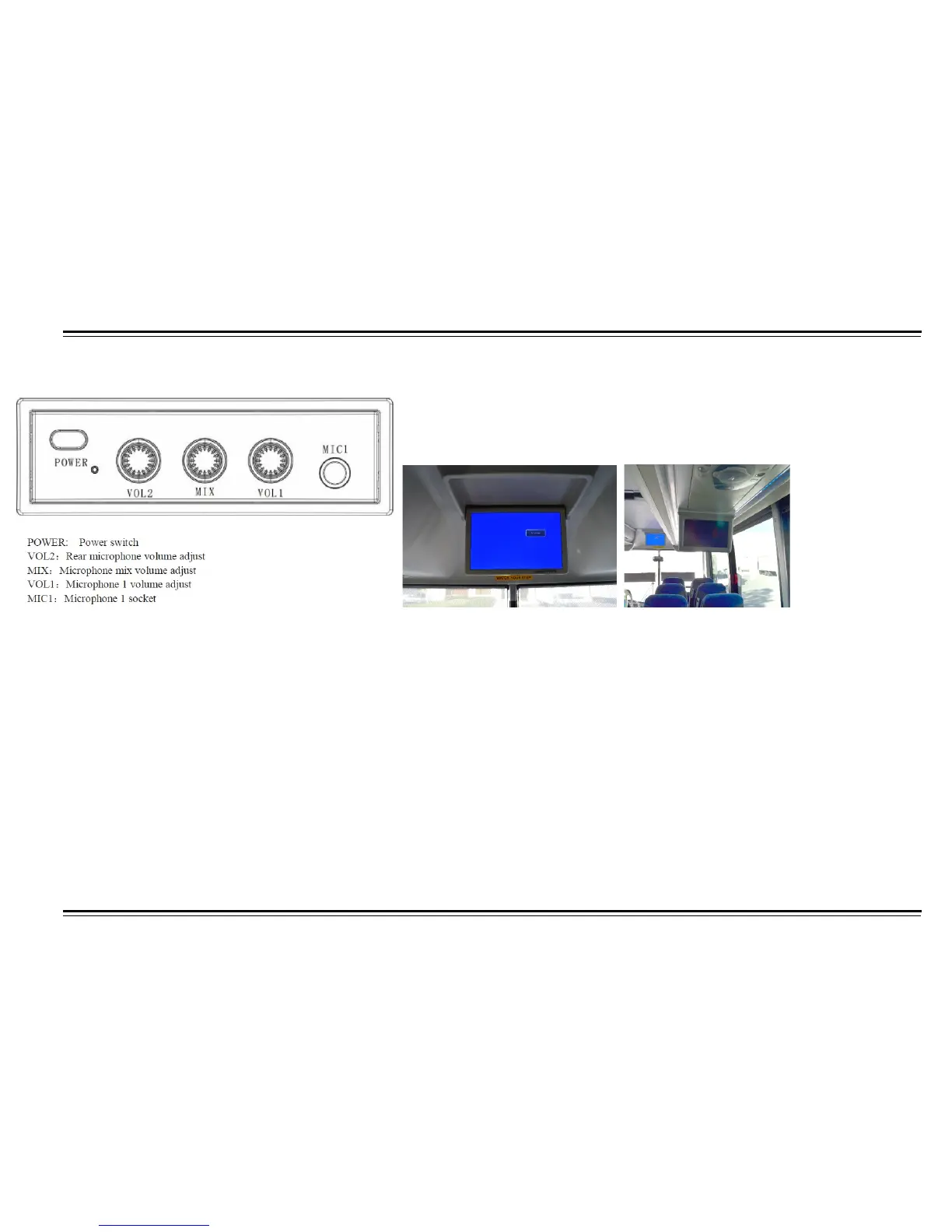
Public Address System
The coach is equipped with one 19 inches strategically drop down
LCD screen monitor that are controlled by switch at drivers dash and 6-10 inch
stationary LCD monitors.
Operation
1. 24V power supply, while output voltage is 13.8V±0.2V (8Amax). Use the host unit with audio amplifier and connect as to system requires, check
cable connection.
2. Press power button and it starts to work.
3. When the driver or guide speaks, plug the microphone to MIC1, turn on the microphone, the background sound is mute, only comes the sound from
the microphone, adjust knob VOL1 to adjust volume of microphone.
4. MIC2 socket on the backside of the unit, you can connect to microphone with long cable to install it on anywhere on coach, plug the microphone and
the background sound is mute, only comes the sound from the microphone, adjust knob VOL2 to adjust volume of microphone.
5. Adjust the mix knob in the middle, you can adjust the mix sound volume, no matter the host unit is in DVD, Cassette or radio status, you can speak
to microphone after it is plugged in, the volume will not be influenced by the host unit volume.
6. When playing karaoke VCD, or dual language VCD, press L/R key to mute the voice or select audio channel, this is only valid for VCD.
7. Gooseneck microphone and wireless microphone is optional.
Remark: Microphone mute function is optional.



 To Next Page