Power supply
Power supply 13.8 V
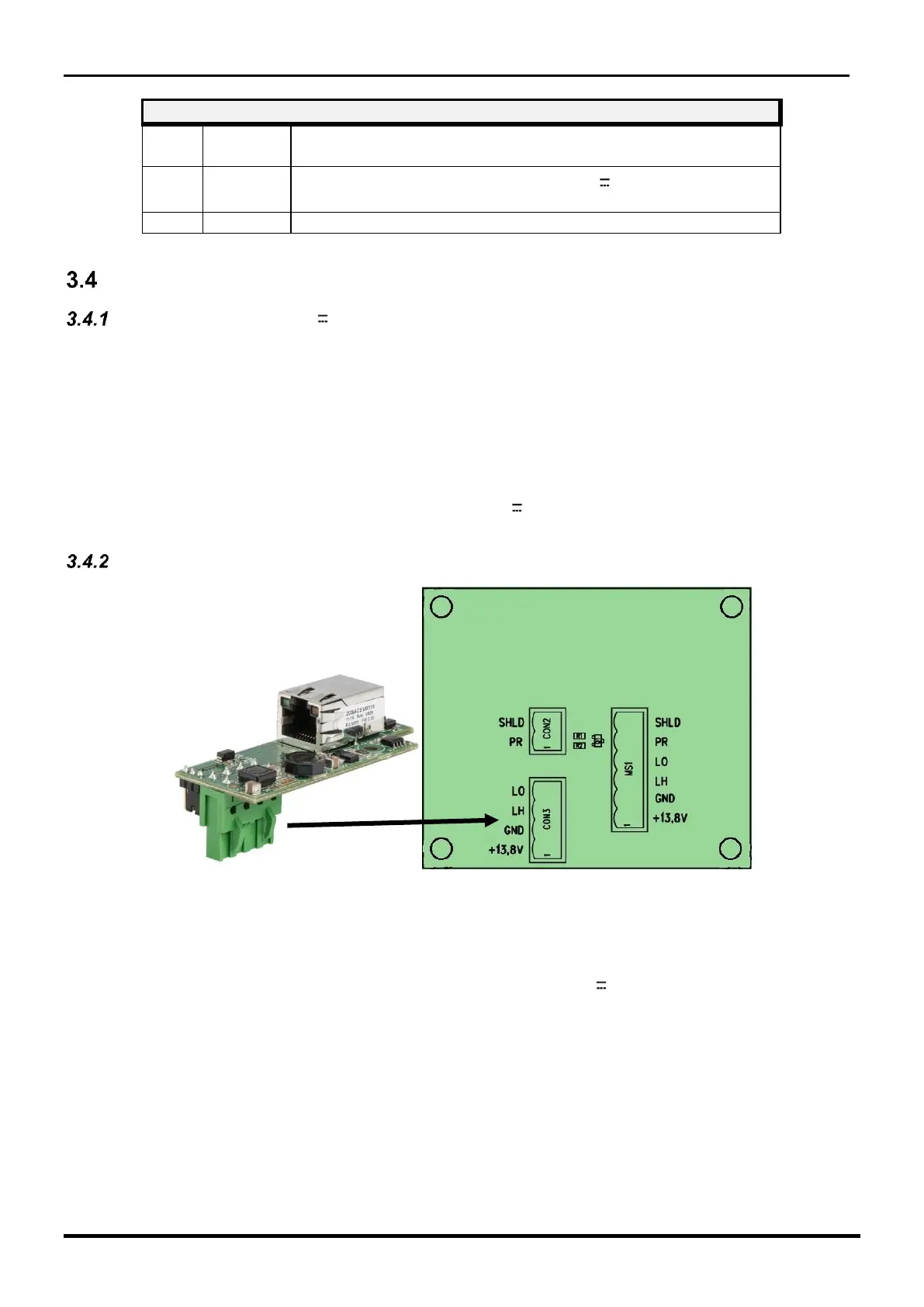
It is sufficient to bring the power supply to the Terminal Block CON3 on the MICRO-RAY interface
card to power all the modules present in the column. The cable that carries the power supply to
the equipment must be shielded, and the screen must be connected to earth.
The connection between the power supply and the columns must be adequately dimensioned,
therefore the conductor section must be calculated based on the connection length and the
absorption of the devices.
If the connections are too long, it is recommended to use an additional power supply.
Connect the Direct Current power supply wires 13.8 V and GND respectively to the terminals 1
and 2 of terminal block CON3 of the interface circuit.
Power supply with optional IP-DOORWAY kits
As an alternative to the 13.8Vdc direct power supply it is possible to supply all the modules present
in the single column through IP-DOORWAY. It is a RS485 - Ethernet line converter expressly
designed to be inserted, in addition to the MICRO-RAY product, also on all CIAS digital devices.
It is available in the Standard PoE version (PoE 802.3 af - code IP-DOORWAY-S), able to be
powered by a Standard PoE SWITCH, and in the version 13.8 V (code IP-DOORWAY-C), able
to be powered from the outside with the standard voltage 13,8Vdc.
In both cases, IP-DOORWAY is in turn capable of powering the device on which it is mounted
and allows direct connection to the Ethernet of native devices on RS485.
The IP-DOORWAY module must be plugged in place of the CON3 terminal block of the MICRO-
RAY interface card
Notes: More details can be found in the specific IP-DOORWAY product manual that can be
downloaded from our web-site.



 To Next Page