1-82
Cisco ONS 15454 SDH Troubleshooting Guide, R5.0
July 2005
Chapter 1 General Troubleshooting
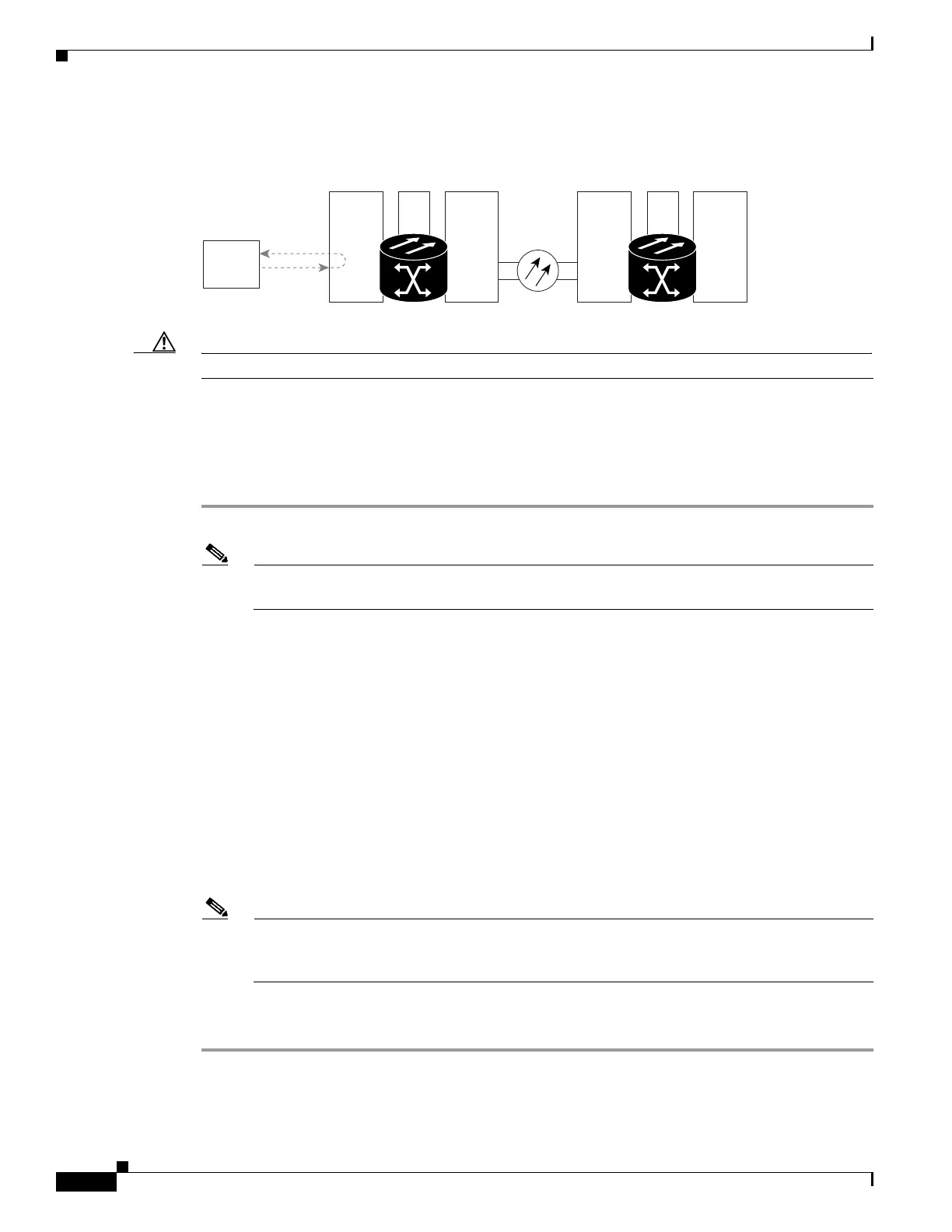
1.5.1 Perform a Facility (Line) Loopback on a Source-Node MXP/TXP/FC_MR Port
Figure 1-34 Facility (Line) Loopback on a Circuit Source MXP/TXP/FC_MR Port
Caution Performing a loopback on an in-service circuit is service-affecting.
Complete the “Create the Facility (Line) Loopback on the Source-Node MXP/TXP/FC_MR Port”
procedure on page 1-82.
Create the Facility (Line) Loopback on the Source-Node MXP/TXP/FC_MR Port
Step 1 Connect an optical test set to the port you are testing.
Note Refer to the manufacturer’s instructions for detailed information about connection and setup of
the optical test set.
Use appropriate cabling to attach the Tx and Rx terminals of the optical test set to the port you are
testing. The Tx and Rx terminals connect to the same port.
Step 2 Adjust the test set accordingly.
Step 3 In CTC node view, double-click the card to display the card view.
Step 4 Click the Maintenance > Loopback tab.
Step 5 Choose Locked,maintenance from the Admin State column for the port being tested. If this is a
multiport card, select the appropriate row for the desired port.
Step 6 Choose Facility (Line) from the Loopback Type column for the port being tested. If this is a multiport
card, select the appropriate row for the desired port.
Step 7 Click Apply.
Step 8 Click Ye s in the confirmation dialog box.
Note It is normal for a “LPBKFACILITY (TRUNK)” condition on page 2-171 or a “LPBKFACILITY
(FCMR)” condition on page 2-168 to appear during loopback setup. The condition clears when
you remove the loopback.
Step 9 Complete the “Test and Clear the MXP/TXP/FC_MR Facility (Line) Loopback Circuit” procedure on
page 1-83.
Source
ONS Node
Destination
ONS Node
MXP TXPXC MXP TXPXC
Test Set
115961









 To Next Page