To Next PageTo Next Page
 Need help?
Do you have a question about the Cisco VG310 and is the answer not in the manual?
Information on how to get technical support from Cisco Systems.
Introduces the voice gateways and their role in TDM to IP transition.
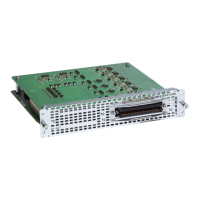
Details physical ports and supported services for the voice gateways.
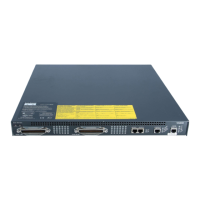
Describes the physical features and LED indicators on the chassis.
Requirements for proper installation location regarding temperature and airflow.
Details on chassis grounding using the provided lug and hardware.
Information on connecting the gateway to AC or +12V DC power sources.
Provides safety alerts and best practices for working with the equipment.
Key guidelines for safe handling of electrical components and connections.
General safety rules to ensure personal safety and equipment protection.
Additional safety tips for installing and operating the voice gateway.
Procedures for preventing ESD damage when handling components.
Overview of the three methods for installing the voice gateway chassis.
Step-by-step guide for securely mounting the chassis in a rack.
Detailed instructions for mounting the voice gateway chassis on a wall.
Procedure for placing and securing the voice gateway on a flat surface.
Steps for connecting the chassis to a reliable earth ground.
Guidelines and warnings for connecting the voice gateway to its power source.
Procedure for connecting the voice gateway to an AC power supply.
Instructions for connecting the voice gateway to a +12V DC power supply.
How to establish connections for administrative access via console or modem.
Guide for removing and replacing the CompactFlash memory card.
Detailed procedure for installing a new CompactFlash memory card.
A checklist of items to verify before powering on the voice gateway.
Steps to power on the voice gateway and verify its initialization.
Overview of tools for performing the initial configuration.
Guide to using the interactive setup command facility for initial configuration.
Information on using the web-based application for initial router settings.
Steps for accessing the CLI to perform initial configuration manually.
Provides common symptoms, causes, and corrective actions for troubleshooting.
Instructions for activating new software packages or features.
Provides input voltage, frequency, current, and power consumption details.
Information on how to get technical support from Cisco Systems.
Introduces the voice gateways and their role in TDM to IP transition.
Details physical ports and supported services for the voice gateways.
Describes the physical features and LED indicators on the chassis.
Requirements for proper installation location regarding temperature and airflow.
Details on chassis grounding using the provided lug and hardware.
Information on connecting the gateway to AC or +12V DC power sources.
Provides safety alerts and best practices for working with the equipment.
Key guidelines for safe handling of electrical components and connections.
General safety rules to ensure personal safety and equipment protection.
Additional safety tips for installing and operating the voice gateway.
Procedures for preventing ESD damage when handling components.
Overview of the three methods for installing the voice gateway chassis.
Step-by-step guide for securely mounting the chassis in a rack.
Detailed instructions for mounting the voice gateway chassis on a wall.
Procedure for placing and securing the voice gateway on a flat surface.
Steps for connecting the chassis to a reliable earth ground.
Guidelines and warnings for connecting the voice gateway to its power source.
Procedure for connecting the voice gateway to an AC power supply.
Instructions for connecting the voice gateway to a +12V DC power supply.
How to establish connections for administrative access via console or modem.
Guide for removing and replacing the CompactFlash memory card.
Detailed procedure for installing a new CompactFlash memory card.
A checklist of items to verify before powering on the voice gateway.
Steps to power on the voice gateway and verify its initialization.
Overview of tools for performing the initial configuration.
Guide to using the interactive setup command facility for initial configuration.
Information on using the web-based application for initial router settings.
Steps for accessing the CLI to perform initial configuration manually.
Provides common symptoms, causes, and corrective actions for troubleshooting.
Instructions for activating new software packages or features.
Provides input voltage, frequency, current, and power consumption details.



 General