3 – 12
24.1 HOW TO REPLACE THE CONTACTOR
When replacing the whole of contactor assembly, dissemble the relevant connector
and put a new contactor in the original position. The followings are how to replace
the contact points of contactor. Disassemble the contactor firstly, and check the
degree of wear of contact points with naked eyes. If the contact point of contactor
isn’t worn much and only the surface is damaged, finish the surface with
sandpaper. But if the damage are serious, replace the contactor as following
orders.
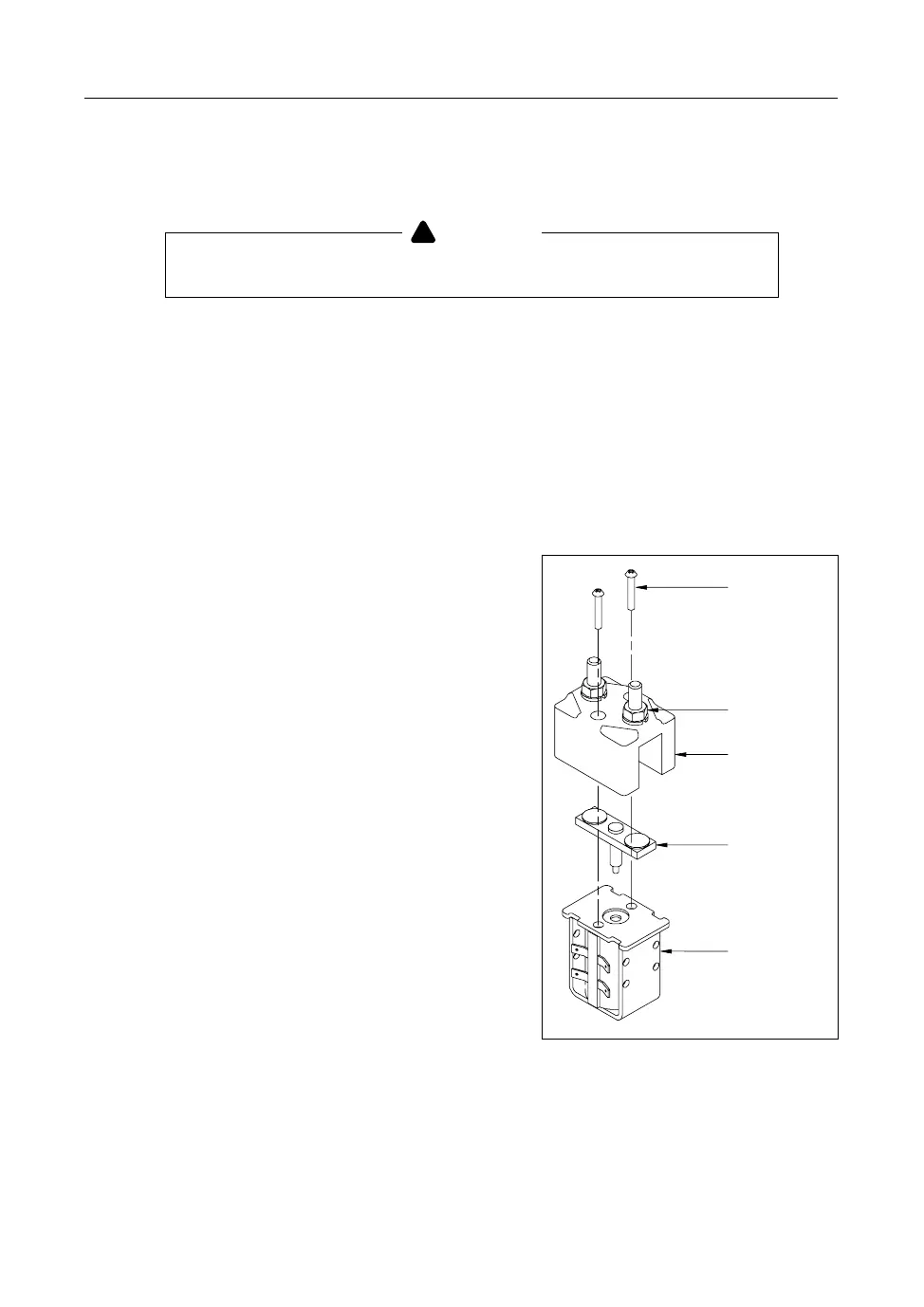
1) Replacing the contact point of line
a Separate the installating bolt from the
contactor assembly.
b Pull the contact points and the coils
of contactor with hands in order to
separate.
c Remove the relevant contact point
from the contact point of contactor,
and replace it with new one.
d Mount the contactor to the machine
after assembling as original condition.
24. GUIDE TO REPLACE AND REPAIR PARTS
Surely disconnect the battery plug and then replace it.
WARNING
Screw
Nut
Contac-A
Contac-Com
Coil
FX1085


 To Next Page