THE SMART SOLUTION FOR ENERGY EFFICIENCY
Tranquility
®
Water-to-Water (TMW) Series
Rev.: 04/15/16
33
climatemaster.com
DXM Control -
For detailed control information, see the
DXM AOM (part #97B0003N13), Lon controller AOM (part
#97B0013N01) or MPC AOM (part # 97B0031N01).
-Slow Flash = 1 fl ash every 2 seconds
-Fast Flash = 2 fl ashes every 1 second
-Flash code 2 = 2 quick fl ashes, 10 second pause, 2 quick
fl ashes, 10 second pause, etc.
-On pulse 1/3 second; off pulse 1/3 second
Field Selectable Inputs -
Test mode: Test mode allows
the service technician to check the operation of the
control in a timely manner. By momentarily shorting the
test terminals, the DXM control enters a 20 minute test
mode period in which all time delays are sped up 15
times. Upon entering test mode, the status LED will fl ash
a code representing the last fault. For diagnostic ease at
the thermostat, the alarm relay will also cycle during test
mode. The alarm relay will cycle on and off similar to the
status LED to indicate a code representing the last fault, at
the thermostat. Test mode can be exited by shorting the
test terminals for 3 seconds.
Retry mode: If the control is attempting a retry of a fault,
the status LED will slow fl ash (slow fl ash = one fl ash every
2 seconds) to indicate the control is in the process of
retrying.
Field Confi guration Options -
Note: In the following fi eld
confi guration options, jumper wires should be clipped
ONLY when power is removed from the DXM control.
Water coil low temperature limit setting:
Jumper
3 (JW3-LT1 Low Temp) provides fi eld selection of
temperature limit setting for LT1 of 30°F or 10°F [-1°F or
-12°C] (refrigerant temperature).
Not Clipped = 30°F [-1°C]. Clipped = 10°F [-12°C].
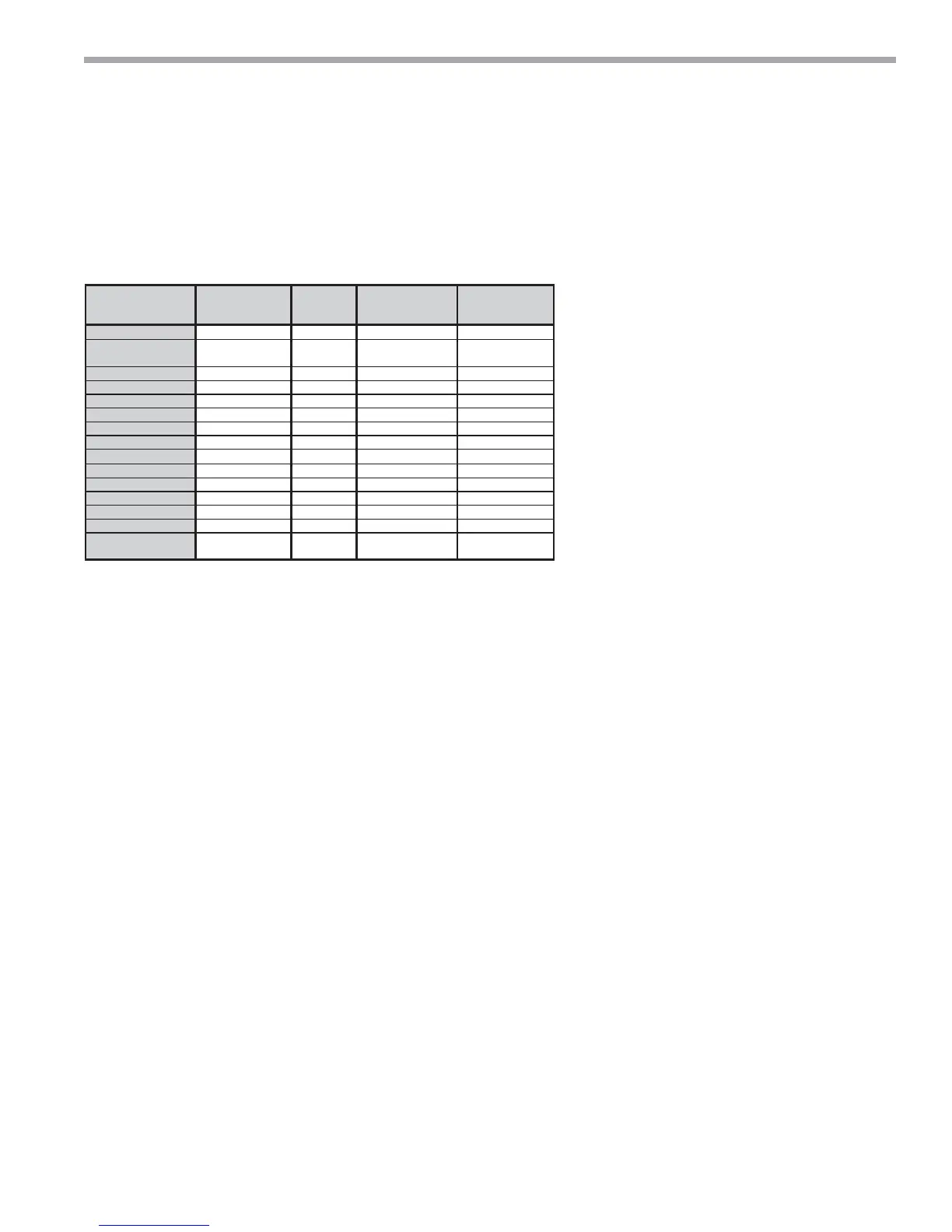
Description of
Operation
Status LED
(green)
Test LED
(yellow)
Fault LED
(red)
Alarm Relay
Normal mode On - Off Open
Normal mode with UPS On - Flashing Code 8
Cycle (closed 5 sec,
open 25 sec)
DXM is non-functional Off Off Off Open
Fault Retry Slow Flash - Flashing fault code Open
Lockout Fast Flash - Flashing fault code Closed
Test Mode -On - -
Night Setback Flashing Code 2 - - -
ESD Flashing Code 3 - - -
HP Fault Slow Flash - Flashing Code 2 Open
LP Fault Slow Flash - Flashing Code 3 Open
LT1 Fault Slow Flash - Flashing Code 4 Open
LT2 Fault Slow Flash - Flashing Code 5 Open
CO Fault Slow Flash - Flashing Code 6 Open
Over/Under Voltages Slow Flash - Flashing Code 7
Open (closed after 15
minutes)
Invalid T-stat Inputs Flashing Code 4 - - -
Air coil low temperature limit setting:
Jumper 2 (JW2-
LT2 Low Temp) provides fi eld selection of temperature
limit setting for LT2 of 30°F or 10°F [-1°F or -12°C]
(refrigerant temperature).
Note: This jumper should only
be clipped under extenuating circumstances,
as recommended by ClimateMaster technical
services.
Not Clipped = 30°F [-1°C]. Clipped = 10°F
[-12°C].
Alarm relay setting:
Jumper 4 (JW4-AL2
Dry) provides fi eld selection of the alarm relay
terminal AL2 to be jumpered to 24VAC or to be
a dry contact (no connection).
Not Clipped = AL2 connected to R.
Clipped = AL2 dry contact
(no connection).
Low pressure normally open:
Jumper 1
(JW1-LP norm open) provides fi eld selection
for low pressure input to be normally closed or
normally open.
Not Clipped = LP normally closed. Clipped = LP normally
open.
DIP Switches -
Note: In the following fi eld confi guration
options, DIP switches should only be changed when
power is removed from the DXM control.
DIP Package #1 (S1) -
DIP Package #1 has 8 switches and
provides the following setup selections:
1.1
- Unit Performance Sentinel (UPS) disable: DIP Switch
1.1 provides fi eld selection to disable the UPS feature.
On = Enabled. Off = Disabled.
1.2
- Compressor relay staging operation: DIP 1.2 provides
selection of compressor relay staging operation. The
compressor relay can be selected to turn on with a stage
1 or stage 2 call from the thermostat. This is used with
dual stage units (2 compressors where 2 DXM controls are
being used) or with master/slave applications. In master/
slave applications, each compressor and fan will stage
according to its appropriate DIP 1.2 setting. If set to stage
2, the compressor will have a 3 second on-delay before
energizing during a Stage 2 demand. Also, if set for stage
2, the alarm relay will NOT cycle during test mode.
On = Stage 1. Off = Stage 2.
Table 3b: DXM LED And Alarm Relay Operations
DXM Controls




 To Next Page