THE SMART SOLUTION FOR ENERGY EFFICIENCY
Tranquility
®
Water-to-Water (TMW) Series
Rev.: 04/15/16
45
climatemaster.com
Start-Up Log Sheet
Installer: Complete unit and system checkout and follow unit start-up procedures in the IOM. Use this form
to record unit information, temperatures and pressures during start-up. Keep this form for future reference.
Job Name: Street Address:
Model Number: Serial Number:
Unit Location in Building:
Date: Sales Order No:
In order to minimize troubleshooting and costly system failures, complete the following checks and data
entries before the system is put into full operation.
Temperatures: F or C Antifreeze: _____%
Type of Antifreeze: __________________
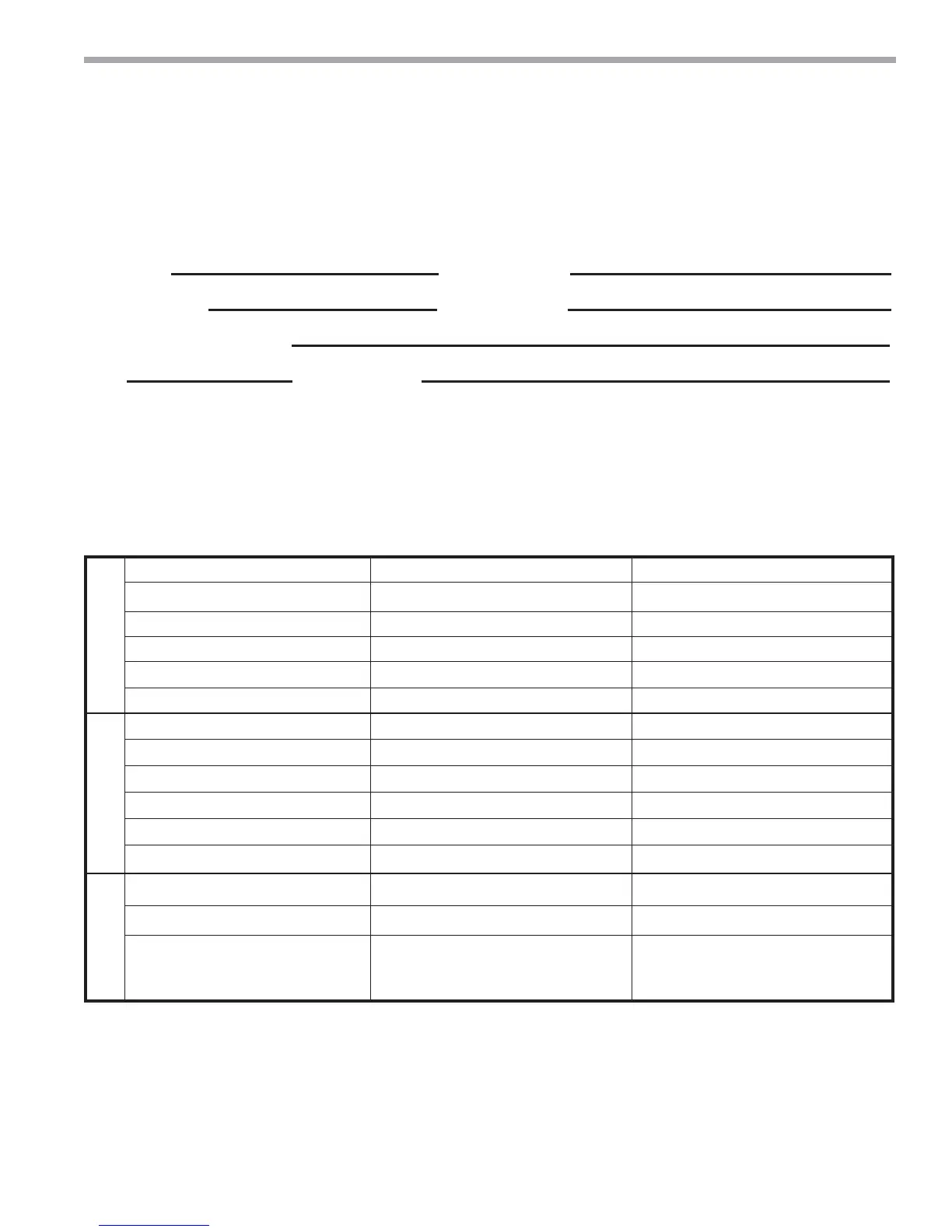
Cooling Mode Heating Mode
Source
Entering Fluid Temperature
Leaving Fluid Temperature
Temperature Differential
Pressure In
Pressure Out
Pressure Differential
Load
Entering Fluid Temperature
Leaving Fluid Temperature
Temperature Differential
Pressure In
Pressure Out
Pressure Differential
Compressor
Amps
Volts
Discharge Line Temperature
(6” from Compressor Outlet)
Allow unit to run 15 minutes in each mode before taking data.
Do not connect gauge lines




 To Next Page