OPERATING MANUAL
800.749.2761 www.coachcomm.com
54
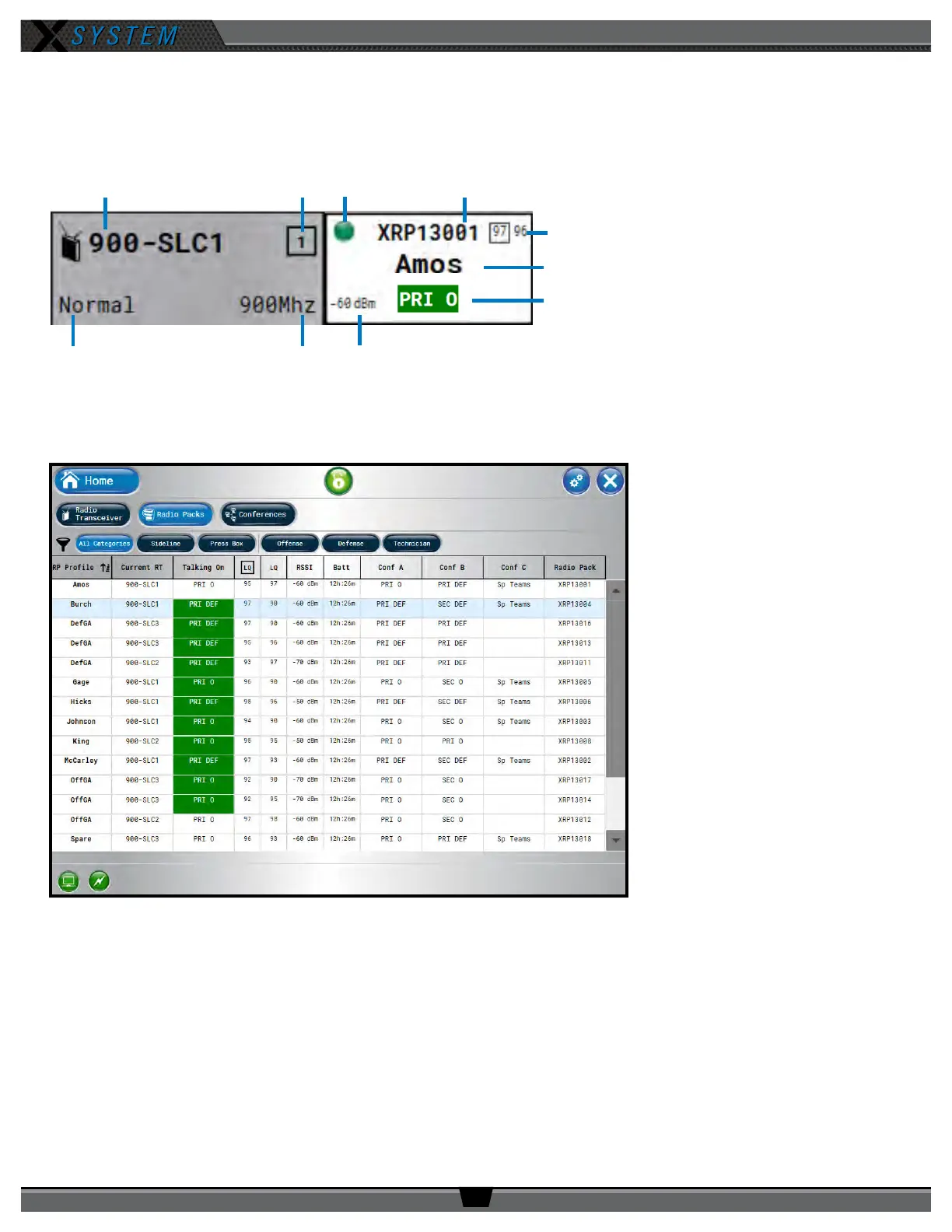
Each RT icon displays the RT’s name, hopping pattern, mode, and frequency. Each paired RP displays to the right of its RT
icon, and their icons display the device status (green for normal, red for error), RP name, link quality, prole name, and
active conference. (The conference displays green when the talk button is active.)
Radio Packs View
The Radio Packs view provides a
list of active RPs, along with the
following information about each
one: Prole Name, Current RT,
Current Conference, LQ, RSSI value,
Remaining Battery Time, Assigned
Conferences, and Radio Pack device
name.
This list can be sorted by clicking on
any column header. You can also lter
the list by clicking on
All
,
Sideline
, or
Press Box,
and add additional lter
groups if desired by using the Group
Management feature. (See page
59 for more information about
Group Management.)
You can also click on any RP in the
list to access that RP’s Prole View.
Figure 71: Radio Transceiver View Detail
RT Mode RT Frequency
Prole Name
Link Quality
Active Conference
(green when talk button active)
Radio Signal Strength
Figure 72: X-Ware Radio Packs View



 To Next Page