Chapter 2: To get started
98-143082-D To access the external network 10
To access the external network
BGAN or cellular network
The EXPLORER 510 is a BGAN terminal. However, you have the option of connecting an
EXPLORER Cellular Modem to the USB interface of the EXPLORER 510, making it possible to use
the cellular network when it is available. See Optional: To set up cellular network for data on
page 76.
If you are going to use the BGAN network, you must first point the antenna in the direction of
the satellite and find the best possible signal strength. See the next sections for details.
To point the antenna (BGAN)
Before pointing
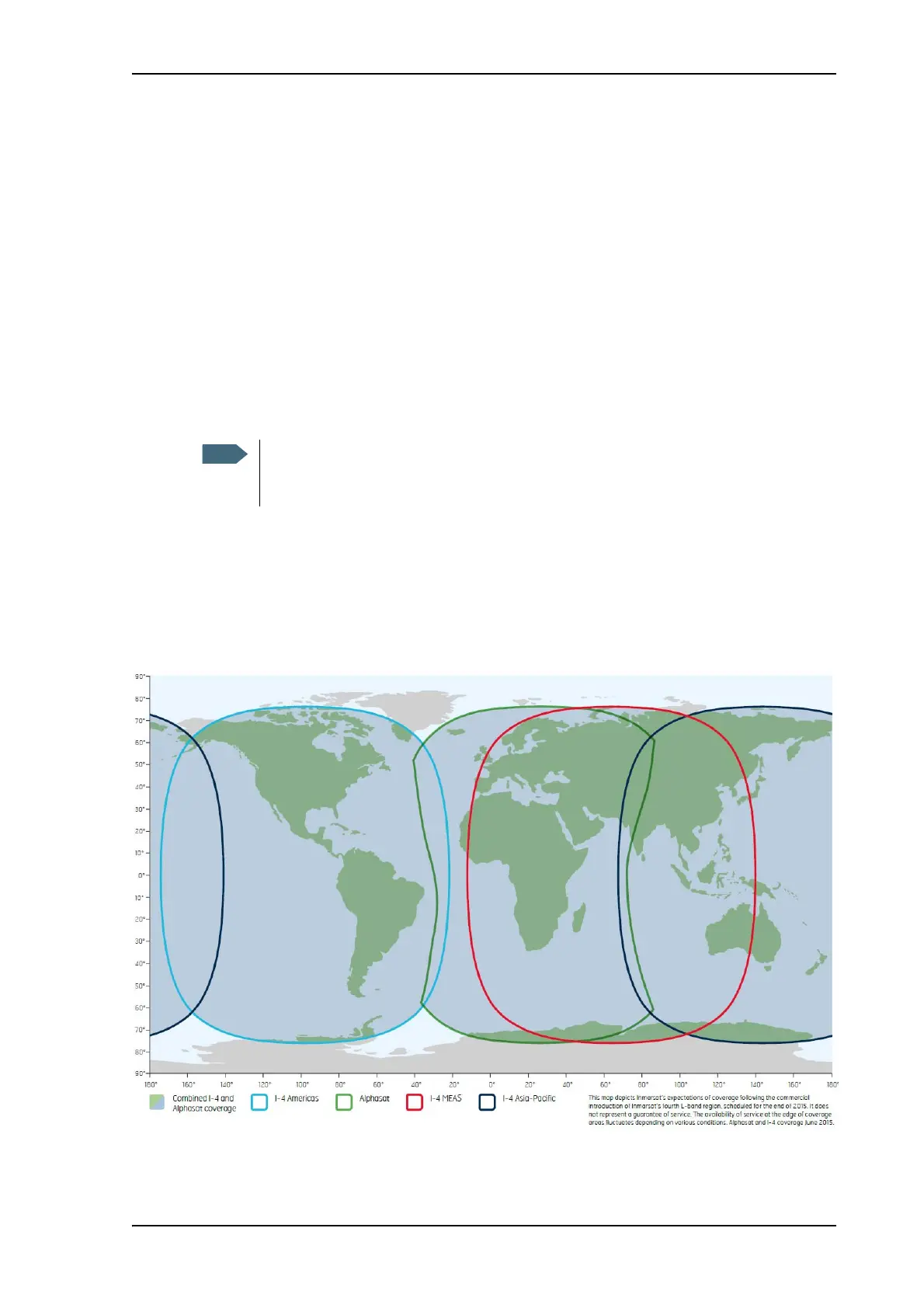
Before pointing the antenna you can use the coverage map below to find your approximate
location in relation to the satellites.
The Inmarsat BGAN services are based on the BGAN I4 geostationary satellites and the
Alphasat satellite, all positioned above the equator, at the centre of each “footprint”.
You can choose to cancel pointing from the pointing page in the EXPLORER Connect
app or the web interface. In this case you cannot communicate on the BGAN
network, but you can access all terminal settings.



 To Next Page