Party500_V1013_EN.PDF http://www.codelight.com
3
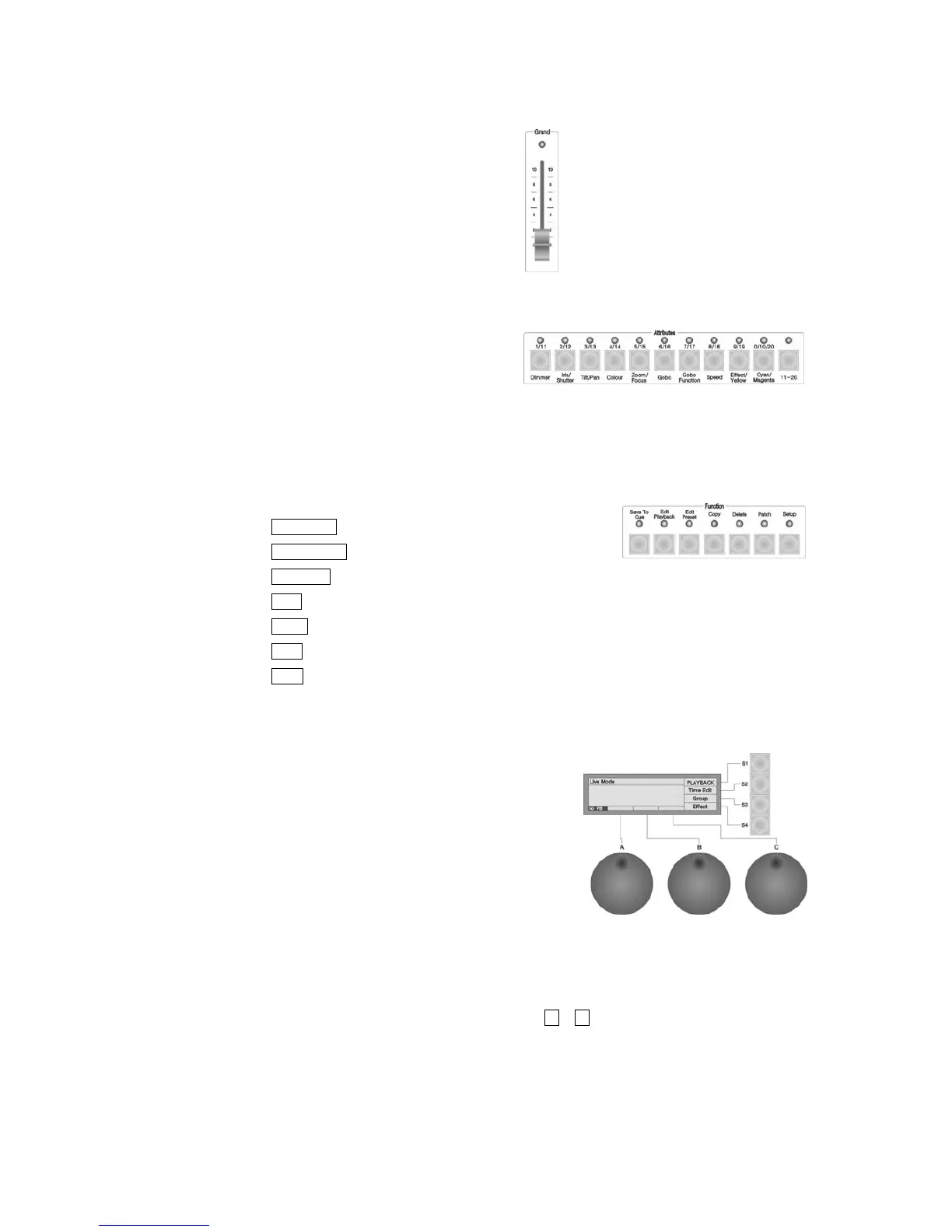
1.2.4. Grand
Grand --- controlling the general output level;
1.2.5. Attributes
These buttons are used for selecting different
attributes of the fixtures, working with the data
wheels, you can adjust the value of brightness,
location, colour and gobo of the fixture and etc.
1.2.6. Function
There are 7 buttons in the Function section:
Save to Cue --- Save the Playback program of Cue;
Edit Playback --- Program and edit Playback;
Edit Preset --- Edit the Preset;
Copy --- Copy function;
Delete --- Delete function;
Patch --- Patch the Units;
Setup --- Setup the Console.
1.2.7. LCD Screen
Display diversified information under various circumstances.
1.2.8. Control Wheels
The 3 wheels A, B and C are used to setup all the attributes
value of the Units, as well as all the controlling parameters of
the Effects.
1.2.9. Menu soft-keys
There are 4 soft-keys on the right of the LCD screen, S1 - S4, the functions of which depend on the
present state of the console. Under different situations, the enabled functions of the keys are displayed on
the corresponding place of the LCD screen.


 To Next Page