15
DEC 2021
INSTALL GUIDE
2SOFTWARE SETUPCOGNEX DataMan 374
REV 00
2.1 IMPORTANT COGNEX SOFTWARE INFORMATION
The Cognex DataMan 374 is supported on the DS-1200 G4i for
software release R0065 onwards. Please contact your local
support team for further information.
The IP address of the camera port must be setup as follows.
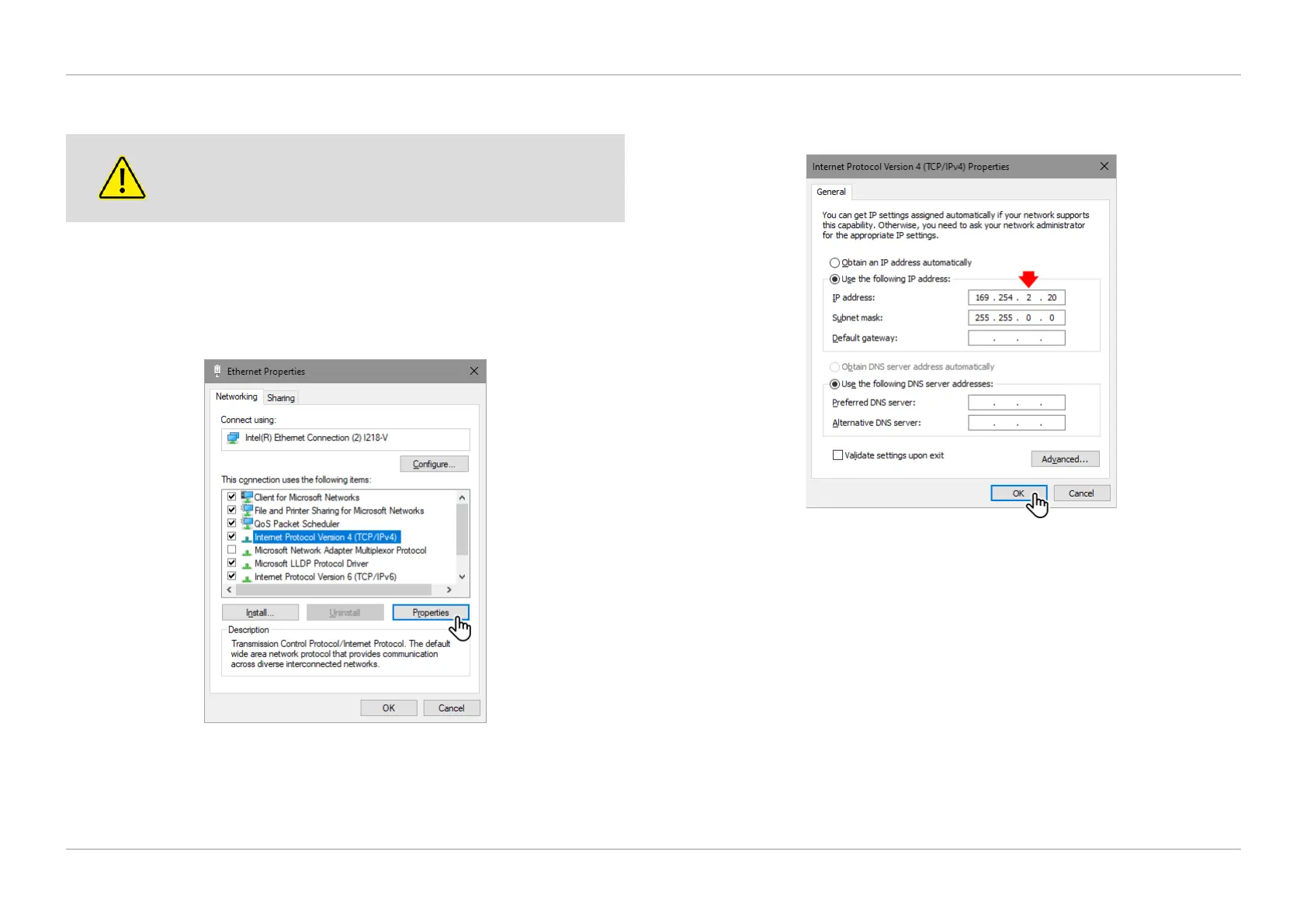
1. Navigate to Windows Network Ethernet Settings on the IMOS PC, select
‘Internet Protocol Version 4 (TCP/IPv4)’, then select ‘Properties’ as shown in
Figure 2.1.
QTL-RND-SCR-00000272-A-00
Figure 2.1 – Selecting Internet Protocol Version 4 Properties
2. Enter the following IP address, then click ‘OK’ once complete as shown in
Figure 2.2.
QTL-RND-SCR-00000273-A-00
Figure 2.2 – Entering the IP address
NOTE:
This will be the IP address of the unit, and the 3rd number shown in Figure 2.2
will be the unit that the camera is tted to.












 To Next Page