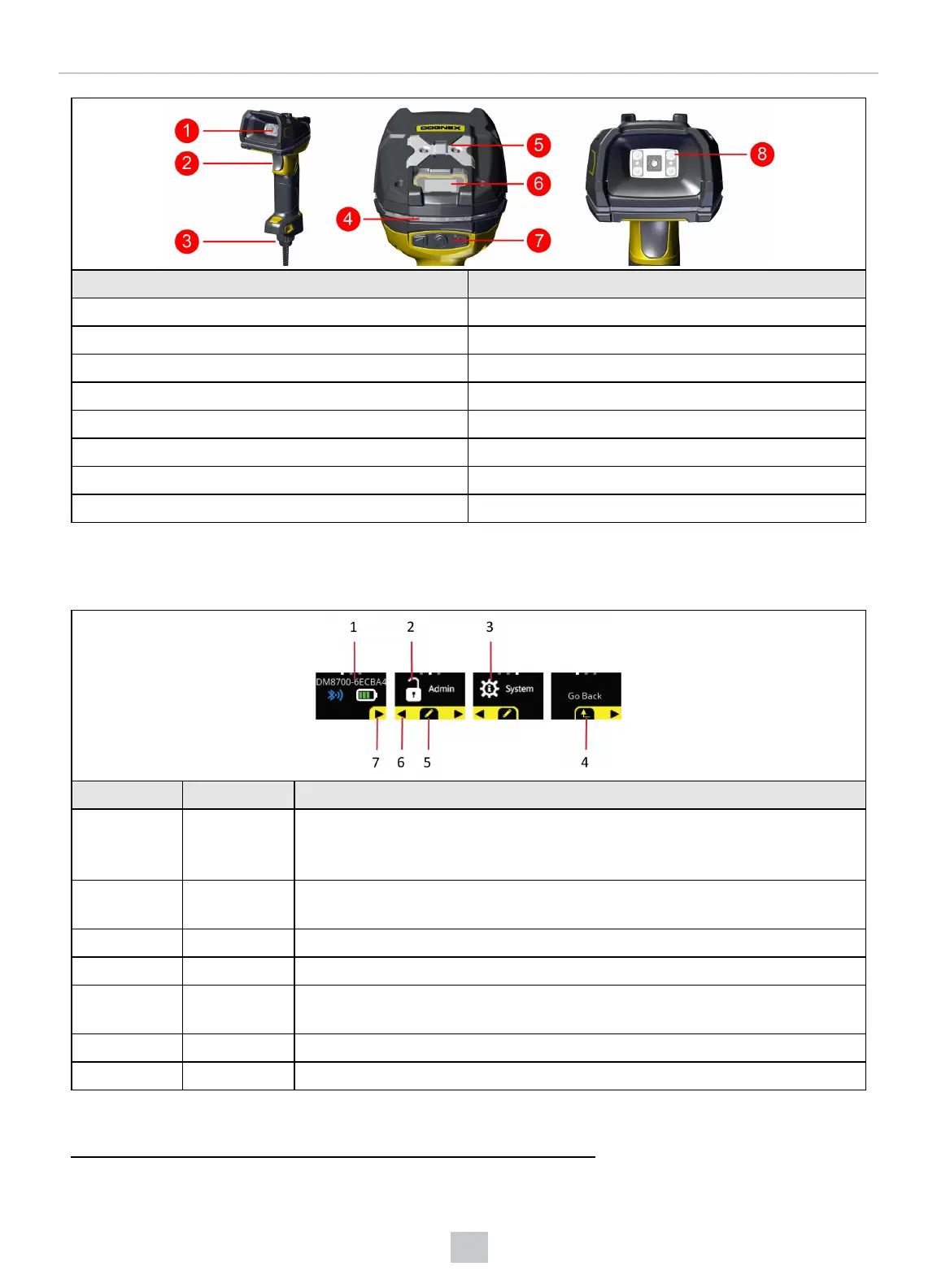
Number DataMan 8700 HD Reader
1 LED aimer
2 Trigger (press and hold to read)
3 Cable insertion point (corded readers only)
4 360° ring light indicator
5 Lanyard hook
6 OLED display
7 OLED input and configuration buttons
8 Diffused light
OLED Display Layout
The OLED display is user interface where you can communicate with the DataMan 8700.
Number Screen or Icon Description
1 Main Screen First screen after boot up is complete.
The main screen contains information about the name of the reader, the Bluetooth
connection and the battery status of the reader.
1
2 Admin Screen Enter the menu on the admin screen, where you can set passwords and other
permissions.
3 System Screen Enter the system menu, where you can configure settings
4 Return arrow Return one level up in the menu
5 Action button Displays a pencil, a check mark, or a toggle icon to select, acknowledge or change a
setting.
6 Left arrow Move to previous screen.
7 Right arrow Move to next screen
1
The Bluetooth connection and the battery status of the reader is only displayed on wireless readers.
13
Getting Started













 To Next Page