FR (Xkb): setxkbmap -display :0 -model fr-latin1 -layout fr -variant oss
CZ (Xkb): setxkbmap -display :0 -model cz-lat2 -layout cz
PL (Xkb): setxkbmap -display :0 -model pl2 -layout pl
IT (Xkb): setxkbmap -display :0 -model it -layout it -variant nodeadkeys
ES (Xkb): setxkbmap -display :0 -model es -layout es
JP: setxkbmap -display :0 -model jp106 -layout jp -variant OADG109A
US: setxkbmap -display :0 -model us -layout us
Changing the Communication Module in DataMan 8700 Corded Reader
The communication modularity of the DataMan 8700 reader allows using USB, Ethernet and RS-232 slide-in communication
type conversion kits. See the list of serial slide-ins in Miscellaneous Accessories on page 8. To change the communication
conversion kit, perform the following steps:
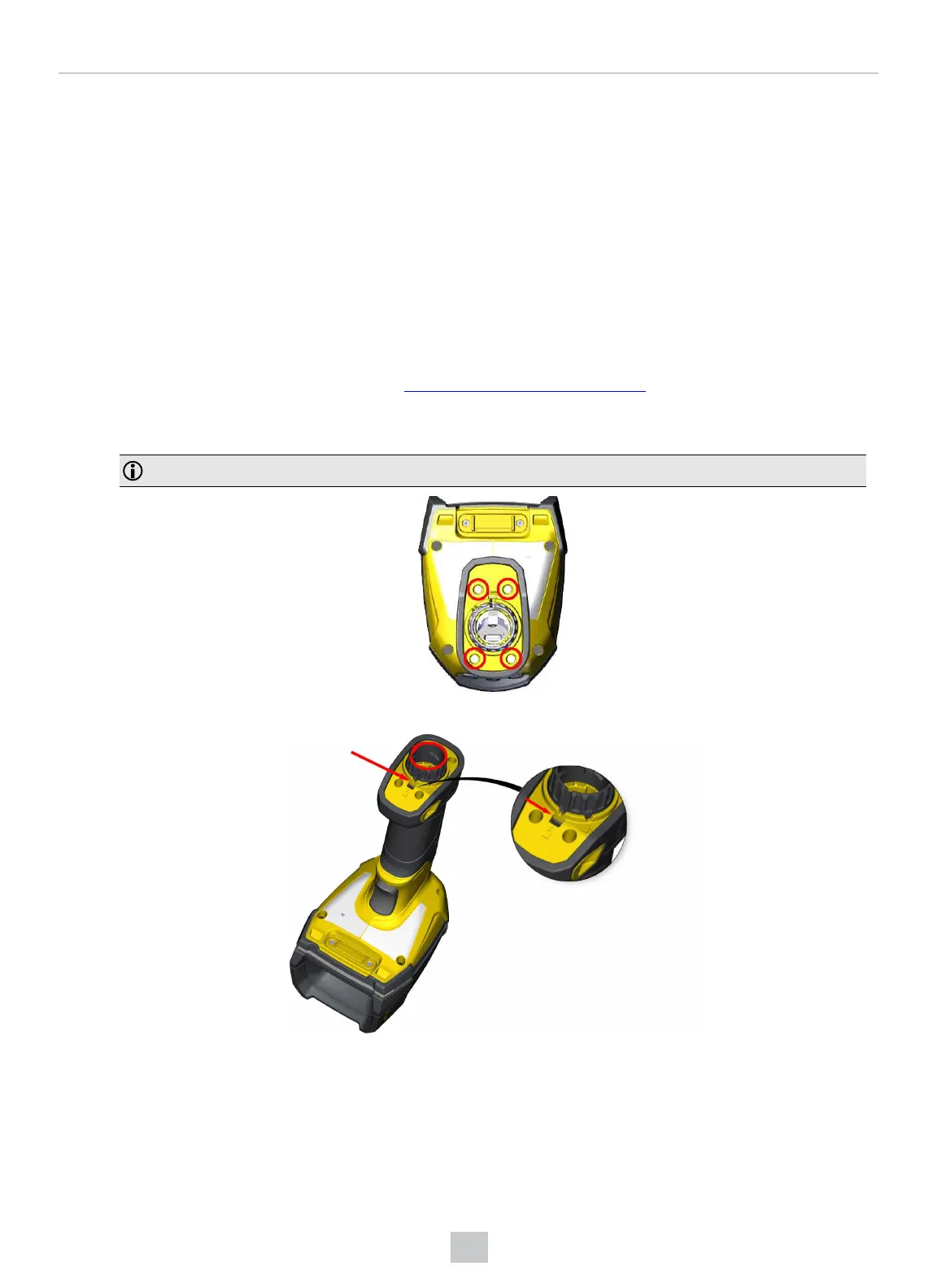
1. Remove the four screws located on the end cap assembly at the base of the reader using a Hex 2.0 mm screwdriver.
Note: Save the screws for later use.
2. Push in the locking pin with the tip of a screwdriver, or with a similar pointy instrument, then twist the end cap.
23
Connection Options













 To Next Page