Cleaning and Maintenance
Cleaning the Reader Housing
To clean the outside of the reader housing, use a small amount of mild detergent cleaner or isopropyl alcohol on a cleaning
cloth. Do not pour the cleaner on the reader housing.
CAUTION: Do not attempt to clean any DataMan product with harsh or corrosive solvents, including lye, methyl ethyl
ketone (MEK) or gasoline.
Cleaning the Reader Lens Cover
To remove dust from the lens cover, use a pressurized air duster. The air must be free of oil, moisture or other contaminants
that could remain on the lens cover. To clean the plastic window of the lens cover, use a small amount of isopropyl alcohol on
a cleaning cloth. Do not scratch the plastic window. Do not pour the alcohol on the plastic window.
Replacing the Latch
In the case of a latch failure, you can replace the latching function using replacement parts.
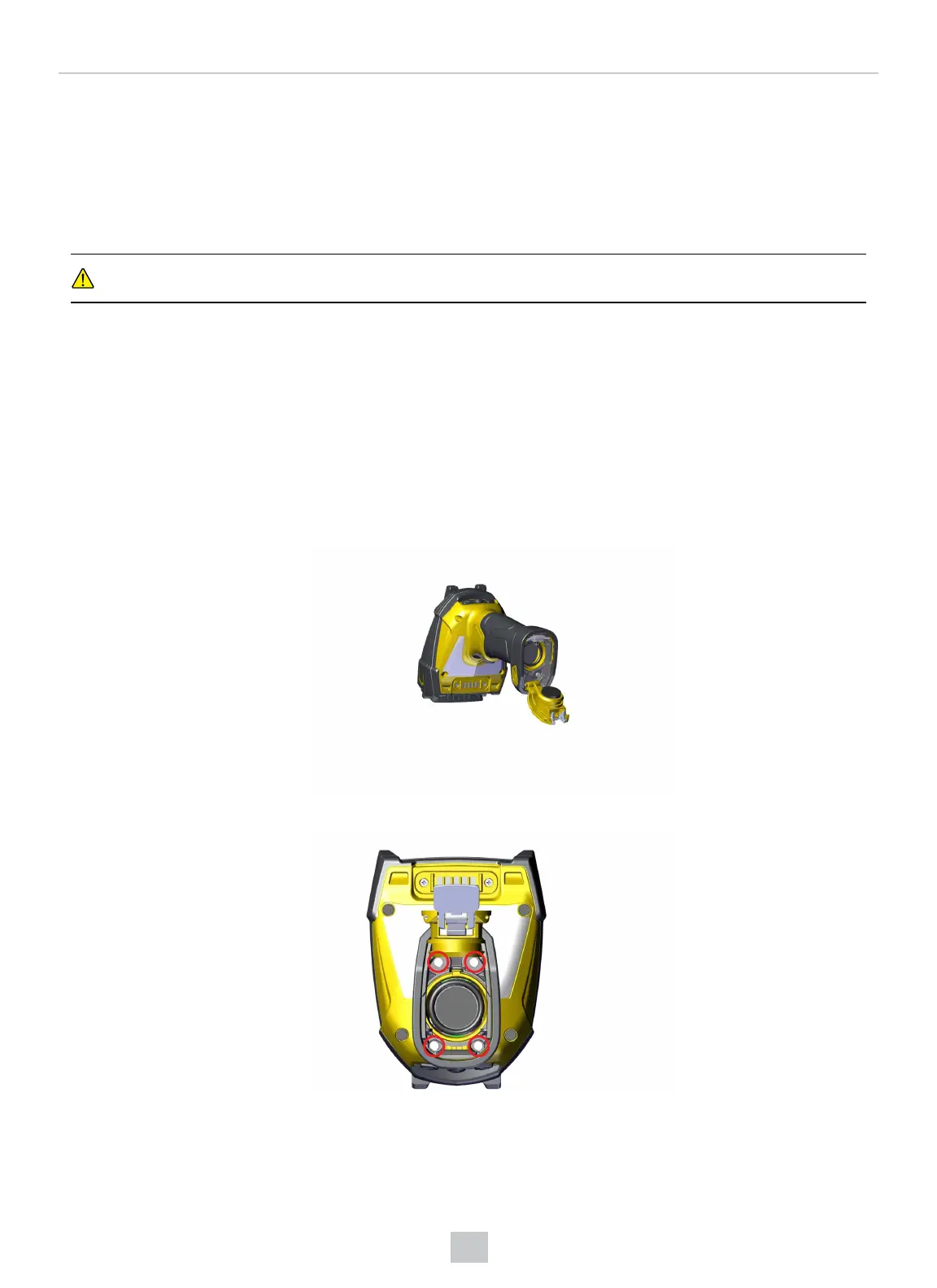
1. Lift the metal tab and open the end cap of the reader.
2. Remove the four screws in the gray base using a 2 mm Allen key.
52
Cleaning and Maintenance













 To Next Page