EasyManua.ls Logo

Comen CM1200B - Page 21

Default Icon
69 pages
Print Icon
To Next Page IconTo Next Page
To Previous Page IconTo Previous Page
Loading...
Overview
3-8
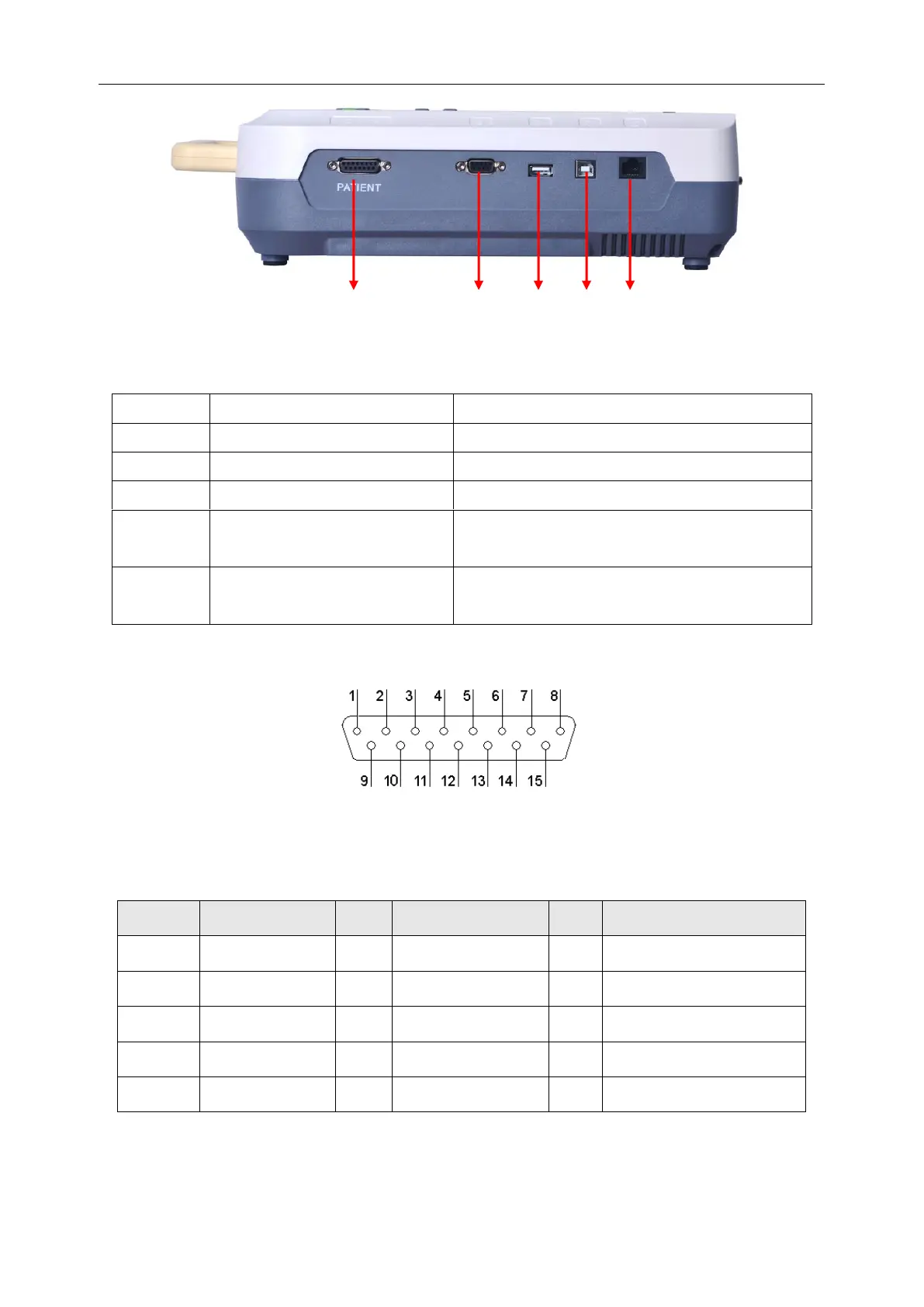
Figure 3-4 Right Panel
No.
Name
Description
A
Patient Cable Socket
Connect the patient cable.
B
External Input / Output interface
Connect other equipment
C
USB Connector1
Standard USB connector
D
USB Connector2 (Reserved)
Standard USB connector, connect the special USB
and special USB printer.
E
Network Connector
Standard network connector, connect the network
cable.
1) Patient Cable Socket:
Figure 3-5 Patient cable socket
Definition of corresponding pins:
Pin
Signal
Pin
Signal
Pin
Signal
1
C2 (input)
6
SH(shield)
11
F (input)
2
C3 (input)
7
NC
12
C1(input)
3
C4 (input)
8
NC
13
NC
4
C5 (input)
9
R (input)
14
N or RF (input)
5
C6 (input)
10
L (input)
15
NC
A
B
C
D
E

Table of Contents